

DrawerJournal: Private Journal
ToastPlanet Inc. Lifestyle iPhoneiPadiPod touchApple Watch
DrawerJournal: Private Journal is a free Lifestyle app for iPhone and iPad by ToastPlanet Inc. Rated 4.6/5 from 74 ratings. Requires iOS 16.4.
- Rating
- 4.6
- 74 ratings
- Price
- Free
- on the App Store
- Size
- 40 MB
- Age 4+
- Updated
- Oct 27
- 2026 · v9.6.3
Screenshots
About DrawerJournal: Private Journal
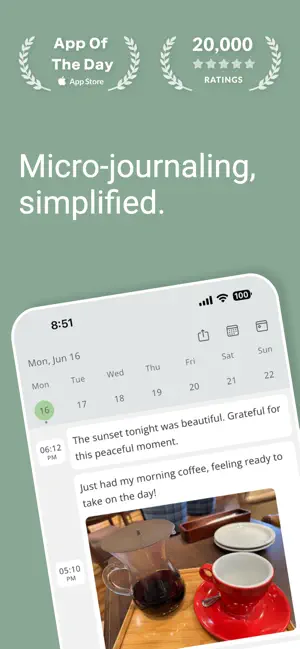
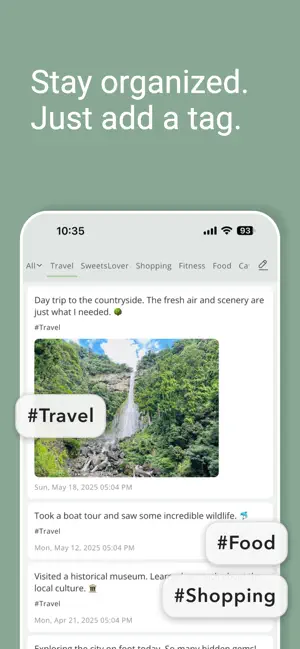
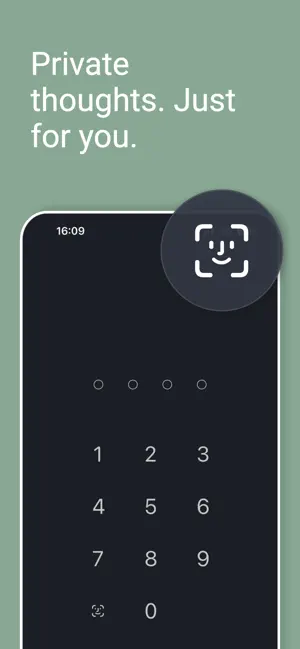
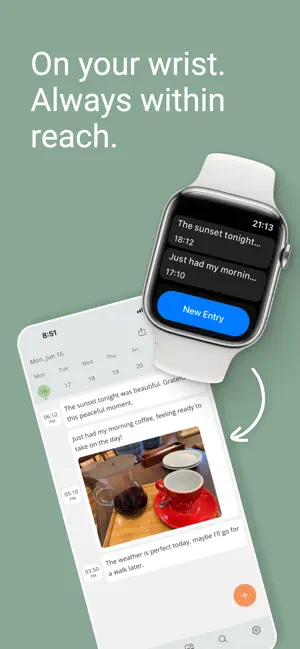
A private journal that feels like texting yourself. Jot down a thought, add a photo, or record a voice memo in seconds. Every entry is time-stamped, so your day reads like a timeline. Lock your journal with Face ID, Touch ID, or a passcode. Stored on this device. Never sent to us. We can't read it. No account needed. No blank page to fill. Write one line when something happens: on the bus, at lunch, at 2 a.m. Then scroll back and find the small moments you'd otherwise forget. QUICK POSTS ON A TIMELINE • Write as many entries a day as you like • Time stamps are added for you, and you can change the date and time anytime PHOTOS, VOICE, AND VIDEO • Up to 6 photos per entry • Record a voice memo with any entry • The Media tab shows the photos, videos, and voice memos from all your entries in one grid • Short video clips with Premium FIND ANYTHING AGAIN • Tags group entries across dates • Calendar view to jump to any day • Search every entry, with matches highlighted • Memories brings back entries from the past LOCK AND PRIVACY • Lock the app with a 4-digit passcode, Face ID, or Touch ID • Your entries are stored on this device. They're never sent to us, and we can't read them • No account, no sign-up • Back up and restore your journal as a ZIP file • Want your journal on more than one device? Turn on iCloud sync (Premium) and your entries are kept in your own iCloud APPLE WATCH AND WIDGETS • Post from your wrist with voice dictation on Apple Watch, plus complications • Home Screen widgets for today and today's entries • Available on iPhone, iPad, and Mac with Apple silicon MAKE IT YOURS • A selection of free themes and fonts • Entry text gets larger when you increase your device's text size • Share a day as an image PREMIUM (OPTIONAL) Everything above is free unless it's marked Premium. The free version shows ads. Premium is an optional paid upgrade, available as a subscription or a one-time purchase. It adds: • Video clips up to 15 seconds each, up to 3 a day: record or choose from your library, then trim (photos and videos share the 6 slots per entry) • iCloud sync between iPhone, iPad, and Mac (iOS 17 or later) • Print your journal or save it as a PDF • Export entries as text (TXT) • Detailed statistics • All 31 themes, handpicked fonts, and premium app icons • More widgets: photo, one-line, and tag widgets • Drawer mode on iPad and Mac, with your tags side by side as columns • Choose the quality of attached photos, videos, and voice memos • All Memories cards (the free version shows 2), a filter for untagged entries, and the option to hide entries in shared images • No ads WHY "DRAWER"? In Japanese, the app is called 引き出し日記, "drawer diary": a drawer to keep your thoughts in. It's popular in Japan and Korea. Open the drawer, drop in a line, close it. Privacy Policy: https://toastplanet.com/drawerjournal/privacy Terms of Use: https://toastplanet.com/drawerjournal/terms
Ratings & reviews
4.6
74 ratings
What’s new
Version 9.6.3 · Updated October 27, 2026
Thank you for using DrawerJournal. This update includes the following. - Addressed an issue where, after starting an entry from the Home Screen widget, you could type but the photo, tag and post buttons, as well as copy and paste, sometimes stopped responding We hope you continue to enjoy DrawerJournal.
App privacy
The developer, ToastPlanet Inc., reported these privacy practices to Apple.
Data Used to Track You
The following data may be used to track you across apps and websites owned by other companies:
- Location: Coarse Location
- Identifiers: Device ID
- Usage Data: Product Interaction, Advertising Data
- Diagnostics: Crash Data, Performance Data
Data Linked to You
The following data, which may be collected and linked to your identity, may be used for the following purposes:
- Location: Coarse Location
- Identifiers: Device ID
- Usage Data: Advertising Data
- Diagnostics: Performance Data
Used for: Third-Party Advertising
Data Not Linked to You
The following data, which may be collected but is not linked to your identity, may be used for the following purposes:
- Diagnostics: Crash Data, Performance Data
- Purchases: Purchase History
- Usage Data: Product Interaction
Used for: Third-Party Advertising, Analytics, App Functionality
Alternatives to DrawerJournal: Private Journal
Looking for apps like DrawerJournal: Private Journal? Here are 6 similar apps on the App Store. The highest rated is Simple Diary - Daily Journal (4.8/5), and all 6 are free to download.
-
 JotJournal - Private Diary
4.4
JotJournal - Private Diary
4.4
-
 My Nikki
4.7
My Nikki
4.7
-
 Moment Diary (journal)
3.5
Moment Diary (journal)
3.5
-
 Simple Diary - Daily Journal
4.8
Simple Diary - Daily Journal
4.8
-
 PenCake: Minimal Writing App
4.3
PenCake: Minimal Writing App
4.3
-
 TenYear Diary - journal & memo
4.7
TenYear Diary - journal & memo
4.7
| App | Rating | Price | Last updated | Compare |
|---|---|---|---|---|
| DrawerJournal: Private Journal | 4.6 / 5 (74 ratings) | Free | October 27, 2026 | |
| JotJournal - Private Diary | 4.4 / 5 (14) | Free | Oct 22, 2026 | Compare |
| My Nikki | 4.7 / 5 (31) | Free | Aug 28, 2026 | Compare |
| Moment Diary (journal) | 3.5 / 5 (60) | Free | Aug 21, 2026 | Compare |
| Simple Diary - Daily Journal | 4.8 / 5 (908) | Free | Sep 14, 2026 | Compare |
| PenCake: Minimal Writing App | 4.3 / 5 (121) | Free | Jul 16, 2026 | Compare |
| TenYear Diary - journal & memo | 4.7 / 5 (155) | Free | Oct 26, 2026 | Compare |