

Proxyman - Capture HTTPS
Proxyman LLC Developer Tools iPhoneiPadiPod touch
Proxyman - Capture HTTPS is a free Developer Tools app for iPhone and iPad by Proxyman LLC. Rated 4.8/5 from 810 ratings. Requires iOS 17.0.
- Rating
- 4.8
- 810 ratings
- Price
- Free
- on the App Store
- Size
- 73 MB
- Age 4+
- Updated
- Oct 20
- 2026 · v26.4.1
Screenshots


About Proxyman - Capture HTTPS
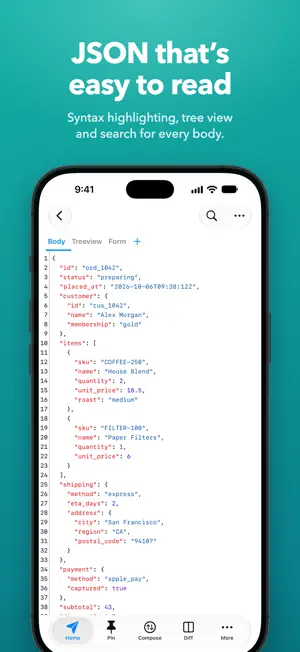
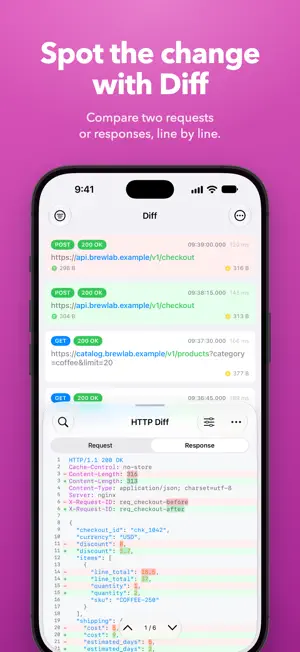
Meet a superb Web Debugging Proxy that can act like a middleman, aka Proxyman. ### Features - Directly Capture & Inspect HTTP/HTTPS from your iOS/iPad Devices without using MacBooks. - Decrypt and View HTTP/HTTPS Request/Response in plain text - JSON Syntax Highlighting - Exclusively designed for iPhone and iPad (Landscape and Two Columns) - Share traffic to Proxyman macOS - a native macOS app for better inspection - Pin working domains - Quick filter with URL, Header Body, and Type of Request/Response (e.g., JSON, Form, HTML, CSS, Document, etc) - Better Request/Response Previewer: Multiple columns, JSON Preview, JSON TreeView, etc - Safe Lock: Protect your sensitive data with FaceID / TouchID / Passcode - Advanced Debugging Tools: SSL Proxying, Block List, Map Local, Breakpoint, etc - Rewrite & Scripting ### Proxyman macOS Proxyman for iOS works perfectly with Proxyman for macOS (native macOS app, supports macOS 26 and M4 Chip) ### How it works Proxyman iOS creates a local VPN on your device and then forwards all traffic to a Local Man-in-The-Middle Server. As long as the VPN is active, Proxyman iOS can capture all traffic over Wi-Fi and cellular Data. ### How about my sensitive data? - Proxyman Root Certificate is a self-signed certificate that is generated on your local machine. Thus, all requests and responses are captured and stored on your devices and Proxyman does not have access to your data. - There are no remote servers involved. What’s in your devices, it’s in your devices. ************* - Support: https://proxyman.com/support - Privacy Policy: https://proxyman.com/privacy - Terms of Services: https://proxyman.com/terms-of-use
Ratings & reviews
4.8
810 ratings
What’s new
Version 26.4.1 · Updated October 20, 2026
- Fix internal crash - Allow to change the alias name
App privacy
The developer, Proxyman LLC, reported these privacy practices to Apple.
Data Not Linked to You
The following data, which may be collected but is not linked to your identity, may be used for the following purposes:
- Purchases: Purchase History
- Diagnostics: Crash Data
Used for: App Functionality
Alternatives to Proxyman - Capture HTTPS
Looking for apps like Proxyman - Capture HTTPS? Here are 6 similar apps on the App Store. The highest rated is Runestone Text Editor (4.7/5), and all 6 are free to download.
-
 Kodex
4.2
Kodex
4.2
-
 Web Inspector
3.9
Web Inspector
3.9
-
 Network Sniffer
4.6
Network Sniffer
4.6
-
 Runestone Text Editor
4.7
Runestone Text Editor
4.7
-
 nRF Device Firmware Update
2.2
nRF Device Firmware Update
2.2
-
 Blink Shell, Build & Code
3.1
Blink Shell, Build & Code
3.1
| App | Rating | Price | Last updated | Compare |
|---|---|---|---|---|
| Proxyman - Capture HTTPS | 4.8 / 5 (810 ratings) | Free | October 20, 2026 | |
| Kodex | 4.2 / 5 (208) | Free | Apr 1, 2024 | Compare |
| Web Inspector | 3.9 / 5 (160) | Free | Aug 29, 2026 | Compare |
| Network Sniffer | 4.6 / 5 (198) | Free | Sep 12, 2026 | Compare |
| Runestone Text Editor | 4.7 / 5 (2,103) | Free | Sep 10, 2026 | Compare |
| nRF Device Firmware Update | 2.2 / 5 (9) | Free | Aug 11, 2026 | Compare |
| Blink Shell, Build & Code | 3.1 / 5 (422) | Free | Sep 17, 2026 | Compare |