

inTheFrame – Photos & Videos
hideyuki kubo Photo & Video iPhoneiPadiPod touchMac
inTheFrame – Photos & Videos is a paid Photo & Video app for iPhone and iPad by hideyuki kubo. Rated 4.8/5 from 5 ratings. Requires iOS 17.6.
- Rating
- 4.8
- 5 ratings
- Price
- 0.99 USD
- on the App Store
- Size
- 463 MB
- Age 4+
- Updated
- Jun 14
- 2026 · v4.3
Screenshots


About inTheFrame – Photos & Videos
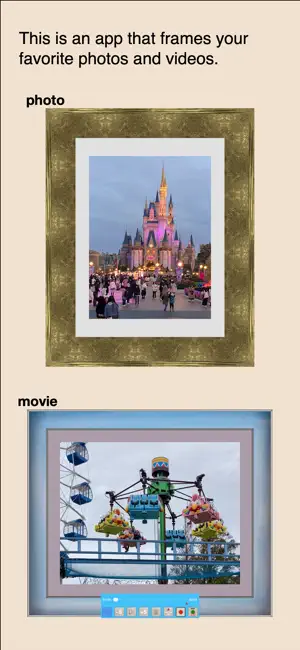
This app will process your beautiful photos and videos to make them appear as if they're in a frame. Why not display your favorite photos and videos in a frame? Of course, displaying them in a realistic frame will make them look even more stunning, but even if you don't want to use a frame, this app can easily create a realistic look. This app can do two things. The first is to add a frame to a photo file or a single frame of a video and output it as an image file. Input: A single photo or video frame from your Photo Library Processing: Cropping (trimming) the image Output: Photo Library Output format: JPEG or PNG Output size: 4 settings The other is to add a frame to the video itself and output it as a framed video. Input: Videos from your Photo Library Processing: Image cropping and video trimming Output: Photo Library Output format: MP4,MOV A wide variety of frame designs are available, and the mat width is customizable. Depending on the frame type, the frame width can also be freely adjusted. We live in a world where image generation is possible with AI. However, for those who are frustrated by the time-consuming generation process, difficult prompts, or concerns about privacy, this app specializes in framed photos and videos, operates entirely within the device with no external information exchange, and displays them quickly just by selecting them. Feel free to upload to social media or send photos and videos edited with this app to friends to highlight the beauty of your photos and videos. Just imagine the impressed faces.
Ratings & reviews
4.8
5 ratings
What’s new
Version 4.3 · Updated June 14, 2026
- Fixed a bug in one framed image that prevented photos and videos from displaying correctly. - Fixed a bug that caused a crash when selecting the texture of a metal engraving frame. - Fixed a bug where the output result did not reflect the clipped video. - Fixed a bug where input and output of mov video files did not work correctly. - For iPad, multitasking is now supported, and image size can be freely changed. The user interface has been significantly redesigned as a result. For iPads, we've added the ability to input photos and videos not only from the Photo Library, but also from the Documents folder, and via drag-and-drop. - Various other bugs, both large and small, have been resolved, and the user interface, including text display, has been improved.
App privacy
The developer, hideyuki kubo, reported these privacy practices to Apple.
Data Not Collected
The developer does not collect any data from this app.
Alternatives to inTheFrame – Photos & Videos
Looking for apps like inTheFrame – Photos & Videos? Here are 6 similar apps on the App Store. The highest rated is PolaCam+ (5.0/5), and 3 of the 6 are free to download.
-
 Photo Art: Rift Effects
4.8
Photo Art: Rift Effects
4.8
-
 Geo Shot Camera
-
 PolaCam+
5.0
PolaCam+
5.0
-
 Kemify Pro - Video Converter
5.0
Kemify Pro - Video Converter
5.0
-
 Snapure+: Secure Photo Cleaner
5.0
Snapure+: Secure Photo Cleaner
5.0
-
 SnapX Pro: Save Your Moments
5.0
SnapX Pro: Save Your Moments
5.0
| App | Rating | Price | Last updated | Compare |
|---|---|---|---|---|
| inTheFrame – Photos & Videos | 4.8 / 5 (5 ratings) | 0.99 USD | June 14, 2026 | |
| Photo Art: Rift Effects | 4.8 / 5 (10) | Free | Sep 28, 2026 | Compare |
| Geo Shot Camera | – | Free | Dec 15, 2025 | Compare |
| PolaCam+ | 5.0 / 5 (3) | Free | Jul 8, 2026 | Compare |
| Kemify Pro - Video Converter | 5.0 / 5 (1) | 2.99 USD | Dec 12, 2025 | Compare |
| Snapure+: Secure Photo Cleaner | 5.0 / 5 (1) | 2.99 USD | Oct 13, 2025 | Compare |
| SnapX Pro: Save Your Moments | 5.0 / 5 (1) | 1.99 USD | Jul 29, 2025 | Compare |