

FloatText
东方 刘 Productivity iPhoneiPadiPod touch
FloatText is a free Productivity app for iPhone and iPad by 东方 刘. Rated 4.7/5 from 334 ratings. Requires iOS 16.6. Updated October 3, 2026.
- Rating
- 4.7
- 334 ratings
- Price
- Free
- on the App Store
- Size
- 18 MB
- Age 4+
- Updated
- Oct 3
- 2026 · v3.3.0
Screenshots



About FloatText
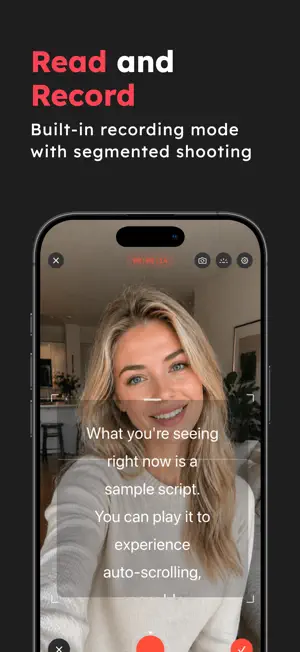
Float your script anywhere — now with 4K, Voice-Follow, and full rotation. Want to look confident and speak naturally on camera? FloatText is a major upgrade built for iOS 26, redesigned to make recording smoother, clearer, and more professional. Read your script while recording — without memorizing, without paper notes, and without breaking your flow. Place the prompter anywhere on the screen, switch between Portrait and Landscape, and keep your delivery natural. Perfect for vlogs, short videos, live content, meetings, speeches, teaching, and more. KEY FEATURES • Floating Prompter Anywhere Overlay your script on the screen and place it exactly where you want. • Portrait & Landscape Support Record in portrait or landscape — the prompter rotates too. • New Zoom & Highlight Scroll Mode Bigger, clearer lines with highlighted reading for easier delivery. • Voice-Follow Scrolling (NEW) Auto-scroll that adapts to your speaking pace for a natural flow. • Smoother Scrolling Details Refined motion and timing for a more comfortable reading experience. • 4K Recording & Export Capture and export sharper, ultra-clear videos. • Full-Screen Prompter Mode Go immersive and focus on your script with minimal distraction. • Manage & Keep Your Recordings Save and organize your recorded videos inside the app. • Polished PiP Floating UI Cleaner, modern picture-in-picture prompter experience. WHO IT’S FOR • Vloggers & YouTube creators • TikTok / short-video creators • Streamers & presenters • Teachers & online course creators • Mobile journalists & reporters • Marketers & content teams • Anyone who records talking videos More features are coming soon! Have ideas or feedback? Email: [email protected] SUBSCRIPTION INFORMATION Subscribe to access premium features. • Subscription options: Monthly / Half-yearly / Yearly • Payment will be charged to your Apple ID account at confirmation of purchase. • Subscriptions automatically renew unless auto-renew is turned off at least 24 hours before the end of the current period. • Your account will be charged for renewal within 24 hours prior to the end of the current period. • You can manage your subscription and turn off auto-renewal in Account Settings after purchase. • If you cancel, your subscription remains active until the end of the current billing period. Auto-renew will be disabled, but the current period will not be refunded. • Any unused portion of a free trial (if offered) will be forfeited when you purchase a subscription. Privacy Policy: https://www.floattext.com/privacy.html Terms of Use: https://www.floattext.com/terms.html
Ratings & reviews
4.7
334 ratings
What’s new
Version 3.3.0 · Updated October 3, 2026
NEW • Two read-along methods: Voice-Follow now offers Classic and Adaptive. Pick wh • Adaptive Read-Along speed: let the prompter run slightly ahead of or behind your voice, saved with each script • Pick a color for the reading-progress highlight, or turn it off. Adaptive Reahe current sentence (on/off). • The Picture in Picture prompter can follow the device into landscape, so text stays upright when you shoot landscape in the system Camera (Settings → Picture in Picture) • Sort your script library by recently edited, recently created, title A-Z or mremembered. IMPROVED • Adaptive Read-Along keeps up better with English and no longer races ahead at the start • Smoother Adaptive Read-Along at large font sizes • In landscape recording, controls now sit on the right, so the prompter window can be made larger • The editor's live preview now matches the current read-along method FIXED • Fixed an occasional long freeze when opening the editor after leaving the recorder
App privacy
The developer, 东方 刘, reported these privacy practices to Apple.
Data Used to Track You
The following data may be used to track you across apps and websites owned by other companies:
- Identifiers: Device ID
- Usage Data: Advertising Data
Data Not Linked to You
The following data, which may be collected but is not linked to your identity, may be used for the following purposes:
- Identifiers: Device ID
- Usage Data: Product Interaction, Advertising Data
Used for: Third-Party Advertising, Developer’s Advertising or Marketing, Analytics
Alternatives to FloatText
Looking for apps like FloatText? Here are 6 similar apps on the App Store. The highest rated is Teleprompter: Captions & Video (4.6/5), and all 6 are free to download.
-
 ▶Teleprompter
4.2
-
 Teleprompter - Floating window
2.3
-
 Teleprompter For Video -FoxCue
4.4
-
 Teleprompter: Captions & Video
4.6
-
 轻抖
1.8
-
 Teleprompter: Sufler
4.4
| App | Rating | Price | Last updated | Compare |
|---|---|---|---|---|
| FloatText | 4.7 / 5 (334 ratings) | Free | October 3, 2026 | |
| ▶Teleprompter | 4.2 / 5 (533) | Free | Oct 17, 2024 | Compare |
| Teleprompter - Floating window | 2.3 / 5 (3) | Free | Sep 25, 2026 | Compare |
| Teleprompter For Video -FoxCue | 4.4 / 5 (1,492) | Free | Jun 29, 2026 | Compare |
| Teleprompter: Captions & Video | 4.6 / 5 (608) | Free | Oct 15, 2026 | Compare |
| 轻抖 | 1.8 / 5 (12) | Free | Oct 12, 2026 | Compare |
| Teleprompter: Sufler | 4.4 / 5 (42) | Free | Mar 8, 2026 | Compare |
Compare FloatText with the top alternatives: ratings, updates, ASO score and keyword gaps →