

Worked Hours
fabrizio chimienti Utilities iPhoneiPadiPod touch
Worked Hours is a free Utilities app for iPhone and iPad by fabrizio chimienti. Requires iOS 17.5. Updated July 30, 2026.
- Price
- Free
- on the App Store
- Size
- 8 MB
- Age 17+
- Updated
- Jul 30
- 2026 · v1.8.6
Screenshots
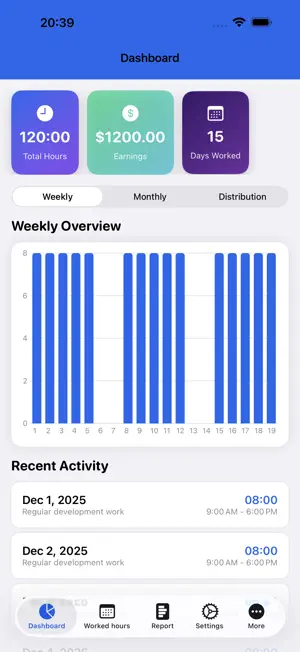


About Worked Hours
The complete work tracking solution for freelancers and independent professionals! NEW FEATURES REAL-TIME TIMER Start tracking your work with a single tap! The built-in timer runs even when you close the app and shows your work session in the Dynamic Island (iPhone 14 Pro and later). Pause, resume, or stop anytime - your time is always accurate. MULTI-CLIENT MANAGEMENT Manage multiple clients with custom hourly rates, colors, and icons. Track earnings separately for each client and see detailed analytics showing which clients are most profitable. GOALS TRACKING Set weekly or monthly goals for hours worked and earnings. Visual progress indicators show if you're on track, with quick templates for common goals (40h week, $3000 month, and more). Core Features Worked Hours is the perfect app for freelancers, consultants, and workers who need to track their working hours in a simple, fast, and professional way. KEY FEATURES Professional PDF Reports Automatically generate detailed reports of your worked hours with advanced charts. Choose between pie, bar, or line charts to clearly visualize the distribution of your work between regular, night, and holiday hours. Reports are ready to be sent to your clients or employers. Custom Templates Create and manage different report templates for each client or project. Add company logos, personalized information, and specific details for each employer. Easily switch between templates based on your needs. Simple and Fast Tracking Record your work hours with just a few taps. Add notes, distinguish between regular, night, and holiday hours, and keep track of breaks. The intuitive interface makes data entry quick and efficient. Interactive iOS Widgets View statistics and control the timer directly from the home screen. Start, pause, and stop work without even opening the app. Now with StandBy mode support! Smart Reminders Enable the monthly reminder that automatically notifies you when it's time to send your report. Never forget a deadline again. Data Import and Export Easily import data from the previous web version via WebView. Export all your data in CSV format for backup, analysis, or sharing. Your data is always under your control. Bulk Add Save time with the bulk entry feature: quickly add the same work hours for an entire selected period. Multilingual Support The app and PDF reports are fully localized in Italian, English, Russian, and Chinese, to fit your international needs. PRIVACY AND SECURITY Your privacy is our top priority. All data is saved exclusively locally on your device. We do not collect or send any information to external servers. The app works completely offline and does not require an internet connection. 100% FREE All features are completely free, with no subscriptions, in-app purchases, or invasive advertising. Download and start tracking your work hours right away. IDEAL FOR - Freelancers and independent contractors - Consultants and contractors - Hourly workers - Project managers - Anyone who needs to track their working time Download Worked Hours now and take control of your working time with professional reports and accurate tracking. For support: [email protected]
What’s new
Version 1.8.6 · Updated July 30, 2026
Bug fix
App privacy
The developer, fabrizio chimienti, reported these privacy practices to Apple.
Data Used to Track You
The following data may be used to track you across apps and websites owned by other companies:
- Location: Coarse Location
- Identifiers: Device ID
- Usage Data: Product Interaction, Advertising Data
- Diagnostics: Crash Data, Performance Data
Data Linked to You
The following data, which may be collected and linked to your identity, may be used for the following purposes:
- Location: Coarse Location
- Identifiers: Device ID
- Usage Data: Product Interaction, Advertising Data
- Diagnostics: Performance Data
Used for: Third-Party Advertising, Analytics
Data Not Linked to You
The following data, which may be collected but is not linked to your identity, may be used for the following purposes:
- Diagnostics: Crash Data
Used for: Third-Party Advertising, Analytics
Alternatives to Worked Hours
Looking for apps like Worked Hours? Here are 6 similar apps on the App Store. The highest rated is Shift & Hours Tracker: Pay Log (5.0/5), and all 6 are free to download.
-
 Shift & Hours Tracker: Pay Log
5.0
-
 Easy Timesheet: Ore Lavoro
4.7
-
 Time Card Calculator App
4.5
-
 Binder-scadenzario
-
 Hours Calculator, Minutes Calc
4.4
-
 Hours Tracker: Shift Clock In
3.0
| App | Rating | Price | Last updated | Compare |
|---|---|---|---|---|
| Worked Hours | – | Free | July 30, 2026 | |
| Shift & Hours Tracker: Pay Log | 5.0 / 5 (2) | Free | Oct 5, 2026 | Compare |
| Easy Timesheet: Ore Lavoro | 4.7 / 5 (3) | Free | Sep 21, 2026 | Compare |
| Time Card Calculator App | 4.5 / 5 (44) | Free | Feb 13, 2025 | Compare |
| Binder-scadenzario | – | Free | Nov 10, 2025 | Compare |
| Hours Calculator, Minutes Calc | 4.4 / 5 (86) | Free | Sep 4, 2026 | Compare |
| Hours Tracker: Shift Clock In | 3.0 / 5 (2) | Free | Apr 2, 2026 | Compare |
Compare Worked Hours with the top alternatives: ratings, updates, ASO score and keyword gaps →