

Compress PDF : Reduce PDF Size
Nitin Katrodiya Productivity iPhoneiPadiPod touch
Compress PDF : Reduce PDF Size is a free Productivity app for iPhone and iPad by Nitin Katrodiya. Rated 1.0/5 from 3 ratings. Requires iOS 12.0.
- Rating
- 1.0
- 3 ratings
- Price
- Free
- on the App Store
- Size
- 12 MB
- Age 4+
- Updated
- Jan 6
- 2025 · v1.3
Screenshots
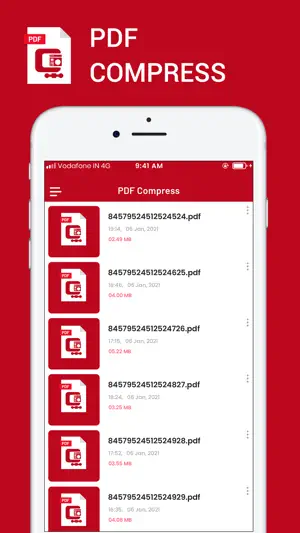


About Compress PDF : Reduce PDF Size
Compress PDF file size makes it possible for anyone to reduce your PDF documents size, especially useful for those PDF files with many scan graphics and photos. Compressed PDF documents requires less disk space for storage and faster uploads and downloads saves transmission time and cost. This app gives you access to compression options to help you to reduce PDF file size without compromising the document's integrity. compression app app provides you a great chance to use the pdf size limit zip and enjoy pdf reduce size app. In this pdf size limit zip app you have to play as a pdf size reducer. Features of Compress PDF Files Size: - Full size compression - Ultra fast processing power - Less Battery usage - Supports all other files also How to play Compress PDF Files Size: - Choose your file - Click compress and give a name - The zip file will appear in the file browser this PDF compress is very useful and very lightweight application. you can reduce size for any PDF file. and Optimize your Memory for other usages. Compressed PDF documents requires less disk space for storage and faster uploads and downloads saves transmission time and cost. The PDFOptim gives you access to compression options to help you to reduce PDF file size without compromising the document's integrity. PDFOptim rewrites the entire PDF documents using selected compression options as efficiently as possible. Some PDF documents might not get compressed, because the PDF documents might be already compressed or have nothing much to compress. If your PDF documents are in another app (For Example Mail, DropBox or SkyDrive etc.) that uses the Open In… button, tap the button to open the PDF document in PDFOptim. You can also transfer PDF documents from your desktop computer via iTunes into PDFOptim application on your iPhone or iPad. If you like this app please share with other and give review or rating. SUBSCRIPTION INFORMATION : - Subscribe for unlimited access to all the Premium features. - - Subscription is automatically renewed unless canceled 24 hours before the renewal - Payment will be charged to iTunes Account at confirmation of purchase - Account will be charged for renewal within 24-hours prior to the end of the current period, at the same price - Subscriptions may be managed by the user and auto-renewal may be turned off by going to the user’s Account Settings after purchase - Any unused portion of a free trial period, if offered, will be forfeited when the user purchases a subscription to that publication, where applicable Privacy Policy : https://nitinkatrodiya.wordpress.com/privacy-policy/ & Terms of Service: https://nitinkatrodiya.wordpress.com/terms-and-condition/
What’s new
Version 1.3 · Updated January 6, 2025
Solve Minor Bug Fix. Performance Improvement.
App privacy
The developer, Nitin Katrodiya, reported these privacy practices to Apple.
Data Not Collected
The developer does not collect any data from this app.
Alternatives to Compress PDF : Reduce PDF Size
Looking for apps like Compress PDF : Reduce PDF Size? Here are 6 similar apps on the App Store. The highest rated is Pic to Zip: Bulk Resize to PDF (5.0/5), and all 6 are free to download.
-
 PDFOptim
4.7
PDFOptim
4.7
-
 Compress PDF reduce pdf size
4.5
Compress PDF reduce pdf size
4.5
-
 PDF Compress - Reduce PDF Size
3.0
PDF Compress - Reduce PDF Size
3.0
-
 PDF Compress - Size Compressor
2.0
PDF Compress - Size Compressor
2.0
-
 Pic to Zip: Bulk Resize to PDF
5.0
Pic to Zip: Bulk Resize to PDF
5.0
-
 PDF Compressor: Compress PDF .
| App | Rating | Price | Last updated | Compare |
|---|---|---|---|---|
| Compress PDF : Reduce PDF Size | 1.0 / 5 (3 ratings) | Free | January 6, 2025 | |
| PDFOptim | 4.7 / 5 (294) | Free | Jan 19, 2026 | Compare |
| Compress PDF reduce pdf size | 4.5 / 5 (37) | Free | Sep 15, 2025 | Compare |
| PDF Compress - Reduce PDF Size | 3.0 / 5 (2) | Free | Dec 23, 2024 | Compare |
| PDF Compress - Size Compressor | 2.0 / 5 (1) | Free | Apr 3, 2025 | Compare |
| Pic to Zip: Bulk Resize to PDF | 5.0 / 5 (4) | Free | Sep 15, 2025 | Compare |
| PDF Compressor: Compress PDF . | – | Free | Dec 9, 2025 | Compare |