

PDF Edit: Document Editor
Yaroslav Ermolaev Business iPhoneiPadiPod touch
PDF Edit: Document Editor is a free Business app for iPhone and iPad by Yaroslav Ermolaev. Requires iOS 15.6. Updated October 28, 2026.
- Price
- Free
- on the App Store
- Size
- 69 MB
- Age 4+
- Updated
- Oct 28
- 2026 · v4.1
Screenshots



About PDF Edit: Document Editor
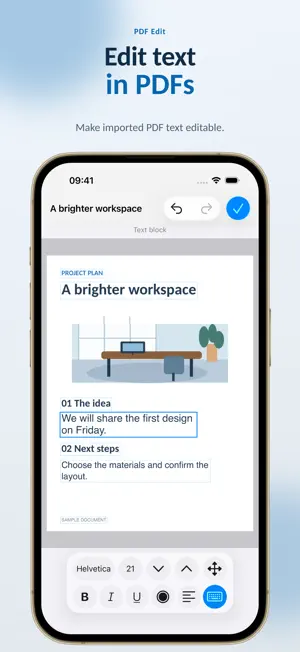
Fix PDF text, fill out forms and add your signature on iPhone and iPad. Turn scans and photos into documents with editable text. PDF Edit helps you get paperwork ready to send from wherever you are: correct details, sign a page, combine documents and save the result as a PDF. EDIT EXISTING PDF CONTENT Change text already in a PDF, as well as adding new text. Open a PDF in editable mode and adjust the font, size, color and alignment. Move, rotate, resize or delete objects available for editing, including text, images and graphics. Switch between the original and editable versions. FILL FORMS AND SIGN Draw a handwritten signature with your finger or Apple Pencil. Fill in PDF text fields or add text to ordinary forms. Insert drawings, images and your own image stamps. Remove unwanted image backgrounds before adding them to a page. TURN SCANS INTO TEXT Scan paper documents with the camera or open existing photos. Recognize text across a whole page or in selected areas, then edit the result. Work with scanned PDFs, too. IMPORT OFFICE DOCUMENTS Open DOC, DOCX, ODT and RTF files, edit their text and save the result as a PDF. Build multipage documents from photos. Import files from Files, email and messaging apps using the Share menu. ORGANIZE YOUR PAGES Merge several PDFs into one document. Add, delete, reorder and rotate pages. Create blank pages in the size you need and choose a background color. Undo and redo changes as you edit. KEEP FILES READY TO SHARE Organize documents and images in folders and mark frequently used items as Favorites. Send finished PDFs to other apps and print with AirPrint. Text recognition and document conversion run on your device, without uploading files to a server for processing. Download PDF Edit and get your documents ready wherever you work. PLEASE NOTE Editing options depend on the document's structure. Converting complex files or recognizing text may change the layout. Text recognition and preparing PDFs for editing require iOS 16 / iPadOS 16 or later. SUBSCRIPTIONS Exporting, sharing and printing documents require a subscription. Monthly and annual plans are available. Prices and trial terms, if a trial is available, are shown before purchase. Subscriptions renew automatically. To avoid the next charge, turn off auto-renewal at least 24 hours before the current period ends, including a free trial period. Manage your subscription in your Apple account settings. Terms of Use: https://regpart.ru/pdfedit_terms.html Privacy Policy: https://regpart.ru/pdfedit_policy.html
What’s new
Version 4.1 · Updated October 28, 2026
Thank you for using PDF Edit! In this update, we've made text editing much more convenient, so it's even easier to make changes to your documents. We've also adapted the app for iPhone Duo. Thank you for your feedback and suggestions! Your feedback helps us make PDF Edit better.
App privacy
The developer, Yaroslav Ermolaev, reported these privacy practices to Apple.
Data Not Linked to You
The following data, which may be collected but is not linked to your identity, may be used for the following purposes:
- Diagnostics: Crash Data, Other Diagnostic Data
Used for: App Functionality
Alternatives to PDF Edit: Document Editor
Looking for apps like PDF Edit: Document Editor? Here are 6 similar apps on the App Store. The highest rated is eZy Sign,Scan & Fill Documents (4.7/5), and all 6 are free to download.
-
 eZy Sign,Scan & Fill Documents
4.7
eZy Sign,Scan & Fill Documents
4.7
-
 Stamp STL Maker
3.0
Stamp STL Maker
3.0
-
 Scanner App Pro: Pdf Documents
4.0
Scanner App Pro: Pdf Documents
4.0
-
 Digital Signature Stamp E Sign
4.2
Digital Signature Stamp E Sign
4.2
-
 Seal Maker-sign pdf with seal
-
 PDF Filler: Edit & Sign
4.5
PDF Filler: Edit & Sign
4.5
| App | Rating | Price | Last updated | Compare |
|---|---|---|---|---|
| PDF Edit: Document Editor | – | Free | October 28, 2026 | |
| eZy Sign,Scan & Fill Documents | 4.7 / 5 (36) | Free | Oct 22, 2026 | Compare |
| Stamp STL Maker | 3.0 / 5 (1) | Free | Aug 18, 2026 | Compare |
| Scanner App Pro: Pdf Documents | 4.0 / 5 (1) | Free | Dec 25, 2023 | Compare |
| Digital Signature Stamp E Sign | 4.2 / 5 (58) | Free | Jan 9, 2025 | Compare |
| Seal Maker-sign pdf with seal | – | Free | Jul 29, 2025 | Compare |
| PDF Filler: Edit & Sign | 4.5 / 5 (82) | Free | Sep 8, 2026 | Compare |