

Today's Tasks
Yasuko Shikiuchi Productivity iPhoneiPadiPod touch
Today's Tasks is a free Productivity app for iPhone and iPad by Yasuko Shikiuchi. Requires iOS 16.6. Updated August 6, 2026.
- Price
- Free
- on the App Store
- Size
- 37 MB
- Age 4+
- Updated
- Aug 6
- 2026 · v1.1.4
Screenshots


About Today's Tasks
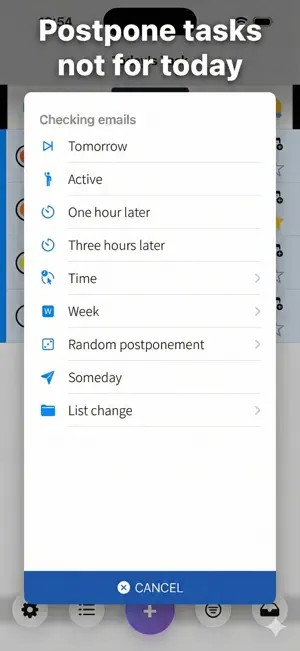
Introduction This application is an auxiliary tool for the standard iOS reminder application. It manages tasks (i.e. reminder items) with or without a notification date and by list classification. You can postpone tasks that you don't want to do immediately, or delete the notification date for undecided tasks (I'll do it someday), so that you can focus on today's tasks that are displayed. About Lists We recommend that you prepare multiple "Lists" for reminders (created from the standard reminder app, e.g. "Shopping", "Work", "Housework"). The default list set in your iPhone reminder app is called Inbox in this app. Today's Tasks screen Displays a list of tasks whose notification dates are up to today. The background color of the past tasks is red, and the background color of the tasks within an hour from now is yellow. Complete a task Tapping the circle icon next to the left side of the task will mark it as completed, and the task will disappear from the list. Postpone a Task Tap the calendar icon on the right side of the task to display the postpone menu. For example, tapping "3 hours later" will postpone the notification date to 3 hours after the current time. Filter Function Tap the filter button to display the list of list names. Tap any list name to switch to the task list of that list. Tasks that have not yet been notified as "To be done someday" will also be displayed, so you can change undecided tasks to be done tonight. To remove the filtered view, tap the title at the top of the screen. Inbox = In other words, from the list of tasks that are set as the default list on your iPhone, use "Change List" to sort them into a list by purpose.
What’s new
Version 1.1.4 · Updated August 6, 2026
Widget layout adjustment
App privacy
The developer, Yasuko Shikiuchi, reported these privacy practices to Apple.
Data Not Linked to You
The following data, which may be collected but is not linked to your identity, may be used for the following purposes:
- Identifiers: Device ID
- Diagnostics: Crash Data
Used for: Third-Party Advertising, Developer’s Advertising or Marketing, Analytics, App Functionality
Alternatives to Today's Tasks
Looking for apps like Today's Tasks? Here are 6 similar apps on the App Store. The highest rated is Daily routine app | Reco (5.0/5), and all 6 are free to download.
-
 Routick: Habit Tracker & To-Do
4.0
Routick: Habit Tracker & To-Do
4.0
-
 Daily routine app | Reco
5.0
Daily routine app | Reco
5.0
-
 メモで体調記録と健康管理、写真を添えて残せる毎日のメモ
4.5
メモで体調記録と健康管理、写真を添えて残せる毎日のメモ
4.5
-
 Grid ToDo - Plan 64 Actions
4.7
Grid ToDo - Plan 64 Actions
4.7
-
 1day Schedule
4.8
1day Schedule
4.8
-
 Daily Chores Checker
4.2
Daily Chores Checker
4.2
| App | Rating | Price | Last updated | Compare |
|---|---|---|---|---|
| Today's Tasks | – | Free | August 6, 2026 | |
| Routick: Habit Tracker & To-Do | 4.0 / 5 (5) | Free | Jul 9, 2026 | Compare |
| Daily routine app | Reco | 5.0 / 5 (1) | Free | Mar 15, 2024 | Compare |
| メモで体調記録と健康管理、写真を添えて残せる毎日のメモ | 4.5 / 5 (12) | Free | Oct 4, 2026 | Compare |
| Grid ToDo - Plan 64 Actions | 4.7 / 5 (11) | Free | Oct 10, 2026 | Compare |
| 1day Schedule | 4.8 / 5 (4) | Free | Dec 11, 2025 | Compare |
| Daily Chores Checker | 4.2 / 5 (12) | Free | Jun 13, 2026 | Compare |
Compare Today's Tasks with the top alternatives: ratings, updates, ASO score and keyword gaps →