

WinPulse – Windows Admin
Signifium LLC Business iPhoneiPadiPod touch
WinPulse – Windows Admin is a free Business app for iPhone and iPad by Signifium LLC. Rated 5.0/5 from 3 ratings. Requires iOS 15.0. Updated June 22, 2026.
- Rating
- 5.0
- 3 ratings
- Price
- Free
- on the App Store
- Size
- 119 MB
- Age 4+
- Updated
- Jun 22
- 2026 · v2.2
Screenshots


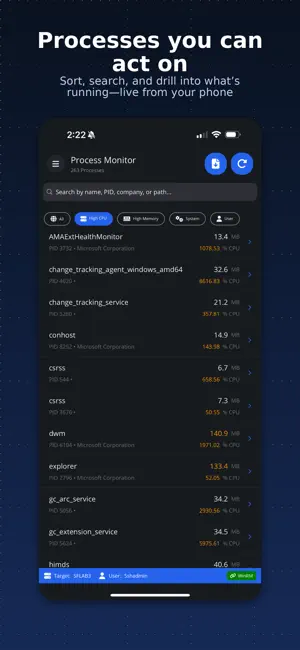
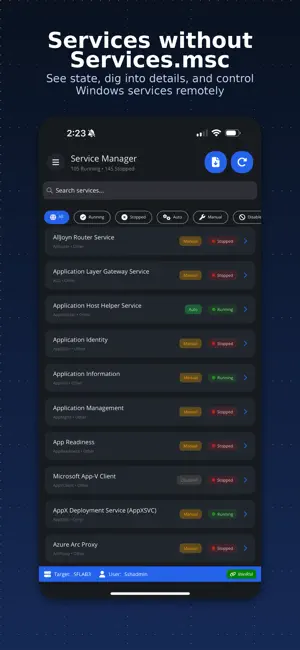
About WinPulse – Windows Admin
## WinPulse — Windows Server management from your iPhone ## Monitor, troubleshoot, and control Windows servers from anywhere — no RDP, no agents, no exposed ports. WinPulse brings processes, services, event logs, diagnostics, and reporting to your iPhone or iPad so you can triage, investigate, and act in seconds. ## How it works ## WinPulse connects to your Windows Gateway server over SSH (port 22). The Gateway communicates with all your target servers using WinRM, WMI, and CIM — native Windows protocols that are already in your environment. No separate agent product. No new attack surface. WinPulse connects your phone to a Windows Gateway over SSH. The Gateway communicates with all target servers using native Windows protocols — no agents required. ## Gateway setup ## Connect your Gateway server in minutes. Full setup documentation at signifium.com/winpulse. On Windows Server 2025, enabling SSH is as simple as ticking a checkbox in Server Manager — just like enabling RDP. No PowerShell required. For Windows Server 2022, 2019, 2016, and 2012 R2, a one-step PowerShell command handles the install. Step-by-step instructions at signifium.com/winpulse. Supported: Windows Server 2025, 2022, 2019, 2016, 2012 R2, and Server Core. ## Built for the moments between full sessions ## Full-screen RDP from a phone is clunky for quick checks. WinPulse surfaces the information you need in seconds — whether you are troubleshooting an outage, reviewing logs before a meeting, or responding to an alert at 2am. ## Complete server management ## Real-time monitoring • Activity dashboard with CPU, memory, and system vitals • Process monitor with resource usage, module details, and process control • Service status with start/stop/restart controls • Event log browser with advanced filtering (ID, level, timeframe, message search) System administration • System information, BIOS details, installed roles, and OS configuration • Network interfaces with IP configuration and adapter management • Disk management with capacity, health, and usage metrics • Local users and groups with membership details • Installed applications and Windows Updates (view and install) • Active RDP sessions and connection monitoring Operations & control • Power management (restart, shutdown, with optional delay) • Windows Update deployment and scheduling • Group Policy refresh and verification • Time synchronisation diagnostics and repair • Remote Desktop enable/disable • User session management and logoff • Recycle bin management Network diagnostics Run connectivity tests from your target servers: • Ping and traceroute • DNS resolution and lookup • Port connectivity checks • HTTP/HTTPS endpoint testing • Active Directory and Kerberos authentication verification File management & reporting • Browse, search, and manage remote files and folders • Security reports: RDP access history, privilege escalation tracking, account lockouts and password changes, failed login analysis • System health reports: uptime, performance baseline, scheduled tasks, Windows Updates • Backup status monitoring with VSS and restore points • Export reports to text/CSV for compliance and analysis ## Multi-target management ## Switch between servers quickly. Save connection profiles for one-tap access across environments — production, staging, DR. One Gateway login, many targets. ## Pricing ## Try free for up to 14 days with full access. After that, manage up to 3 servers forever at no charge. Subscribe when you need more than three targets. All features included — no tiered feature gates. Cancel anytime in your Apple account settings. ## Support ## Documentation: signifium.com/winpulse Direct support: [email protected] Privacy Policy: signifium.com/privacy Terms of Service: signifium.com/termsofuse
What’s new
Version 2.2 · Updated June 22, 2026
Bug fixes
App privacy
The developer, Signifium LLC, reported these privacy practices to Apple.
Data Linked to You
The following data, which may be collected and linked to your identity, may be used for the following purposes:
- Identifiers: User ID
- Usage Data: Product Interaction
Used for: Analytics
Alternatives to WinPulse – Windows Admin
Looking for apps like WinPulse – Windows Admin? Here are 6 similar apps on the App Store. The highest rated is Network Configuration Manager (4.3/5), and all 6 are free to download.
-
 Windows Service Monitor
3.7
Windows Service Monitor
3.7
-
 eScan MDM
-
 NetSupport Manager Control
3.5
NetSupport Manager Control
3.5
-
 PA Server Monitor for iPhone
4.0
PA Server Monitor for iPhone
4.0
-
 Endpoint Central MSP
4.2
Endpoint Central MSP
4.2
-
 Network Configuration Manager
4.3
Network Configuration Manager
4.3
| App | Rating | Price | Last updated | Compare |
|---|---|---|---|---|
| WinPulse – Windows Admin | 5.0 / 5 (3 ratings) | Free | June 22, 2026 | |
| Windows Service Monitor | 3.7 / 5 (6) | Free | Aug 4, 2025 | Compare |
| eScan MDM | – | Free | Oct 8, 2024 | Compare |
| NetSupport Manager Control | 3.5 / 5 (2) | Free | Dec 15, 2025 | Compare |
| PA Server Monitor for iPhone | 4.0 / 5 (4) | Free | Apr 4, 2025 | Compare |
| Endpoint Central MSP | 4.2 / 5 (19) | Free | Oct 27, 2026 | Compare |
| Network Configuration Manager | 4.3 / 5 (13) | Free | Aug 25, 2026 | Compare |