

X Icon Changer: Icons & Themes
Uladzislau Yanushka Graphics & Design iPhoneiPadiPod touch
X Icon Changer: Icons & Themes is a free Graphics & Design app for iPhone and iPad by Uladzislau Yanushka. Rated 4.2/5 from 255 ratings. Requires iOS 15.6.
- Rating
- 4.2
- 255 ratings
- Price
- Free
- on the App Store
- Size
- 66 MB
- Age 4+
- Updated
- Dec 19
- 2024 · v1.2
Screenshots



About X Icon Changer: Icons & Themes
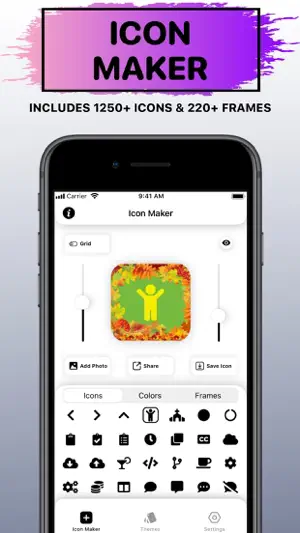
Tired of the way your Home Screen looks and want something new? Refresh it with our brand-new Aesthetic App Icons & Themes for every taste, color and mood! Make your Home Screen unique! X Icon Changer App Content & Main Features: – Theme Gallery – explore 20 categories of unique Themes, such as: Neon, Luxury, etc; – Themes Preview – see how the selected Theme will look on Home Screen before adding it on your own; – Icon Maker – create your own app icons by adding a frame or your photo to the background, picking colors for the icon and background, zooming and rotating icon. Contains 1250+ Icons and 220+ Frames to choose from; – 35,000+ App Icons with weekly updates; – 200+ Themes with weekly updates; – No ads! Each theme contains resources for saving and setting, such as: – 181 App Icons; – 1 Wallpaper. These icons are for custom shortcut using the “Shortcuts” app. Please note that they don’t change your current app icons. How to Add Icons to your Home Screen? 1. Open ”Shortcuts” App; 2. Tap the Add (“+”) button in the upper-right corner; 3. Tap “Search Actions”; 4. Search for “Open App” and tap on it; 5. Tap on “App”; 6. Find and select the app you want to change icon; 7. Tap on the Shortcut name (arrow down ⌄); 8. Tap on “Add to Home Screen”; 9. Enter the name of app icon; 10. Tap on the left image icon, then “Choose Photo“; 11. Choose the icon from your Photos you want to set; 12. Tap on the “Add” button in upper-right corner; 13. Done! Icon added to your Home Screen. Repeat steps 1-12 to add more custom app icons. Unclear? Do not worry! You can find a more detailed guide with pictures inside the app by clicking on the ( i ) button. * Note: Free version of the app is limited to 20 Themes only (1 Theme for Free in each category). If you want to use the app without limits, an auto-renewable subscription ”X Icon Changer Pro” is available. Auto-renewable Subscription ”X Icon Changer Pro” Info: By subscribing you get premium (full, unlimited) access to all the features and content offered by ”X Icon Changer” app. Auto-renewable Subscription ”X Icon Changer Pro” Includes: – Unlock 35K+ App Icons; – Unlock 200+ Themes; – Unlock Icon Maker; – Get New Themes Weekly; – Request Custom App Icons. The app contains the following auto-renewable subscription called ”X Icon Changer Pro”: – Weekly (4,99 US$) with a 3-days for free period * Subscription price may vary depending on your location. * Payment will be charged to iTunes Account at confirmation of purchase; * Subscription automatically renews unless auto-renew is turned off at least 24-hours before the end of the current period; * Account will be charged for renewal within 24-hours prior to the end of the current period, and identify the cost of the renewal; * Subscriptions may be managed by the user and auto-renewal may be turned off by going to the user's Account; * Any unused portion of a free trial period, if offered, will be forfeited when the user purchases a subscription to that publication, where applicable. Privacy Policy: https://sites.google.com/view/icon-changer-app-privacy/ Terms of Use: https://sites.google.com/view/icon-changer-app-terms/ Requested Access: Photos - to save icons and wallpapers to your Photos to add them to your Home Screen.
Ratings & reviews
4.2
255 ratings
What’s new
Version 1.2 · Updated December 19, 2024
Bug fix and stability improvement.
App privacy
The developer, Uladzislau Yanushka, reported these privacy practices to Apple.
Data Not Collected
The developer does not collect any data from this app.
Alternatives to X Icon Changer: Icons & Themes
Looking for apps like X Icon Changer: Icons & Themes? Here are 6 similar apps on the App Store. The highest rated is AI Art Generator - AI image (4.8/5), and all 6 are free to download.
-
 AI Art Generator - AI image
4.8
AI Art Generator - AI image
4.8
-
 WidgetX - Themes,Widgets,Icons
4.0
WidgetX - Themes,Widgets,Icons
4.0
-
 Icon Changer: Themes Widgets
4.0
Icon Changer: Themes Widgets
4.0
-
 TensorArt - AI model generator
4.6
TensorArt - AI model generator
4.6
-
 Banana AI - image generation
4.3
Banana AI - image generation
4.3
-
 App ICON Changer - Theme Maker
4.6
App ICON Changer - Theme Maker
4.6
| App | Rating | Price | Last updated | Compare |
|---|---|---|---|---|
| X Icon Changer: Icons & Themes | 4.2 / 5 (255 ratings) | Free | December 19, 2024 | |
| AI Art Generator - AI image | 4.8 / 5 (16) | Free | Jun 3, 2024 | Compare |
| WidgetX - Themes,Widgets,Icons | 4.1 / 5 (20) | Free | Aug 9, 2024 | Compare |
| Icon Changer: Themes Widgets | 4.0 / 5 (56) | Free | Dec 23, 2024 | Compare |
| TensorArt - AI model generator | 4.6 / 5 (936) | Free | Dec 27, 2025 | Compare |
| Banana AI - image generation | 4.3 / 5 (9) | Free | Oct 26, 2026 | Compare |
| App ICON Changer - Theme Maker | 4.6 / 5 (867) | Free | Nov 23, 2023 | Compare |