

Time { + - x ÷ } Calculator
Vecihi LLC Utilities iPhoneiPadiPod touchMacApple Watch
Time { + - x ÷ } Calculator is a free Utilities app for iPhone and iPad by Vecihi LLC. Rated 5.0/5 from 1 ratings. Requires iOS 17.0.
- Rating
- 5.0
- 1 ratings
- Price
- Free
- on the App Store
- Size
- 16 MB
- Age 4+
- Updated
- Oct 22
- 2026 · v2.0.0
Screenshots

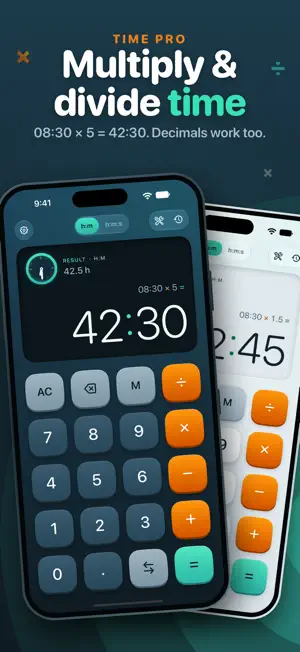

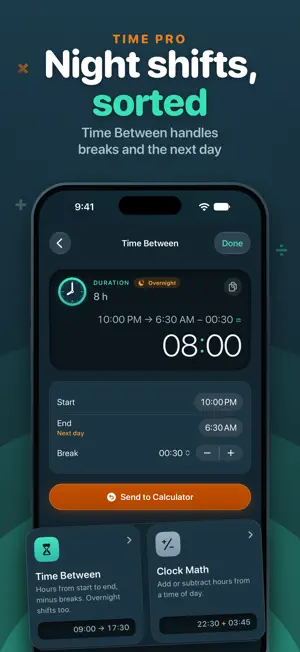
About Time { + - x ÷ } Calculator
Hours don't add up like ordinary numbers: 08:45 + 07:30 is 16:15, not 15.75. Time { + - x ÷ } is a calculator made for hours, minutes and seconds. Type times the way a clock shows them and the minutes carry over by themselves. Use it for timesheets, shifts and overtime, billable hours, flight and duty times, or any list of durations. INCLUDED FOR EVERYONE • Add and subtract hours and minutes, or switch to h:m:s to count seconds too • Digits come in from the right, like a clock: 1, 3, 0 reads 01:30 • Totals keep counting past 24 hours (38:15), the way a timesheet needs • Decimal hours with every result: 07:45 is 7.75 h • The whole calculation stays in view above the result • Tap the result to copy it, as a time or as decimal hours • Convert any result to years, days, hours, minutes and seconds • Dark mode for everyone: System, Light or Dark TIME PRO, A ONE-TIME IN-APP PURCHASE • Multiply and divide with decimals: 08:30 × 5 = 42:30, 37:30 ÷ 3 = 12:30 • Save calculations with M, add a title and a note, search, share, and export as CSV or text • iCloud Sync keeps your saved calculations up to date on iPhone, iPad, Mac and Apple Watch. It turns on by itself with Pro • Time Tools: – Time Between: hours from start to end, minus breaks, overnight shifts too – Clock Math: add or subtract hours from a time of day, and see when it falls on another day – Earnings: what a duration pays at your hourly rate, in your currency – Decimal ⇄ HH:MM: 7.75 becomes 07:45, and back • Six more color themes, each made for light and dark • A light version of the app icon for your Home Screen Bought Pro in version 1? It's already yours, with everything new included. ONE APP FOR EVERY DEVICE • iPhone: a large keypad in portrait and landscape, key clicks that follow your Keyboard Feedback setting and Silent mode, and haptics • iPad: the calculator with History or Time Tools beside it, keyboard shortcuts and pointer support, in every window size from Split View to Stage Manager • Mac: a native Mac app with full keyboard input, menu commands and your saved calculations in a sidebar • Apple Watch: the whole keypad on one screen, with Convert and History a tap away. It also works without the iPhone app, and you can buy or restore Time Pro right on the watch Buy Time Pro once and use it on all of them with the same Apple Account. PRIVATE BY DESIGN • No ads, no tracking, no analytics • No account, no sign-in • No data collected: your calculations stay on your devices, and in your own iCloud when you use iCloud Sync MORE DETAILS • Comma or point for decimals, as you prefer • VoiceOver reads times as durations, like "1 hour 23 minutes", and text follows your text size setting • Updating from version 1? Your saved calculations, settings and Pro come along automatically
What’s new
Version 2.0.0 · Updated October 22, 2026
Time { + - x ÷ } 2.0 is rebuilt from the ground up. Thank you for counting your hours with us! • A fresh design, made separately for iPhone, iPad and Mac. On the Mac it is now a true native app, with full keyboard input, menu commands and a sidebar for saved calculations. • New: Time { + - x ÷ } on Apple Watch. The whole keypad on your wrist, with Convert, saved calculations and Time Pro. It also works without the iPhone app. • No ads. None, for anyone. • Dark mode is now free for everyone: System, Light or Dark. • Decimal hours with every result (07:45 is 7.75 h). • Key clicks on iPhone and iPad that follow your Keyboard Feedback setting and Silent mode. • Your saved calculations, settings and Pro purchase come along automatically. Time Pro is still a one-time purchase and now includes × and ÷ with decimals, saved calculations with titles, notes, search and export, iCloud Sync across iPhone, iPad, Mac and Apple Watch (on automatically), Time Tools (time between, clock math, earnings, decimal hours), color themes and a light app icon for iPhone and iPad. Already bought Pro? It's all yours.
App privacy
The developer, Vecihi LLC, reported these privacy practices to Apple.
Data Not Collected
The developer does not collect any data from this app.
Alternatives to Time { + - x ÷ } Calculator
Looking for apps like Time { + - x ÷ } Calculator? Here are 6 similar apps on the App Store. The highest rated is Time Calculator Hours (5.0/5), and all 6 are free to download.
-
 Time Calculator Hours
5.0
Time Calculator Hours
5.0
-
 Timely: Time Calculator
2.0
Timely: Time Calculator
2.0
-
 Pace Time
4.0
Pace Time
4.0
-
 Time Calc - Time Calculator
4.5
Time Calc - Time Calculator
4.5
-
 Time Calculator ×
4.7
Time Calculator ×
4.7
-
 Calculator hours and minutes
4.8
Calculator hours and minutes
4.8
| App | Rating | Price | Last updated | Compare |
|---|---|---|---|---|
| Time { + - x ÷ } Calculator | 5.0 / 5 (1 rating) | Free | October 22, 2026 | |
| Time Calculator Hours | 5.0 / 5 (6) | Free | Jun 1, 2026 | Compare |
| Timely: Time Calculator | 2.0 / 5 (3) | Free | Oct 26, 2026 | Compare |
| Pace Time | 4.0 / 5 (1) | Free | Jul 7, 2026 | Compare |
| Time Calc - Time Calculator | 4.5 / 5 (235) | Free | Oct 27, 2026 | Compare |
| Time Calculator × | 4.7 / 5 (288) | Free | Apr 27, 2026 | Compare |
| Calculator hours and minutes | 4.8 / 5 (52) | Free | Aug 27, 2026 | Compare |