

Content Manager: AI Сleaner
DevMeApp Utilities iPhoneiPadiPod touch
Content Manager: AI Сleaner is a free Utilities app for iPhone and iPad by DevMeApp. Rated 4.4/5 from 60,577 ratings. Requires iOS 16.4.
- Rating
- 4.4
- 60.5K ratings
- Price
- Free
- on the App Store
- Size
- 191 MB
- Age 4+
- Updated
- Oct 22
- 2026 · v3.9.33
Screenshots


About Content Manager: AI Сleaner
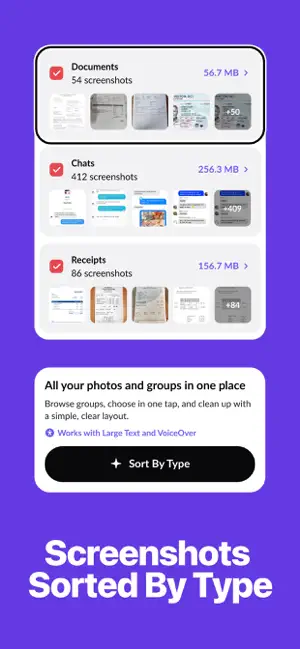
Content Manager helps you organize photos, videos, screenshots, and contacts on your iPhone, so you can find what matters, free up storage, and keep only what you want. ACCESSIBLE FOR EVERYONE • VoiceOver: the main flow, from onboarding to review and deletion, is fully labeled and announces each step and its result • Larger Text: screens adapt to the text size you set in iOS Settings and stay clear and easy to read A FREE YEAR FOR STUDENTS Student life fills a phone fast: lecture slides, notes, screenshots, and photos. Less clutter on your phone, more focus on your studies. • Enter your university email in the app • Get an offer code by email and redeem it in the App Store • Enjoy 12 months of Premium for free Available for a limited time to users 18+ with a university email address. One offer per email. After the free year, the subscription renews automatically at the yearly price shown in the app unless you cancel. We will email you a reminder 3 days before your first payment. Swipe through your gallery, compare similar shots, sort screenshots by type, and optimize heavy videos. Nothing is deleted without your confirmation. ORGANIZE PHOTOS AND VIDEOS You stay in control of every decision. • Swipe through your library: keep, mark for removal, or skip and decide later • Review everything at once, or focus on a specific month or date range • Compare similar photos and possible duplicates, with the best shot highlighted • Find screenshots, screen recordings, selfies, and similar videos in one place • Use Smart Cleanup to see everything you can review in one list • Start a quick timed session when you only have a few minutes • See a summary and estimated storage impact before you confirm Items you delete move to the Recently Deleted album in Photos, where you can recover them for 30 days. SMART SCREENSHOT CATEGORIES Content Manager automatically sorts your screenshots into Chats, Receipts, Apps & Websites, and Documents, so you can see what you have and review each group faster. Screenshots that don't fit a category stay in Unsorted. OPTIMIZE HEAVY VIDEOS Compress large videos to save space while keeping them in your library. TIDY UP CONTACTS Find duplicate contacts and keep your address book clean and error-free. PRIVATE BY DESIGN Photo, video, and screenshot analysis happens on your device. Your library is never uploaded to our servers. ONE PLACE FOR YOUR DIGITAL CONTENT Content Manager helps you manage your digital life, not simply delete parts of it. Organize it. Optimize it. Keep what matters. SUBSCRIPTION INFORMATION Content Manager is free to download. Premium features are available with a weekly or yearly auto-renewable subscription. Prices are shown in the app before purchase and may vary by country. • Payment is charged to your Apple Account at confirmation of purchase. • The subscription renews automatically unless auto-renew is turned off at least 24 hours before the end of the current period. Your account is charged for renewal within 24 hours before the end of the current period. • Free trials and free offers convert to a paid subscription unless canceled at least 24 hours before they end. • Any unused portion of a free trial is forfeited when you purchase a subscription. • You can manage or cancel your subscription anytime in your Apple Account settings. After cancellation, Premium stays active until the end of the current period. Privacy Policy: https://phonecleaner.app/privacy/ Terms of Use: https://phonecleaner.app/terms-of-use/
Ratings & reviews
4.4
60.5K ratings
What’s new
Version 3.9.33 · Updated October 22, 2026
Improved screenshot organization and cleanup, clearer subscription management, and additional usability and performance improvements.
App privacy
The developer, DevMeApp, reported these privacy practices to Apple.
Data Used to Track You
The following data may be used to track you across apps and websites owned by other companies:
- Identifiers: Device ID
- Usage Data: Advertising Data
Data Linked to You
The following data, which may be collected and linked to your identity, may be used for the following purposes:
- Identifiers: Device ID
- Usage Data: Advertising Data, Product Interaction
- Diagnostics: Crash Data
Used for: Developer’s Advertising or Marketing, Analytics
Alternatives to Content Manager: AI Сleaner
Looking for apps like Content Manager: AI Сleaner? Here are 6 similar apps on the App Store. The highest rated is Tidy Up-Phone Storage Cleaner! (4.5/5), and all 6 are free to download.
-
 Tidy Up-Phone Storage Cleaner!
4.5
Tidy Up-Phone Storage Cleaner!
4.5
-
 Clean Manager: Storage Cleaner
4.2
Clean Manager: Storage Cleaner
4.2
-
 Cleaner: AI Phone Cleanup Tool
4.4
Cleaner: AI Phone Cleanup Tool
4.4
-
 Clean Storage: Master Cleaner
4.4
Clean Storage: Master Cleaner
4.4
-
 AI Cleaner: Clean Up Storage+
4.5
AI Cleaner: Clean Up Storage+
4.5
-
 Phone Cleaner:AI Clean Storage
4.5
Phone Cleaner:AI Clean Storage
4.5
| App | Rating | Price | Last updated | Compare |
|---|---|---|---|---|
| Content Manager: AI Сleaner | 4.4 / 5 (60,577 ratings) | Free | October 22, 2026 | |
| Tidy Up-Phone Storage Cleaner! | 4.5 / 5 (3,200) | Free | Aug 31, 2026 | Compare |
| Clean Manager: Storage Cleaner | 4.2 / 5 (13,010) | Free | Oct 26, 2026 | Compare |
| Cleaner: AI Phone Cleanup Tool | 4.4 / 5 (10,762) | Free | Jul 2, 2026 | Compare |
| Clean Storage: Master Cleaner | 4.4 / 5 (7,861) | Free | Oct 22, 2026 | Compare |
| AI Cleaner: Clean Up Storage+ | 4.5 / 5 (9,043) | Free | Sep 23, 2026 | Compare |
| Phone Cleaner:AI Clean Storage | 4.5 / 5 (7,750) | Free | Jul 1, 2026 | Compare |