

Mini Clock - Focus & Pomodoro
细清 陈 Utilities iPhoneiPadiPod touch
Mini Clock - Focus & Pomodoro is a free Utilities app for iPhone and iPad by 细清 陈. Rated 3.0/5 from 2 ratings. Requires iOS 15.0. Updated May 26, 2026.
- Rating
- 3.0
- 2 ratings
- Price
- Free
- on the App Store
- Size
- 17 MB
- Age 4+
- Updated
- May 26
- 2026 · v1.1.1
Screenshots
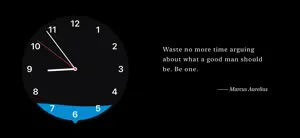
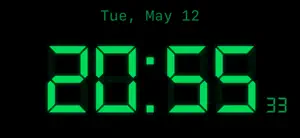

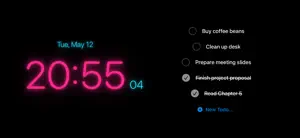
About Mini Clock - Focus & Pomodoro
Turn your iPhone or iPad into a clean desk clock and focus space. Mini Clock combines 10 clock faces, a Pomodoro timer, to-dos, widgets, and white noise for study, work, and desk setups. ◆ 10 Clock Styles Wave pointer, digital, flip, LED, minimal, classic, retro, orbit, solar, and neon — each carefully designed for different moods and settings. Reverse clock mode lets time flow backward. ◆ Pomodoro Focus Timer Built-in Pomodoro timer with customizable work and break intervals. Get notified when each session ends to keep your rhythm going. ◆ To-Do Integration Reads directly from iOS Reminders. View and manage your tasks right on the clock face — no app switching, no interruptions. ◆ Ambient Sounds & Quotes Rain, white noise, and fireplace sounds create an immersive atmosphere. Enjoy typewriter-style quote displays in English and Chinese, or add your own custom quotes. ◆ Home Screen Widgets Multiple widget sizes automatically sync with your chosen clock style. See time and quotes at a glance on your Home Screen. ◆ Landscape & iPad Support Improved landscape and iPad layouts make the clock, to-dos, and quotes feel better on larger screens and desk setups. ◆ Three Theme Modes Default, to-do, and minimal themes — switch between them to match your workflow. ◆ Privacy First No account required. Your core data stays on your device. Reminders access is used only to display and manage your to-dos. ◆ One-Time Purchase Free to use with basic features. Remove ads or unlock all themes with a single purchase — no subscriptions, no hidden fees.
What’s new
Version 1.1.1 · Updated May 26, 2026
• Added Flip and Solar clock faces, bringing the total to 10 styles • Widgets now support more synced clock styles • Improved landscape and iPad layouts • Refined Focus Mode, to-do, and quote display experience • Fixed crashes on some devices • Improved permission prompts, ad loading, and overall stability
App privacy
The developer, 细清 陈, reported these privacy practices to Apple.
Data Used to Track You
The following data may be used to track you across apps and websites owned by other companies:
- Usage Data: Advertising Data
Data Linked to You
The following data, which may be collected and linked to your identity, may be used for the following purposes:
- Usage Data: Advertising Data
Used for: Third-Party Advertising
Data Not Linked to You
The following data, which may be collected but is not linked to your identity, may be used for the following purposes:
- Identifiers: Device ID
- Diagnostics: Crash Data, Performance Data
Used for: Third-Party Advertising, App Functionality
Alternatives to Mini Clock - Focus & Pomodoro
Looking for apps like Mini Clock - Focus & Pomodoro? Here are 6 similar apps on the App Store. The highest rated is Small Clock - Beautiful Clock (5.0/5), and all 6 are free to download.
-
 Wonder beauty Clock
-
 Amaze Clock
-
 Small Clock - Beautiful Clock
5.0
Small Clock - Beautiful Clock
5.0
-
 Premium Clock Collection
4.6
Premium Clock Collection
4.6
-
 Minimum Clock
4.3
Minimum Clock
4.3
-
 Analog Clock & Timer
4.4
Analog Clock & Timer
4.4
| App | Rating | Price | Last updated | Compare |
|---|---|---|---|---|
| Mini Clock - Focus & Pomodoro | 3.0 / 5 (2 ratings) | Free | May 26, 2026 | |
| Wonder beauty Clock | – | Free | Sep 19, 2026 | Compare |
| Amaze Clock | – | Free | Feb 25, 2024 | Compare |
| Small Clock - Beautiful Clock | 5.0 / 5 (1) | Free | Aug 21, 2026 | Compare |
| Premium Clock Collection | 4.6 / 5 (56) | Free | Jan 12, 2026 | Compare |
| Minimum Clock | 4.3 / 5 (3) | Free | Jul 26, 2026 | Compare |
| Analog Clock & Timer | 4.4 / 5 (44) | Free | Dec 4, 2024 | Compare |