

GFOS App
GFOS - Gesellschaft f. Organisationsberatung und Softwareentwicklung Utilities iPhoneiPadiPod touch
GFOS App is a free Utilities app for iPhone and iPad by GFOS - Gesellschaft f. Organisationsberatung und Softwareentwicklung. Requires iOS 16.6.
- Price
- Free
- on the App Store
- Size
- 82 MB
- Age 4+
- Updated
- Sep 25
- 2026 · v2.50.0
Screenshots
About GFOS App
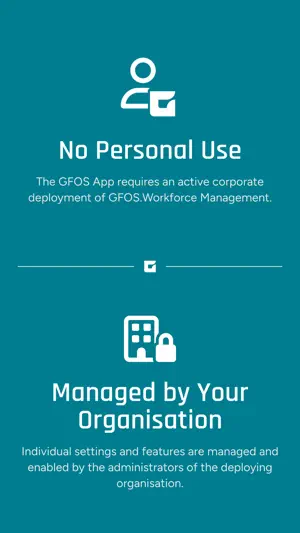
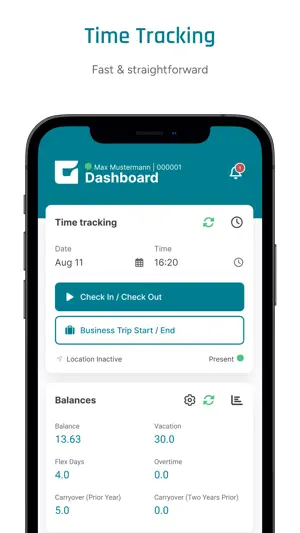
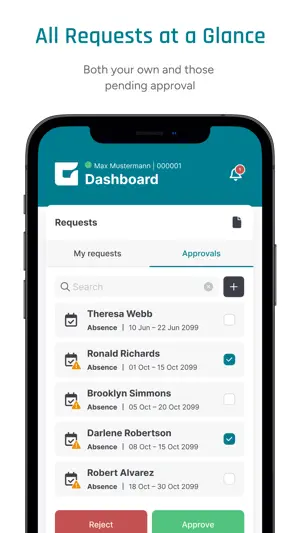
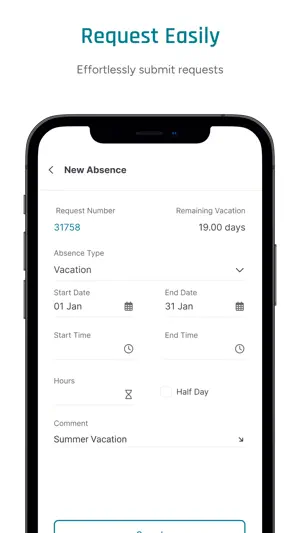
Time tracking, leave requests, shift planning, and much more: available anytime, anywhere. The GFOS App brings key features of GFOS.Workforce Management together in one mobile application for employees, managers, and organizations that want to make workforce processes more efficient. Time Tracking Track working hours quickly and easily from a smartphone. Employees and managers retain a clear overview of attendance times, time entries, and relevant bookings at all times. - Record working hours with clock-in and clock-out bookings - Create time entries with date and time - Document off-site work activities - Book hourly absences - View current attendance status - Use offline functionality - Complete QR code bookings - Optional: add location information for time entries Leave Requests & Request Management Submit leave, absence, or special time requests directly in the GFOS App and track approval status with full transparency. - Submit leave requests from a mobile device - Request absences and special times - Report missing time entries - View and cancel personal requests - Add comments to requests - Upload documents and supporting evidence - View overlaps in the approver view - Approve multiple requests at once - Map approval substitutions and delegations Employee Scheduling Stay informed about assigned duties and shifts at any time and simplify day-to-day workforce scheduling. - View personal duties and shifts - Access duty information at any time - Receive and respond to availability requests - Submit preferred working times - Connect shift schedules directly with the calendar - View planning units and stored qualifications Calendar & Absences Bring important workforce information together in the integrated calendar for better organization throughout the workday. - Use a personal calendar on mobile devices - View leave, absences, and special times - Get an overview of holidays and special events - View time entries and seminars - Submit requests directly from the calendar and cancel existing requests Project Time Tracking Document project-related work faster with mobile project time tracking and create greater transparency across projects. - Record project times from a mobile device - Create project bookings with start and stop functionality - Add or correct times manually - Use comments for project entries - Find projects faster Messages & Communication Receive important information directly on your mobile device. Push notifications help ensure that employees and managers do not miss relevant updates. - Receive important information directly in the app - Use push notifications - Manage and delete messages - Trigger actions directly from messages - Receive notifications about approvals, availability requests, and more Convenience Features Benefit from modern login and usability concepts that provide fast, secure access to workforce management processes. - Login via single sign-on - Use the app in multiple languages - Use QR code features for different workflows, such as cost center changes or clock-in and clock-out bookings - Configure quick access options - Personal dashboard: configure widgets individually for different authorization groups Why Companies Trust GFOS For more than 35 years, GFOS has supported companies in digitalizing HR and workforce management processes. The software is used worldwide and is available to organizations in numerous languages. - Software development and support from Germany, with servers located in Germany - Use in accordance with GDPR requirements - ISO 27001-certified system Important Note The GFOS App is intended exclusively for employees and managers of companies that use GFOS.Workforce Management. Use of the app requires an existing GFOS installation and activation by your organization.
What’s new
Version 2.50.0 · Updated September 25, 2026
- Various bug fixes and optimizations
App privacy
The developer, GFOS - Gesellschaft f. Organisationsberatung und Softwareentwicklung, reported these privacy practices to Apple.
Data Linked to You
The following data, which may be collected and linked to your identity, may be used for the following purposes:
- Location: Precise Location, Coarse Location
- User Content: Customer Support
- Identifiers: User ID, Device ID
Used for: App Functionality
Data Not Linked to You
The following data, which may be collected but is not linked to your identity, may be used for the following purposes:
- Diagnostics: Crash Data, Performance Data
Used for: App Functionality
Alternatives to GFOS App
Looking for apps like GFOS App? Here are 6 similar apps on the App Store. The highest rated is WSL – Secure Logon (3.0/5), and all 6 are free to download.
-
 WSL – Secure Logon
3.0
WSL – Secure Logon
3.0
-
 OfficeEfficient
-
 Azubiheft App
-
 Lead Scanning – pretixLEAD
-
 autocrm AM3
-
 reev
2.3
reev
2.3
| App | Rating | Price | Last updated | Compare |
|---|---|---|---|---|
| GFOS App | – | Free | September 25, 2026 | |
| WSL – Secure Logon | 3.0 / 5 (5) | Free | Feb 5, 2026 | Compare |
| OfficeEfficient | – | Free | Oct 27, 2026 | Compare |
| Azubiheft App | – | Free | Mar 16, 2026 | Compare |
| Lead Scanning – pretixLEAD | – | Free | May 9, 2025 | Compare |
| autocrm AM3 | – | Free | Sep 4, 2026 | Compare |
| reev | 2.3 / 5 (3) | Free | Oct 27, 2026 | Compare |
Compare GFOS App with the top alternatives: ratings, updates, ASO score and keyword gaps →