

JPG Optimizer
Mikhail Kuznetsov Photo & Video iPhoneiPadiPod touchMac
JPG Optimizer is a free Photo & Video app for iPhone and iPad by Mikhail Kuznetsov. Rated 1.0/5 from 1 ratings. Requires iOS 17.0. Updated October 18, 2026.
- Rating
- 1.0
- 1 ratings
- Price
- Free
- on the App Store
- Size
- 141 MB
- Age 4+
- Updated
- Oct 18
- 2026 · v2.0.5
Screenshots

About JPG Optimizer
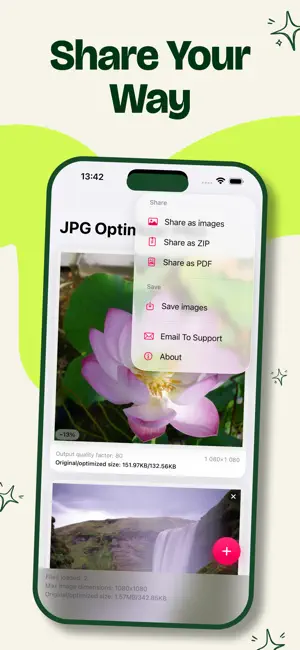
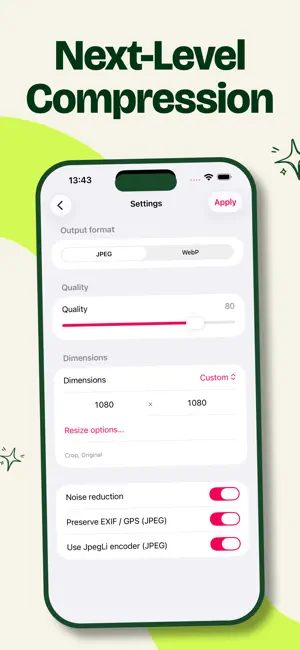
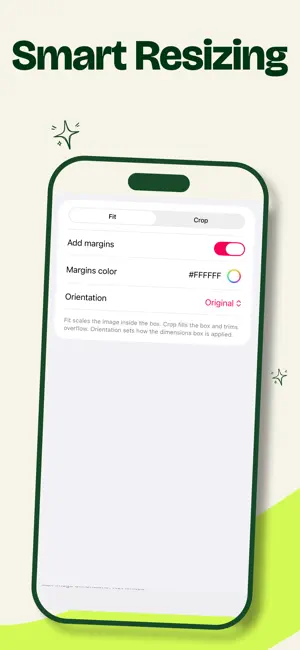
Tired of emails bouncing back because your photos are too big? Want to reclaim gigabytes of storage without deleting a single memory? JPG Optimizer makes your images as small as possible — while keeping every bit of quality you see. Completely private. Completely on your device. Tiny files. Same stunning photos. You'll love it because: • Email attachments finally go through — no more rejections • Free up massive space without losing a single shot • Optimize entire batches with one set of settings • Tap to compare, pinch to inspect, then share with confidence Next-level compression: • Jpegli: up to 35% smaller at high quality — still a normal JPEG • ISO noise reduction for cleaner, lighter files • Full quality control in your hands • Keep or remove EXIF / GPS data (JPEG) • Save as JPEG or WebP Smart resizing: • Ready-to-use presets or custom width × height • Fit with optional colored margins, or Crop precisely • Choose Original, Portrait, or Landscape orientation Import from anywhere: • Library, Files, Camera — even Document Camera for scanning photos and documents Compare with ease: • Tap to switch between original and compressed versions • Pinch-to-zoom stays perfectly aligned Share your way: • Single images, ZIP archive, or PDF • Save directly to a Photos album Zero uploads. Zero accounts. Zero compromises. Your photos stay yours and only yours. Try it now — and be amazed at what you've been missing! FREE AND PRO • Free: up to 3 photos at a time, shared as JPEG • PRO: unlimited photos, WebP, ZIP and PDF, plus Fit/Crop resize with margins
What’s new
Version 2.0.5 · Updated October 18, 2026
Minor interface improvements
App privacy
The developer, Mikhail Kuznetsov, reported these privacy practices to Apple.
Data Used to Track You
The following data may be used to track you across apps and websites owned by other companies:
- Identifiers: Device ID
- Usage Data: Product Interaction, Advertising Data
- Other Data: Other Data Types
Data Not Linked to You
The following data, which may be collected but is not linked to your identity, may be used for the following purposes:
- Identifiers: Device ID
- Usage Data: Product Interaction, Advertising Data
- Diagnostics: Performance Data
- Other Data: Other Data Types
Used for: Third-Party Advertising, Analytics, Other Purposes
Alternatives to JPG Optimizer
Looking for apps like JPG Optimizer? Here are 6 similar apps on the App Store. The highest rated is Picmori: Photo Cleaner (4.9/5), and all 6 are free to download.
-
 Compressly: Image Size Pro
-
 mosaic + : Blur photo & video.
3.4
-
 Photo Batch Resize & Converter
3.8
-
 Compress JPEG
-
 Picmori: Photo Cleaner
4.9
-
 MP4 Video Player: Framelens
3.9
| App | Rating | Price | Last updated | Compare |
|---|---|---|---|---|
| JPG Optimizer | 1.0 / 5 (1 rating) | Free | October 18, 2026 | |
| Compressly: Image Size Pro | – | Free | Aug 17, 2026 | Compare |
| mosaic + : Blur photo & video. | 3.4 / 5 (18) | Free | Aug 1, 2026 | Compare |
| Photo Batch Resize & Converter | 3.8 / 5 (15) | Free | Oct 25, 2026 | Compare |
| Compress JPEG | – | Free | Jul 16, 2024 | Compare |
| Picmori: Photo Cleaner | 4.9 / 5 (41) | Free | Oct 27, 2026 | Compare |
| MP4 Video Player: Framelens | 3.9 / 5 (16) | Free | Oct 12, 2026 | Compare |
Compare JPG Optimizer with the top alternatives: ratings, updates, ASO score and keyword gaps →