

VoCat - My Own Vocabulary
DevStory Corp. Education iPhoneiPadiPod touch
VoCat - My Own Vocabulary is a free Education app for iPhone and iPad by DevStory Corp. Rated 4.8/5 from 112 ratings. Requires iOS 15.5.0.
- Rating
- 4.8
- 112 ratings
- Price
- Free
- on the App Store
- Size
- 169 MB
- Age 4+
- Updated
- Sep 19
- 2026 · v5.1.5
Screenshots
About VoCat - My Own Vocabulary
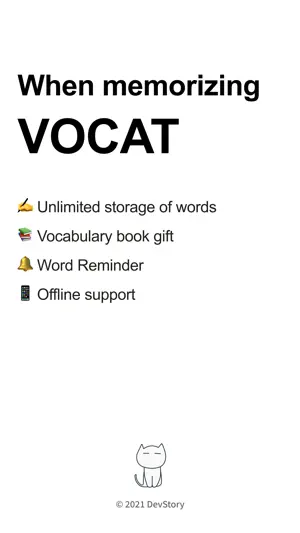
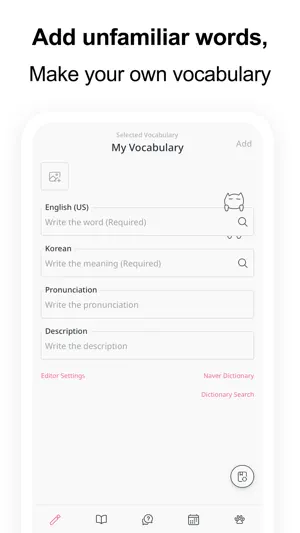
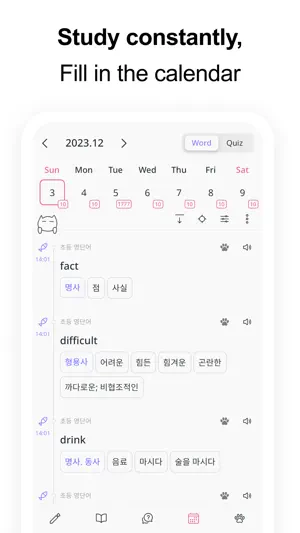
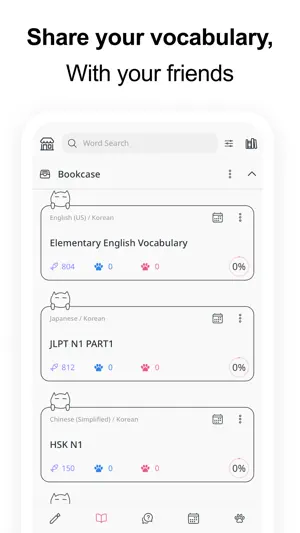
You can create your own vocabulary with no limit to the number of words, and use the app even without data :) The cute cat Nero is a bonus. Easily create your own vocabulary • Just enter a word and Google Translator automatically completes the meaning, part of speech, and synonyms. • It is very convenient to use, so you can easily add words. • You can easily find the results of Naver Dictionary and Google Translate with one click of a button. • You can create a vocabulary in Excel or Google Sheets and easily add it to the app in CSV format. Record with images • You can select a photo from the album and record it with words. • You can record by taking pictures with the camera directly. Share it easily • You can share the vocabulary as CSV. • Share the vocabulary with your friends to study together. Back up safely • You can back up your entire data as a file. • Back up your entire data to Google Drive with the click of a button to keep it safe. Use the vocabulary prepared in the bookstore • English • SAT words • Japanese • JLPT • Chinese • HSK • Medicine See what you've studied on the calendar • You can see the words added that day on the calendar. • Quiz history is also displayed on the calendar, so you can review it. Learn by taking quizzes • At the end of the quiz, you can retest by collecting only the wrong words. • Swipe Cards (FlashCard) • Multiple Choice • Dictation • Blinker Get word alerts • It is important to see the words often! • You can receive word notifications at any time you want. Plan your study schedule • You can make a schedule by specifying how many words in the vocabulary to study per day. • According to the learning schedule, you can select only the words you want to learn today and take the quiz. Listen to the words • Words will be read using the built in speech engine (TTS, Text To Speech). • You can listen to words like listening to music. The following languages are supported • Afrikaans • Albanian • Amharic • Arabic • Armenian • Assamese • Aymara • Azerbaijani • Bambara • Basque • Belarusian • Bengali • Bhojpuri • Bosnian • Bulgarian • Catalan • Cebuano • Chinese (Simplified) • Chinese (Traditional) • Corsican • Croatian • Czech • Danish • Dhivehi • Dogri • Dutch • English (US, UK, Ireland, India, Australia) • Esperanto • Estonian • Ewe • Filipino (Tagalog) • Finnish • French • Frisian • Galician • Georgian • German • Greek (Ancient) • Greek (Modern) • Guarani • Gujarati • Haitian Creole • Hausa • Hawaiian • Hebrew (Biblical) • Hebrew (Modern) • Hindi • Hmong • Hungarian • Icelandic • Igbo • Ilocano • Indonesian • Irish • Italian • Japanese • Javanese • Kannada • Kazakh • Khmer • Kinyarwanda • Konkani • Korean • Krio • Kurdish • Kurdish (Sorani) • Kyrgyz • Lao • Latin • Latvian • Lingala • Lithuanian • Luganda • Luxembourgish • Macedonian • Maithili • Malagasy • Malay • Malayalam • Maltese • Maori • Marathi • Meiteilon (Manipuri) • Mizo • Mongolian • Myanmar (Burmese) • Nepali • Norwegian • Nyanja (Chichewa) • Odia (Oriya) • Oromo • Pashto • Persian • Polish • Portuguese (Portugal, Brazil) • Punjabi • Quechua • Romanian • Russian • Samoan • Sanskrit • Scots Gaelic • Sepedi • Serbian • Sesotho • Shona • Sindhi • Sinhala (Sinhalese) • Slovak • Slovenian • Somali • Spanish • Sundanese • Swahili • Swedish • Tagalog (Filipino) • Tajik • Tamil • Tatar • Telugu • Thai • Tigrinya • Tsonga • Turkish • Turkmen • Twi (Akan) • Ukrainian • Urdu • Uyghur • Uzbek • Vietnamese • Welsh • Xhosa • Yiddish • Yoruba • Zulu • Crimean Tatar • Swazi Would you like to make your own vocabulary? Terms of Use (EULA): • https://www.apple.com/legal/internet-services/itunes/dev/stdeula
Ratings & reviews
4.8
112 ratings
What’s new
Version 5.1.5 · Updated September 19, 2026
- We've improved the app's stability and usability.
App privacy
The developer, DevStory Corp., reported these privacy practices to Apple.
Data Used to Track You
The following data may be used to track you across apps and websites owned by other companies:
- Usage Data: Advertising Data
Data Not Linked to You
The following data, which may be collected but is not linked to your identity, may be used for the following purposes:
- Usage Data: Advertising Data
Used for: Third-Party Advertising, Analytics, Product Personalization
Alternatives to VoCat - My Own Vocabulary
Looking for apps like VoCat - My Own Vocabulary? Here are 6 similar apps on the App Store. The highest rated is Moca - AI Flashcards (4.8/5), and all 6 are free to download.
-
 Onevoca: Flashcards/vocabulary
4.7
Onevoca: Flashcards/vocabulary
4.7
-
 암기고래
4.7
암기고래
4.7
-
 Moca - AI Flashcards
4.8
Moca - AI Flashcards
4.8
-
 클래스카드
4.2
클래스카드
4.2
-
 Langflix - Learn English
4.8
Langflix - Learn English
4.8
-
 NAVER Dictionary
3.2
NAVER Dictionary
3.2
| App | Rating | Price | Last updated | Compare |
|---|---|---|---|---|
| VoCat - My Own Vocabulary | 4.8 / 5 (112 ratings) | Free | September 19, 2026 | |
| Onevoca: Flashcards/vocabulary | 4.7 / 5 (75) | Free | Oct 31, 2026 | Compare |
| 암기고래 | 4.7 / 5 (86) | Free | Sep 3, 2026 | Compare |
| Moca - AI Flashcards | 4.8 / 5 (41) | Free | Oct 30, 2026 | Compare |
| 클래스카드 | 4.2 / 5 (208) | Free | Oct 23, 2026 | Compare |
| Langflix - Learn English | 4.8 / 5 (120) | Free | Oct 13, 2026 | Compare |
| NAVER Dictionary | 3.2 / 5 (252) | Free | Oct 26, 2026 | Compare |