

Journal Mate: Media Organizer
Vitalii Bahmet Productivity iPhoneiPadiPod touch
Journal Mate: Media Organizer is a free Productivity app for iPhone and iPad by Vitalii Bahmet. Rated 5.0/5 from 1 ratings. Requires iOS 26.0.
- Rating
- 5.0
- 1 ratings
- Price
- Free
- on the App Store
- Size
- 189 MB
- Age 4+
- Updated
- Sep 14
- 2026 · v5.2.2
Screenshots
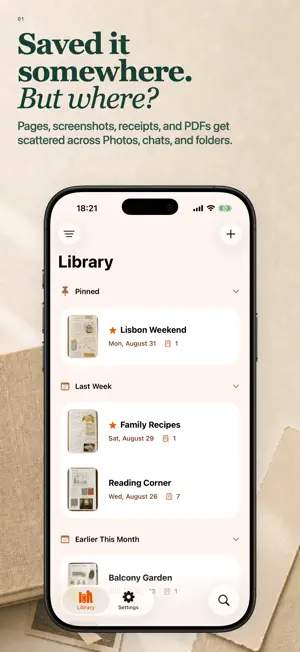


About Journal Mate: Media Organizer
Saved something important - but can’t remember where? Journal Mate keeps handwritten notes, receipts, scans, photos, screenshots, GIFs, videos, Live Photos, PDFs, saved locations, and web links together and organized - instead of scattered across Photos, chats, browsers, albums, and folders. CAPTURE IT WHILE IT MATTERS • Scan paper pages or capture several photos with the built-in camera, then review or retake them before saving • Import photos, screenshots, GIFs, videos, Live Photos, and PDFs • Scan QR codes, save websites as bookmark pages, play saved YouTube links inline, and save locations shared from Apple Maps or Google Maps as map bookmarks • Create blank pages for drawing and annotation KEEP THE CONTEXT • Keep related pages together in Stacks and group new imports automatically without changing their journal order • Search journals by title and notes, then manage content with filters, multi-select, and Spotlight • Reorder pages, move or copy them between journals, merge or duplicate journals, mark journals as favorites, pin important ones, and archive older ones • Edit photos, GIFs, Live Photos, and videos: crop, rotate, adjust, filter, pixelate or blur details, draw, and add text, emoji, or stickers - while preserving animation and motion USE IT WHEN YOU NEED IT • Share media files, create configurable PDFs from selected pages or complete journals, and export a restorable backup • Preview PDFs and adjust paper size, layout, margins, scaling, and pages per sheet • Save content to Journal Mate from other apps with the Share Extension • Sync your library through iCloud across your Apple devices • Work comfortably on iPad with a multi-column layout and easy navigation between your library, journals, and pages YOUR DATA, WITHOUT TRACKING Your library is stored on your devices and syncs through your iCloud account. Journal Mate does not use third-party ad SDKs or cross-app tracking. Journal Mate includes improvements to VoiceOver, Dynamic Type, contrast, and navigation, refreshed themes, and support for 85 languages. Your first 50 active pages are free. Pro removes the page limit and unlocks every color theme. Save it now. Find it later. Terms of Use: https://journalmate.app/en/legal/terms/
What’s new
Version 5.2.2 · Updated September 14, 2026
• Choose multiple journals when moving pages or saving through the Share Extension. • After moving pages, the last selected journal opens automatically. • Press and hold a journal to preview its visible videos. • Try the new Burgundy and Glacier themes.
App privacy
The developer, Vitalii Bahmet, reported these privacy practices to Apple.
Data Not Collected
The developer does not collect any data from this app.
Alternatives to Journal Mate: Media Organizer
Looking for apps like Journal Mate: Media Organizer? Here are 6 similar apps on the App Store. The highest rated is Prompto Your AI prompt library (3.7/5), and all 6 are free to download.
-
 Prompto Your AI prompt library
3.7
-
 Scan Partner
-
 PromptKit - AI Prompt Manager
-
 PDF Reflow
3.6
-
 Cortex - Local AI
-
 Blip Notes
| App | Rating | Price | Last updated | Compare |
|---|---|---|---|---|
| Journal Mate: Media Organizer | 5.0 / 5 (1 rating) | Free | September 14, 2026 | |
| Prompto Your AI prompt library | 3.7 / 5 (3) | Free | Jun 4, 2026 | Compare |
| Scan Partner | – | Free | Jun 22, 2026 | Compare |
| PromptKit - AI Prompt Manager | – | Free | Aug 17, 2026 | Compare |
| PDF Reflow | 3.6 / 5 (28) | Free | Oct 15, 2026 | Compare |
| Cortex - Local AI | – | Free | May 11, 2026 | Compare |
| Blip Notes | – | Free | Jun 13, 2026 | Compare |