

Participant 3rd Party Zoom App
Think Tap Work Business iPhoneiPadiPod touchApple Watch
Participant 3rd Party Zoom App is a free Business app for iPhone and iPad by Think Tap Work. Rated 4.7/5 from 7,111 ratings. Requires iOS 15.0.
- Rating
- 4.7
- 7.1K ratings
- Price
- Free
- on the App Store
- Size
- 273 MB
- Age 4+
- Updated
- Sep 11
- 2026 · v4.7
Screenshots



About Participant 3rd Party Zoom App
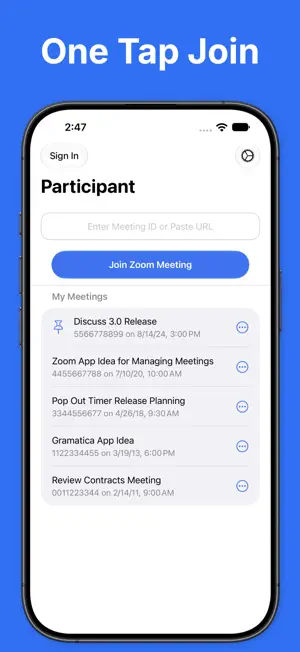
Participant is an intentionally simple, video-focused 3rd-party Zoom client* designed for meeting participants. No sharing, polls, or host features. Participant may not be for you, and that's OK. Here's what it gives you: • Get back in that meeting quickly – your recent meeting IDs and passcodes are stored and one tap away. No more searching for the link or trying to find the passcode in an email. • Control of your mic, camera, and raised hand – always on-screen and easy to reach. • Data Saver Mode – bad connection or on cellular? Use Data Saver to turn off your camera and stop streaming videos. This will reduce your data usage by approximately 60-95% depending on the number of participants. • Live Activity – control your mic or raised hand from the Dynamic Island or Lock Screen. • Watch app – control your meeting from across the room. Use the Apple Watch app to control the mic, camera, and raised hand in a meeting on iPhone or iPad. • Automatic Raised Hand Detection – turn this on in Meeting Settings and we'll raise your Zoom hand when you raise your actual hand. Vision at work. • Put videos in focus – configure columns, focus on active cameras only, or hold and drag to sort it just how you like it. • Sane chat – Pro users can use threaded chat. No more accidentally responding to everyone when you meant to DM. • Get on the big screen – share to your Apple TV and you have total control of what is shown on the external display. • Zoom in/zoom out – simply tap a video to get a larger view. Tap again to close it. • Control host requests – you control what happens if a host asks to unmute or start your camera: ask, always allow, or automatically allow if your hand is raised. Thanks for giving Participant a try. Let us know what you think. Please note that webinars are not currently supported. * Participant uses the Zoom SDK but is not endorsed, certified, warrantied, or supported by Zoom Communications Inc. If Zoom changes their policies or capabilities of their SDK this app may lose access. If you choose to purchase a Pro subscription, payment will be charged to your iTunes account, and your account will be charged for renewal 24 hours prior to the end of the current period. Auto-renewal may be turned off at any time by going to your settings in the iTunes Store after purchase. Terms of use: https://thinktapwork.com/tos.html
Ratings & reviews
4.7
7.1K ratings
What’s new
Version 4.7 · Updated September 11, 2026
Updated for iOS 27. • Built and optimized for iOS 27. • Updated icons. • Fixed issue where raising hand from Live Activity may not correctly reflect state. • Fixed issue where Watch actions were not being performed on connected iPhone. • Fixed crash when launching Watch app. • Fixed a bunch of missing translations. • Tons of other bug fixes. • Tons of performance improvements.
App privacy
The developer, Think Tap Work, reported these privacy practices to Apple.
Data Linked to You
The following data, which may be collected and linked to your identity, may be used for the following purposes:
- Contact Info: Email Address, Name, Phone Number
- Identifiers: User ID, Device ID
- Usage Data: Advertising Data, Product Interaction
- Purchases: Purchase History
- User Content: Emails or Text Messages, Photos or Videos, Audio Data, Customer Support
- Diagnostics: Other Diagnostic Data
- Location: Precise Location, Coarse Location
Used for: Third-Party Advertising, Analytics, App Functionality
Data Not Linked to You
The following data, which may be collected but is not linked to your identity, may be used for the following purposes:
- Location: Coarse Location
- Identifiers: Device ID
- Usage Data: Product Interaction
- Diagnostics: Performance Data, Other Diagnostic Data, Crash Data
Used for: Third-Party Advertising, Analytics
Alternatives to Participant 3rd Party Zoom App
Looking for apps like Participant 3rd Party Zoom App? Here are 6 similar apps on the App Store. The highest rated is Zoom Workplace for Intune (4.7/5), and all 6 are free to download.
-
 AI Note Taker - flick
4.2
AI Note Taker - flick
4.2
-
 Zoom Workplace for Intune
4.7
Zoom Workplace for Intune
4.7
-
 Zoom Rooms
3.4
Zoom Rooms
3.4
-
 Zoom for BlackBerry
4.6
Zoom for BlackBerry
4.6
-
 Zoom Workplace
4.7
Zoom Workplace
4.7
-
 Video Meeting - Online Meeting
4.6
Video Meeting - Online Meeting
4.6
| App | Rating | Price | Last updated | Compare |
|---|---|---|---|---|
| Participant 3rd Party Zoom App | 4.7 / 5 (7,111 ratings) | Free | September 11, 2026 | |
| AI Note Taker - flick | 4.2 / 5 (400) | Free | Apr 1, 2026 | Compare |
| Zoom Workplace for Intune | 4.7 / 5 (18,888) | Free | Sep 19, 2026 | Compare |
| Zoom Rooms | 3.4 / 5 (240) | Free | Sep 18, 2026 | Compare |
| Zoom for BlackBerry | 4.6 / 5 (275) | Free | Sep 25, 2026 | Compare |
| Zoom Workplace | 4.7 / 5 (3,238,275) | Free | Sep 19, 2026 | Compare |
| Video Meeting - Online Meeting | 4.6 / 5 (396) | Free | Aug 21, 2026 | Compare |