

Sign Language Study Cards
Satoshi Horiguchi Education iPhoneiPadiPod touch
Sign Language Study Cards is a free Education app for iPhone and iPad by Satoshi Horiguchi. Rated 2.0/5 from 3 ratings. Requires iOS 16.0.
- Rating
- 2.0
- 3 ratings
- Price
- Free
- on the App Store
- Size
- 4 MB
- Age 4+
- Updated
- Nov 1
- 2025 · v1.0.9
Screenshots


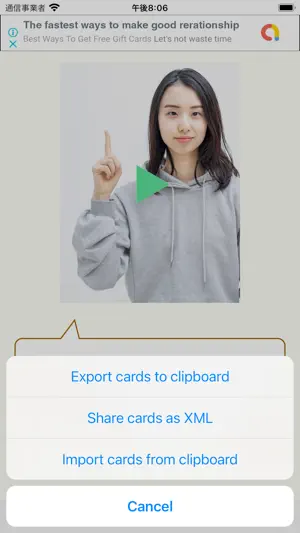
About Sign Language Study Cards
Register "meaning of sign language", "video", and "keywords that express the characteristics of movement". Registered sign language can be searched by action keyword and video ID in addition to the same semantic search as a normal dictionary. ● Overview of how to use 1. Create a new card Display the menu with the button on the left end of the toolbar and select "Create new card". 2. Enter meaning Use the pencil icon button to display the input view and enter the meaning of sign language. * Be sure to click the "Done" button after entering. Please note that if you close the view without pressing the "Done" button, the words you type will be deleted without being saved. 3. Select the characteristics of the action Use the button in the center of the toolbar to set a keyword that represents characteristics of action. Keywords are selected from hands, hand movements, head, face, chest, belly, arms, etc. to set the body parts and movements to be used. Features that are not included in the options can be set as free input keywords. 4. Register the video Use the buttons on the far right of the toolbar to perform various operations related to videos. Videos can be recorded with this app. Cut out and register only the necessary part of the recorded video. Be sure to "save" the recorded video before closing the card. The video is saved in your iOS library. You can also load videos recorded by another app saved in your library. 5. Search You can search for cards by selecting the search method with the second button from the right on the toolbar. You can search by three methods: "meaning", "features of action", and "video ID". 6. Data export / import The data on the created card can be exported as text in XML format. The second button from the left on the toolbar allows you to export to the clipboard or share it as a text file. The saved file can be converted to card data and imported by selecting this app when opening the file.
What’s new
Version 1.0.9 · Updated November 1, 2025
We have updated the app for the latest iOS version.
App privacy
The developer, Satoshi Horiguchi, reported these privacy practices to Apple.
Data Used to Track You
The following data may be used to track you across apps and websites owned by other companies:
- Location: Coarse Location
- Identifiers: Device ID
- Usage Data: Product Interaction, Advertising Data
- Diagnostics: Crash Data, Performance Data
Data Linked to You
The following data, which may be collected and linked to your identity, may be used for the following purposes:
- Location: Coarse Location
- Identifiers: Device ID
- Usage Data: Product Interaction, Advertising Data
- Diagnostics: Crash Data, Performance Data
Used for: Third-Party Advertising
Alternatives to Sign Language Study Cards
Looking for apps like Sign Language Study Cards? Here are 6 similar apps on the App Store. The highest rated is Signs and Cues (5.0/5), and all 6 are free to download.
-
 Signs and Cues
5.0
Signs and Cues
5.0
-
 Sign Language Transcription
5.0
Sign Language Transcription
5.0
-
 ISL Journey
4.2
ISL Journey
4.2
-
 ASL: American Sign Language
3.2
ASL: American Sign Language
3.2
-
 SignLexicon
5.0
SignLexicon
5.0
-
 International Sign Language
5.0
International Sign Language
5.0
| App | Rating | Price | Last updated | Compare |
|---|---|---|---|---|
| Sign Language Study Cards | 2.0 / 5 (3 ratings) | Free | November 1, 2025 | |
| Signs and Cues | 5.0 / 5 (1) | Free | Sep 15, 2024 | Compare |
| Sign Language Transcription | 5.0 / 5 (2) | Free | Dec 4, 2024 | Compare |
| ISL Journey | 4.2 / 5 (5) | Free | Jul 23, 2025 | Compare |
| ASL: American Sign Language | 3.2 / 5 (40) | Free | May 15, 2024 | Compare |
| SignLexicon | 5.0 / 5 (1) | Free | Jan 11, 2024 | Compare |
| International Sign Language | 5.0 / 5 (2) | Free | Feb 12, 2025 | Compare |