

cashbackpro.online
Cashback.pro Shopping iPhoneiPadiPod touch
cashbackpro.online is a free Shopping app for iPhone and iPad by Cashback.pro. Requires iOS 15.0. Updated July 28, 2026.
- Price
- Free
- on the App Store
- Size
- 2 MB
- Age 12+
- Updated
- Jul 28
- 2026 · v1.1.1
Screenshots


About cashbackpro.online
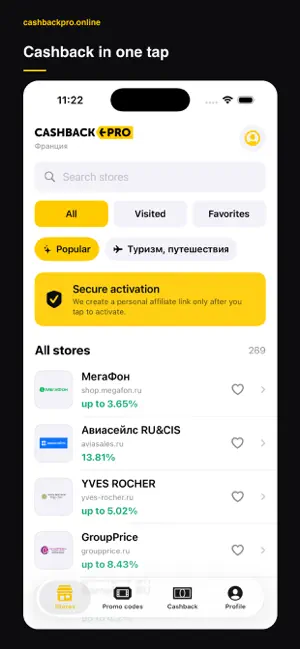
Earn cashback on online purchases, discover current promo codes and open partner stores through a tracked link with cashbackpro.online. Find the right store and check the available cashback rate before you shop. When you are ready, activate cashback in the app and continue to the store website through your personal tracked link. WITH CASHBACKPRO.ONLINE YOU CAN: • Search the partner store catalog and browse categories • See available cashback rates and tracking terms • Activate a personal store visit in one tap • Find, copy and rate promo codes before checkout • Save favorite stores and return to recently visited offers • Follow pending and confirmed cashback in your account • Check payout status and account details • Choose a light, dark or system appearance • Use the app in English or Russian HOW CASHBACK WORKS 1. Sign in to your cashbackpro.online account. 2. Choose a partner store in the app. 3. Tap “Open with cashback” before adding products or paying. 4. Complete the purchase in the opened store. 5. Follow the transaction status in the Cashback tab. Cashback availability, rates, exclusions and confirmation times depend on each store and affiliate partner. cashbackpro.online does not sell products directly. Orders, payments, delivery, returns and warranties are handled by the merchant.
What’s new
Version 1.1.1 · Updated July 28, 2026
This update improves the shopping experience and makes it easier to support cashbackpro.online: - clearer App Store presentation for cashback and promo codes; - a native rating request after repeated successful cashback activations; - updated localized store information; - small stability and interface improvements.
App privacy
The developer, Cashback.pro, reported these privacy practices to Apple.
Data Linked to You
The following data, which may be collected and linked to your identity, may be used for the following purposes:
- Purchases: Purchase History
- Location: Coarse Location
- Search History: Search History
- Browsing History: Browsing History
- Identifiers: Device ID, User ID
- Usage Data: Product Interaction, Advertising Data, Other Usage Data
- Diagnostics: Performance Data, Other Diagnostic Data
- Financial Info: Payment Info, Other Financial Info
- Contact Info: Physical Address, Email Address, Name, Phone Number
- User Content: Photos or Videos, Customer Support, Other User Content
- Other Data: Other Data Types
Used for: Analytics, Product Personalization, App Functionality