

Stud Finder: AI Metal Detector
Shining Muffin LLC Utilities iPhoneiPadiPod touch
Stud Finder: AI Metal Detector is a free Utilities app for iPhone and iPad by Shining Muffin LLC. Rated 4.2/5 from 1,164 ratings. Requires iOS 15.0.
- Rating
- 4.2
- 1.1K ratings
- Price
- Free
- on the App Store
- Size
- 85 MB
- Age 4+
- Updated
- Oct 26
- 2026 · v3.2.0
Screenshots



About Stud Finder: AI Metal Detector
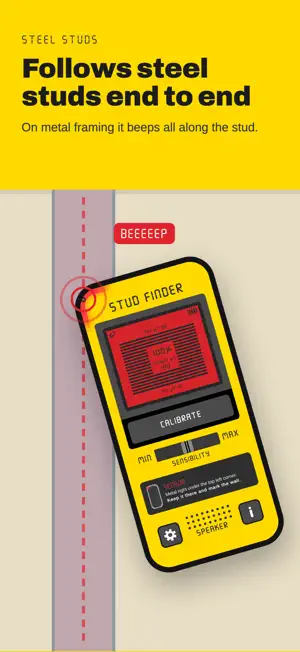
Find hidden metal behind walls using your phone's magnetic sensor. Stud Finder turns your iPhone's built-in magnetometer into a wall scanner and EMF meter. It detects ferrous metal (iron, steel) by measuring changes in the magnetic field in microteslas (µT): metal studs, the nails and screws that hold drywall to wood studs, steel pipes, rebar and other magnetic objects. HOW IT WORKS Your phone measures the magnetic field around it. When you open the app, a short guided calibration takes a baseline away from metal: you tilt the phone around a ring, and if metal nearby throws it off, the app tells you and starts over. After that, a rise over the baseline means there is metal close by. Slide the phone slowly across the wall: on a wood stud it beeps at each screw, and on a steel stud it beeps all along. WHAT THE READINGS MEAN (above baseline) - Empty wall: about the baseline (10–60 µT) - Nail or screw: +5 to +20 µT - Paper clip or washer: +20 to +50 µT - Pipe or screwdriver: +50 to +100 µT - Metal stud: +80 to +150 µT - Strong magnet: +150 to 300+ µT FEATURES - Shows where your iPhone's sensor is, with a light at the edge of the screen that turns red over metal - Guided calibration that checks you did it right - Real-time µT reading - Adjustable sensitivity - Sound and vibration alerts - Four-step tutorial - Works without internet TIPS FOR BETTER ACCURACY - Take off the phone case before calibrating - Calibrate away from walls, tables, appliances and laptops - Pass the spot the app marks over the wall: on some iPhones it is at the top, on others at the bottom - Beeps everywhere? Calibrate again near that wall, or lower the sensitivity USE IT TO - Locate studs behind drywall before hanging a shelf or a TV - Find hidden screws, nails and steel pipes - Measure magnetic fields around devices and magnets Note: the magnetometer only reacts to magnetic (ferrous) metal. It does not see wood, plastic, copper or aluminum.
Ratings & reviews
4.2
1.1K ratings
What’s new
Version 3.2.0 · Updated October 26, 2026
Detection rebuilt from the ground up: • The app shows where your iPhone's sensor is, with a light at the edge of the screen that turns red over metal. • Guided calibration: tilt the phone around a ring. If metal nearby throws it off, the app tells you and starts over. • The reading stays the same when you turn the phone. • A new tutorial: try it on a paper clip, then on wood and steel studs. • The HOLD button is gone: detection never pauses while you scan.
App privacy
The developer, Shining Muffin LLC, reported these privacy practices to Apple.
Data Not Linked to You
The following data, which may be collected but is not linked to your identity, may be used for the following purposes:
- Location: Coarse Location
- Identifiers: Device ID
Used for: Analytics
Alternatives to Stud Finder: AI Metal Detector
Looking for apps like Stud Finder: AI Metal Detector? Here are 6 similar apps on the App Store. The highest rated is Metal Detector - Stud Finder (4.6/5), and all 6 are free to download.
-
 Stud Finder Detector
4.4
Stud Finder Detector
4.4
-
 Stud Finder®
4.4
Stud Finder®
4.4
-
 Stud Finder - Metal Detector
4.4
Stud Finder - Metal Detector
4.4
-
 Stud Finder & Metal Detector
4.3
Stud Finder & Metal Detector
4.3
-
 Stud Finder Wall Detector Tool
4.1
Stud Finder Wall Detector Tool
4.1
-
 Metal Detector - Stud Finder
4.6
Metal Detector - Stud Finder
4.6
| App | Rating | Price | Last updated | Compare |
|---|---|---|---|---|
| Stud Finder: AI Metal Detector | 4.2 / 5 (1,164 ratings) | Free | October 26, 2026 | |
| Stud Finder Detector | 4.4 / 5 (723) | Free | Oct 10, 2026 | Compare |
| Stud Finder® | 4.4 / 5 (22,985) | Free | Oct 21, 2026 | Compare |
| Stud Finder - Metal Detector | 4.4 / 5 (531) | Free | Oct 13, 2026 | Compare |
| Stud Finder & Metal Detector | 4.3 / 5 (359) | Free | May 23, 2024 | Compare |
| Stud Finder Wall Detector Tool | 4.1 / 5 (256) | Free | Sep 5, 2026 | Compare |
| Metal Detector - Stud Finder | 4.6 / 5 (414) | Free | Oct 12, 2026 | Compare |