

DjVu Reader: Scanned Books
吉帅 仇 Productivity iPhoneiPadiPod touch
DjVu Reader: Scanned Books is a free Productivity app for iPhone and iPad by 吉帅 仇. Rated 5.0/5 from 1 ratings. Requires iOS 18.0. Updated October 22, 2026.
- Rating
- 5.0
- 1 ratings
- Price
- Free
- on the App Store
- Size
- 20 MB
- Age 4+
- Updated
- Oct 22
- 2026 · v2.0.7
Screenshots


About DjVu Reader: Scanned Books
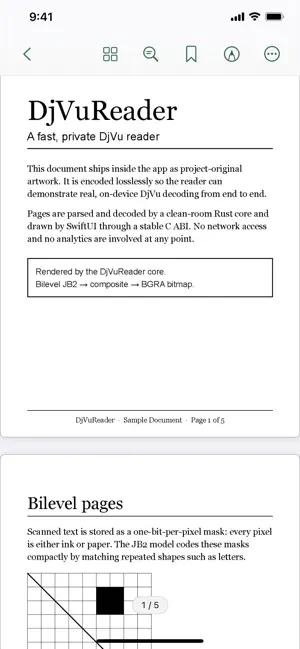
DjVu Reader is a fast, private reader for DjVu documents—the format used by millions of scanned books, journals, research papers and digital archives—with built-in PDF and EPUB support. Open rare books, historical documents, academic scans and personal collections directly from Files, Mail, Safari or AirDrop. A clean-room DjVu engine written in Rust delivers smooth page turns and precise zoom on iPhone and iPad. READ WITH FOCUS • Single-page, two-page and continuous layouts • Pinch and double-tap zoom • Dark mode that dims bright scans • Remembers your reading position SEARCH AND STUDY • Full-text search with highlighted results • Table of contents, bookmarks and thumbnails • Select and copy the document's text layer • Search ignores accents: cafe finds café • Highlights and notes in one searchable list, exportable as Markdown PRIVATE BY DESIGN • No account, ads, analytics or tracking • Documents stay on your device • Reading works completely offline • Only purchases and restores connect to Apple through StoreKit FREE TO READ Import and read up to three documents in full. One optional, non-consumable lifetime purchase unlocks an unlimited library, annotations, PDF export, printing and Read Aloud. No subscription. DjVu Reader is designed for archivists, researchers, students, historians, genealogists and anyone who needs to read scanned books, academic papers or legacy DjVu collections without uploading them.
What’s new
Version 2.0.7 · Updated October 22, 2026
Back and forward in DjVu, PDF and EPUB: return from a jump, then go forward again. Keyboard: Space / Shift-Space turn pages in PDF and EPUB, ⌘+ / ⌘− resize EPUB text, and Esc closes panels one layer at a time. DjVu photo layers in progressive or CMYK JPEG now display, and Trim Page Margins works on scans with black borders. The EPUB contents mark the section you are in, and resizing the window keeps your place. Improved double-tap zoom on rotated pages, smoother trackpad zoom, and Cancel in Go to Page on iPad.
App privacy
The developer, 吉帅 仇, reported these privacy practices to Apple.
Data Not Collected
The developer does not collect any data from this app.
Alternatives to DjVu Reader: Scanned Books
Looking for apps like DjVu Reader: Scanned Books? Here are 6 similar apps on the App Store. The highest rated is Prayer First: Christian Focus (5.0/5), and all 6 are free to download.
-
 DjVuView
-
 PDF to Text OCR: Scan & Copy
-
 iReadr — Speed Reader
-
 Prayer First: Christian Focus
5.0
-
 Vult: Private Cloud
5.0
-
 Rectoly for Zotero
| App | Rating | Price | Last updated | Compare |
|---|---|---|---|---|
| DjVu Reader: Scanned Books | 5.0 / 5 (1 rating) | Free | October 22, 2026 | |
| DjVuView | – | Free | Oct 3, 2026 | Compare |
| PDF to Text OCR: Scan & Copy | – | Free | May 6, 2026 | Compare |
| iReadr — Speed Reader | – | Free | Jul 19, 2026 | Compare |
| Prayer First: Christian Focus | 5.0 / 5 (1) | Free | Oct 21, 2026 | Compare |
| Vult: Private Cloud | 5.0 / 5 (2) | Free | Jun 4, 2026 | Compare |
| Rectoly for Zotero | – | Free | Oct 25, 2026 | Compare |