

Eze for iPhone
Eze Castle Software LLC Finance iPhoneiPadiPod touch
Eze for iPhone is a free Finance app for iPhone and iPad by Eze Castle Software LLC. Rated 5.0/5 from 6 ratings. Requires iOS 15.1. Updated October 8, 2026.
- Rating
- 5.0
- 6 ratings
- Price
- Free
- on the App Store
- Size
- 82 MB
- Age 4+
- Updated
- Oct 8
- 2026 · v5.6
Screenshots



About Eze for iPhone
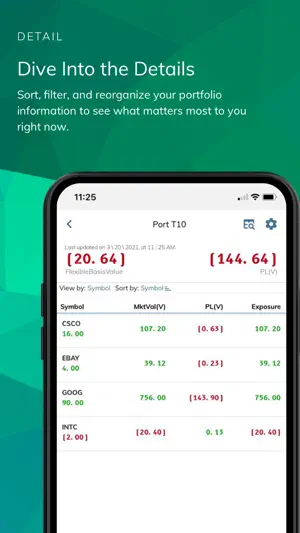
Introduction The new Eze mobile experience has arrived on your Phone and Tablet! Powered by Eze Eclipse and Eze OMS, the next-generation SS&C Eze app provides secure, access to Eze applications on-the-go with a simple, easy-to-use interface. Whether you’re a Trader or a Portfolio Manager, the SS&C Eze app helps you manage your portfolio and keep an eye on performance so you can more quickly act when the time is right. Eze App for OMS Secure and Fast Login • Select your product (Eze OMS) from the Product drop-down list on the Log in screen. • Login using Open ID Authentication • Unlock the app using biometrics Quickly View Portfolio Information and Analytics • View high-level summary and detail view of your portfolios and get a quick idea about your performance on the portfolio at groups level/aggregated level. • Metrics such as PL(V)/PLBPs, Exposure, MarketValGross and more are at your fingertips, with the ability to add fields such as Market Value, Currency, Port Base Currency at portfolio level. • Customize data points as per your needs. • Aggregate the portfolios by Industry, Sector, and more! Your App, Your Configuration • Configure positions split by Location (Custodian) or Net Positions or Strategy • Choose from a list of Position States such as Proposed, Released to Market, Fill Received, Finalized, Confirmed, and Settled. • Edit columns in the Analytics screen. Trading Screen • You can view the trade details on-the-go. Also, Market Data Integration is live. Settings Screen • You can configure Default Portfolio settings, and Trade Swipe Options to quickly act on your trade or confirmation before cancelling an order or removing a card from Home, respectively. • Switch between Dark and Light modes. Eze App for Eclipse Secure and Fast Login • Select your product (Eze Eclipse) from the Product drop-down list on the Log in screen. • Login using Open ID Authentication • Unlock the app using biometrics Quickly View Portfolio Information • See a summary view of your real-time intraday portfolio and get a quick idea about your performance. • Metrics such as Realized PL(V)/PLBPs, Unrealized PL(V)/PLBPs, and more are at your fingertips, with the ability to add fields such as Market Value, Currency, Port Base Currency. Analytics On-the-Go • View the high-level summary of your portfolios with various data points • Customize data points as per your needs • Aggregate the portfolios by Industry, Sector, and more! Your App, Your Configuration • Configure positions split by Location (Custodian) or Net Positions or Strategy • Choose from a list of Position States such as Proposed, Released to Market, Fill Received, Finalized, Confirmed, and Settled. • Edit columns in the Analytics detailed screen. Trading (Trade Blotter, Order Management and Routes Management) • Create orders from Trade Blotter, filter orders based on Order Status and Action • View orders created, fill status and order progression for the orders on the Trade Blotter. • Sort orders based on Symbol and Date • Add, Edit, Cancel All and Cancel Selected orders from the Trade Blotter and Order details screen • Add, Edit and Cancel Routes from Order Details and Routes Details screen • Add new symbols while creating trade which are not present in the master security files Settings Screen • You can configure Trade Swipe Options and Account Settings to quickly act on your trade or confirmation before cancelling an order or removing a card from Home, respectively. • Switch between Dark and Light modes. Ensure Your Data is Secure • SS&C Eze maintains a robust security framework and is ISO 27001 certified, encompassing ISO 27017 and 27018 for Cloud Security and Cloud Privacy. Note: Your organization must authorize access to the SS&C Eze mobile app. You’ll only have access to mobile features your organization has enabled, based on your role (not all mobile features may be available to you). Not all SS&C Eze features are available on mobile.
Ratings & reviews
5.0
6 ratings
What’s new
Version 5.6 · Updated October 8, 2026
Our latest release includes new features and enhancements! Enter a dollar ($) amount to automatically calculate estimated shares and trade value. Get notified when a new version is available and update with a single tap. Improved stability and performance with bug fixes.
App privacy
The developer, Eze Castle Software LLC, reported these privacy practices to Apple.
Data Not Collected
The developer does not collect any data from this app.
Alternatives to Eze for iPhone
Looking for apps like Eze for iPhone? Here are 6 similar apps on the App Store. The highest rated is Arcana Analytics (5.0/5), and all 6 are free to download.
-
 Arcana Analytics
5.0
Arcana Analytics
5.0
-
 Hurricane Capital 2.0
-
 Enfusion Mobile
3.8
Enfusion Mobile
3.8
-
 SS&C GlobeOp
5.0
SS&C GlobeOp
5.0
-
 Morgan Stanley Matrix
4.2
Morgan Stanley Matrix
4.2
-
 UBS Neo
3.0
UBS Neo
3.0
| App | Rating | Price | Last updated | Compare |
|---|---|---|---|---|
| Eze for iPhone | 5.0 / 5 (6 ratings) | Free | October 8, 2026 | |
| Arcana Analytics | 5.0 / 5 (10) | Free | Oct 9, 2026 | Compare |
| Hurricane Capital 2.0 | – | Free | Sep 14, 2026 | Compare |
| Enfusion Mobile | 3.8 / 5 (20) | Free | Oct 11, 2026 | Compare |
| SS&C GlobeOp | 5.0 / 5 (5) | Free | Jul 10, 2026 | Compare |
| Morgan Stanley Matrix | 4.2 / 5 (5) | Free | Sep 11, 2026 | Compare |
| UBS Neo | 3.0 / 5 (3) | Free | Aug 14, 2026 | Compare |
Compare Eze for iPhone with the top alternatives: ratings, updates, ASO score and keyword gaps →