

Doc Scan - PDF Photo Scanner
培 李 Utilities iPhoneiPadiPod touch
Doc Scan - PDF Photo Scanner is a free Utilities app for iPhone and iPad by 培 李. Rated 4.2/5 from 21 ratings. Requires iOS 13.0. Updated October 7, 2026.
- Rating
- 4.2
- 21 ratings
- Price
- Free
- on the App Store
- Size
- 15 MB
- Age 4+
- Updated
- Oct 7
- 2026 · v5.5
Screenshots

About Doc Scan - PDF Photo Scanner
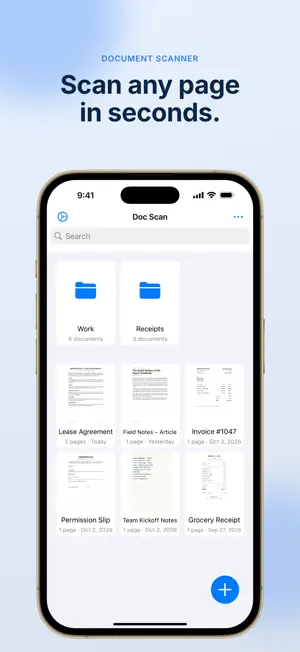
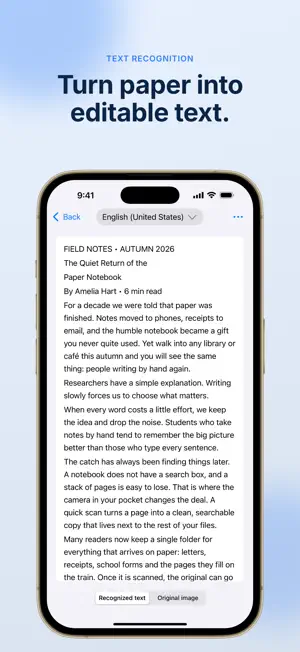
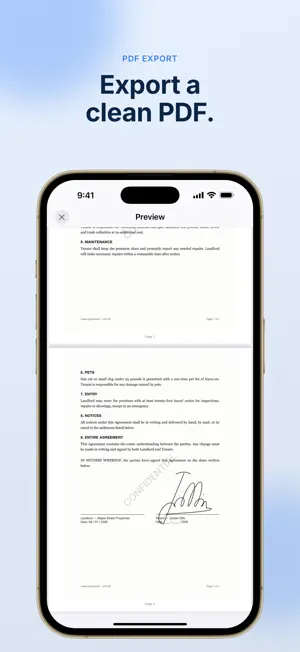
Turn any paper into a clean, searchable PDF or JPG in seconds — no bulky scanner needed, just your phone's camera. Point your camera at a document and Doc Scan automatically detects it and captures the shot. Crop your scan and choose from color, grayscale, black & white, or photo mode to get the cleanest result every time. Once your scan is ready, use built-in OCR to extract accurate text from receipts, bills, passports, contracts, and any other document. Add your own signature to sign documents on the spot — no printing required. Export and share your finished scans as PDFs or JPGs, completely free. Every document is automatically backed up to iCloud, so nothing is lost even if you delete the app, and everything syncs across all your Apple devices. Why people choose Doc Scan: • Scan receipts, bills, passports, contracts, and any paper document • Auto document detection with one-tap cropping • Color, grayscale, black & white, and photo filters • Accurate text recognition (OCR) • Add a signature to sign documents digitally • Export and share as PDF or JPG, free • Automatic iCloud backup and sync across all your devices • App lock to keep your documents private Stop carrying paper. Download Doc Scan and start scanning in seconds.
Ratings & reviews
4.2
21 ratings
What’s new
Version 5.5 · Updated October 7, 2026
Your document library is easier to browse: grid view now lines up documents evenly on iPhone, and dates read the way you're used to. Improved • Dates follow your region settings. Recent scans show "Today" or "Yesterday", and older ones appear in your local format, like "Oct 3, 2026", instead of a fixed day/month order. • New documents are named using your local date and time format. Fixed • Grid view no longer shows only two documents per row with a wide gap in the middle.
App privacy
The developer, 培 李, reported these privacy practices to Apple.
Data Not Linked to You
The following data, which may be collected but is not linked to your identity, may be used for the following purposes:
- Diagnostics: Crash Data
Used for: Analytics
Alternatives to Doc Scan - PDF Photo Scanner
Looking for apps like Doc Scan - PDF Photo Scanner? Here are 6 similar apps on the App Store. The highest rated is Scanner Air - Scan Documents (4.8/5), and all 6 are free to download.
-
 OCR Scanner - Scan PDF & Image
4.6
OCR Scanner - Scan PDF & Image
4.6
-
 OCR Text Scanner: Extract Text
3.4
OCR Text Scanner: Extract Text
3.4
-
 Text Extract(文字提取)-PDF Scanner
4.4
Text Extract(文字提取)-PDF Scanner
4.4
-
 Scanner Air - Scan Documents
4.8
Scanner Air - Scan Documents
4.8
-
 Flex Scanner - PDF Scanner
4.5
Flex Scanner - PDF Scanner
4.5
-
 Image to PDF & Photo Converter
4.6
Image to PDF & Photo Converter
4.6
| App | Rating | Price | Last updated | Compare |
|---|---|---|---|---|
| Doc Scan - PDF Photo Scanner | 4.2 / 5 (21 ratings) | Free | October 7, 2026 | |
| OCR Scanner - Scan PDF & Image | 4.6 / 5 (107) | Free | Apr 9, 2026 | Compare |
| OCR Text Scanner: Extract Text | 3.4 / 5 (5) | Free | Aug 10, 2026 | Compare |
| Text Extract(文字提取)-PDF Scanner | 4.4 / 5 (40) | Free | Sep 4, 2026 | Compare |
| Scanner Air - Scan Documents | 4.8 / 5 (5,244) | Free | Feb 16, 2026 | Compare |
| Flex Scanner - PDF Scanner | 4.5 / 5 (24) | Free | Sep 11, 2025 | Compare |
| Image to PDF & Photo Converter | 4.6 / 5 (116) | Free | Dec 4, 2025 | Compare |