

Smart Scanner: Scan to PDF
Hung Duong Productivity iPhoneiPadiPod touch
Smart Scanner: Scan to PDF is a free Productivity app for iPhone and iPad by Hung Duong. Rated 4.5/5 from 2 ratings. Requires iOS 15.0.
- Rating
- 4.5
- 2 ratings
- Price
- Free
- on the App Store
- Size
- 112 MB
- Age 4+
- Updated
- Sep 27
- 2026 · v3.0.0
Screenshots



About Smart Scanner: Scan to PDF
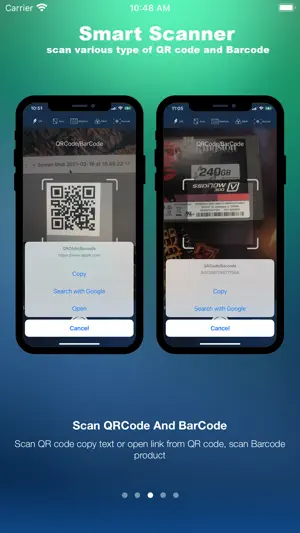
Turn your iPhone into a powerful document scanner — fast, simple and private. Smart Scanner lets you scan documents, receipts, invoices, ID cards, notes, business cards and more. Create clean PDF files, extract text with OCR, share your documents or print them whenever you need. SCAN ANY DOCUMENT Use your iPhone camera to quickly scan: • Documents • Receipts • Invoices • ID cards • Business cards • Notes • Certificates • Contracts • Photos and other paper documents Smart Scanner automatically detects document edges, crops pages and improves image quality for clearer, more professional scans. SCAN TO PDF Turn paper documents and images into clean PDF files in seconds. Create multi-page documents, edit your scans and keep everything organized on your device. OCR Extract text directly from images and scanned documents with OCR. Recognize text in multiple languages and export extracted content to TXT or DOCX for easy editing and reuse. YOUR DOCUMENTS STAY ON YOUR DEVICE Your documents are processed and stored on your device, helping keep sensitive information private. No cloud upload is required for your document scanning and processing. Perfect for scanning personal documents, IDs, receipts, invoices and other information you want to keep private. AI-POWERED SCAN ENHANCEMENT Get cleaner scans with intelligent image processing. Automatically crop documents and enhance scan quality so your digital files look clear and easy to read. QR CODE & BARCODE SCANNER Quickly scan QR codes and barcodes directly with your camera. SHARE YOUR DOCUMENTS Share your PDF files easily through the apps and services available on your iPhone. Send documents by email, transfer them over WiFi or share them with other apps. PRINT WITH AIRPRINT Print your scanned documents directly to nearby AirPrint-compatible printers. PROTECT YOUR DOCUMENTS Keep sensitive PDF files protected with password security. Whether you're scanning a receipt, invoice, ID card, contract or important paperwork, Smart Scanner gives you the tools to scan, convert, extract, share, print and protect your documents. Smart Scanner — your private document scanner, right on your iPhone. Terms of Use: https://smartscanner.tipai.tech/api/v1/terms-of-service.html Privacy Policy: https://smartscanner.tipai.tech/api/v1/privacy-policy.html
What’s new
Version 3.0.0 · Updated September 27, 2026
• New and improved user interface • Optimized image compression to reduce file size • Performance and stability improvements
App privacy
The developer, Hung Duong, reported these privacy practices to Apple.
Data Not Collected
The developer does not collect any data from this app.
Alternatives to Smart Scanner: Scan to PDF
Looking for apps like Smart Scanner: Scan to PDF? Here are 6 similar apps on the App Store. The highest rated is PDF Scanner: Photo & Document (4.7/5), and all 6 are free to download.
-
 PDF Scanner: Photo & Document
4.7
PDF Scanner: Photo & Document
4.7
-
 Fuelink
1.9
Fuelink
1.9
-
 Excise Sindh
2.3
Excise Sindh
2.3
-
 My Nayatel
3.7
My Nayatel
3.7
-
 Daewoo Fastex
-
 Dastak App
2.1
Dastak App
2.1
| App | Rating | Price | Last updated | Compare |
|---|---|---|---|---|
| Smart Scanner: Scan to PDF | 4.5 / 5 (2 ratings) | Free | September 27, 2026 | |
| PDF Scanner: Photo & Document | 4.7 / 5 (243) | Free | Sep 29, 2026 | Compare |
| Fuelink | 1.9 / 5 (25) | Free | Oct 4, 2026 | Compare |
| Excise Sindh | 2.3 / 5 (7) | Free | Apr 7, 2026 | Compare |
| My Nayatel | 3.7 / 5 (42) | Free | Oct 2, 2026 | Compare |
| Daewoo Fastex | – | Free | Jan 6, 2025 | Compare |
| Dastak App | 2.1 / 5 (10) | Free | Sep 28, 2026 | Compare |