

Live Recorder: Record Screen
VERTEC AI SDN. BHD. Utilities iPhoneiPadiPod touch
Live Recorder: Record Screen is a free Utilities app for iPhone and iPad by VERTEC AI SDN. BHD. Rated 4.4/5 from 4,142 ratings. Requires iOS 15.6.
- Rating
- 4.4
- 4.1K ratings
- Price
- Free
- on the App Store
- Size
- 298 MB
- Age 4+
- Updated
- Sep 30
- 2026 · v3.2.5
Screenshots

About Live Recorder: Record Screen
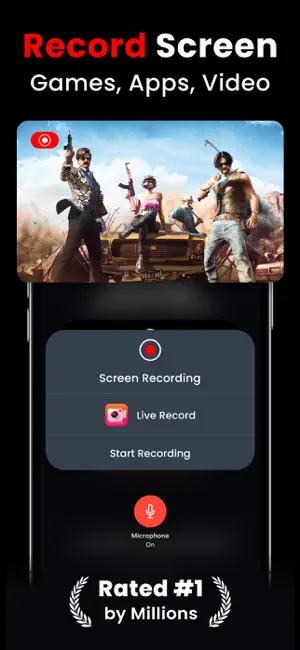
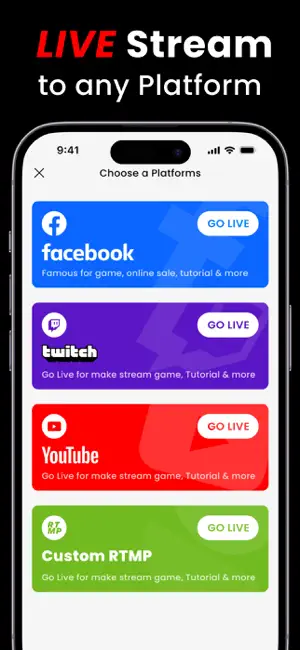
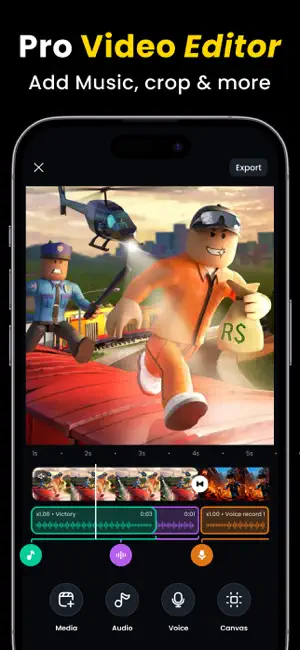
Live Recorder is the all-in-one screen recorder for iPhone and iPad. Record your screen in HD, go live to YouTube, Facebook or Instagram, add your face with FaceCam, and edit your final video — all without leaving the app. One tap to start. No complicated setup. Designed for gamers, content creators, streamers, and anyone who wants to share their iPhone/iPad screen professionally. BUILT FOR - Mobile gamers capturing gameplay highlights and clips - YouTube creators producing tutorials and walkthroughs - TikTok and Instagram Reels content creators - Reaction video creators using FaceCam picture-in-picture - iPhone and iPad streamers going live to YouTube and Instagram - Beginners who want a simple, one-tap screen recorder SCREEN RECORDING Record any app, game, or screen on your iPhone or iPad in full HD quality. Works across all apps — mobile games, social media, tutorials, walkthroughs, and more. No time limits on premium. HD LIVE STREAMING Go live directly from your iPhone to YouTube, Facebook, and Instagram. Stream gameplay, tutorials, or reaction videos to your audience in real time without any third-party streaming software. FACECAM — PICTURE IN PICTURE Add your face to any recording or live stream using the built-in FaceCam. Adjust the size, position, and rotation of your FaceCam overlay to create the perfect picture-in-picture layout for your content. VOICEOVER AND COMMENTARY Record your voice directly over your footage inside the app. Ideal for gaming commentary, tutorial narration, and reaction video voiceovers. BUILT-IN VIDEO EDITOR Trim clips, adjust playback speed, apply filters, control volume, rotate footage, split scenes, add background music, and rearrange your video timeline — all inside Live Recorder. No third-party video editor needed. SAVE DRAFTS Save any video project as a draft and return to finish editing at any time. Your clips, edits, and settings are preserved exactly as you left them. WHY LIVE RECORDER Most iPhone screen recorder apps only record. Live Recorder is one of the few apps that combines HD screen recording, live streaming, FaceCam overlay, voiceover recording, and a full video editor in a single app — removing the need to switch between multiple tools to create and publish content. SUBSCRIPTION OPTIONS - Weekly plan: $4.99 - Monthly plan: $7.99 per month - Annual plan: $49.99 per year - Remove all ads: $1.99 one-time purchase Payment is charged to your Apple ID at confirmation of purchase. Subscriptions renew automatically unless cancelled at least 24 hours before the end of the current billing period. Manage or cancel anytime in iPhone Settings under Subscriptions. SUPPORT AND FEEDBACK Live Recorder is updated regularly with new features and improvements based on user feedback. To report a bug or suggest a feature, reach us on Facebook at facebook.com/kingappsstudio If Live Recorder has helped your content creation, please take a moment to leave a rating on the App Store. Your review helps other creators find the app and helps us keep building. Privacy Policy: https://sites.google.com/view/kinggamesstudio/privacy-tos/rec-game-privacy-policy Terms of Use: https://sites.google.com/view/kinggamesstudio/privacy-tos/rec-game-tos
Ratings & reviews
4.4
4.1K ratings
What’s new
Version 3.2.5 · Updated September 30, 2026
Thank you for using Live Recorder! This update focuses on a smoother live streaming experience. * Fixed an orientation issue affecting Live Streaming * Improved streaming stability across orientations * General bug fixes and performance improvements Please keep your app updated to enjoy the latest improvements. As always, we love hearing your feedback — reach us anytime with suggestions or issues!
App privacy
The developer, VERTEC AI SDN. BHD., reported these privacy practices to Apple.
Data Used to Track You
The following data may be used to track you across apps and websites owned by other companies:
- Usage Data: Advertising Data
Data Not Linked to You
The following data, which may be collected but is not linked to your identity, may be used for the following purposes:
- Usage Data: Product Interaction, Advertising Data
Used for: Third-Party Advertising, Analytics
Alternatives to Live Recorder: Record Screen
Looking for apps like Live Recorder: Record Screen? Here are 6 similar apps on the App Store. The highest rated is Screen Recorder ‑ Record Video (4.7/5), and all 6 are free to download.
-
 Screen Recorder with Audio
4.5
-
 Screen Recorder ®
4.6
-
 Screen Recorder: Go Record
4.5
-
 Screen Recorder ‑ Record Video
4.7
-
 Screen Recorder - Go Record
3.2
-
 Screen Recorder- Record Game
4.3
| App | Rating | Price | Last updated | Compare |
|---|---|---|---|---|
| Live Recorder: Record Screen | 4.4 / 5 (4,142 ratings) | Free | September 30, 2026 | |
| Screen Recorder with Audio | 4.5 / 5 (2,431) | Free | Jul 17, 2025 | Compare |
| Screen Recorder ® | 4.6 / 5 (2,908) | Free | Oct 10, 2026 | Compare |
| Screen Recorder: Go Record | 4.5 / 5 (111,367) | Free | Jan 8, 2026 | Compare |
| Screen Recorder ‑ Record Video | 4.7 / 5 (10,260) | Free | Aug 14, 2026 | Compare |
| Screen Recorder - Go Record | 3.2 / 5 (118) | Free | Jul 3, 2024 | Compare |
| Screen Recorder- Record Game | 4.3 / 5 (10,796) | Free | Apr 5, 2025 | Compare |