

PianoSprout
毅聪 纪 Music iPhoneiPadiPod touch
PianoSprout is a free Music app for iPhone and iPad by 毅聪 纪. Rated 5.0/5 from 1 ratings. Requires iOS 15.6. Updated October 10, 2026.
- Rating
- 5.0
- 1 ratings
- Price
- Free
- on the App Store
- Size
- 131 MB
- Age 4+
- Updated
- Oct 10
- 2026 · v2.3
Screenshots


About PianoSprout
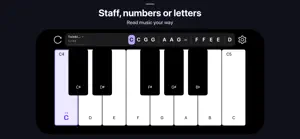
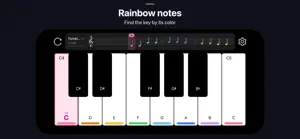
Play Beautiful Music in Seconds – No Experience Needed! PianoSprout turns your iPhone or iPad into a piano anyone can play. Tap the glowing key and the app plays each note for exactly the right length. Toddlers, kids learning to read music and grown-ups who just want to relax each get their own way to play. 【Follow the melody】 • Sheet music above the keys: see the melody as a staff, as numbers (1 2 3) or as letters (C D E), scrolling as you play. • 30 built-in songs, from Twinkle, Twinkle, Little Star and Mary Had a Little Lamb to Ode to Joy, Für Elise and the Moonlight Sonata. Easiest first. • Rainbow notes: one color per note, so children who can't read yet find the key by its color. • A keyboard that follows the song: only the keys the piece needs, bigger and easier to hit. • "Who's playing?" presets: Little one, Child or Learner. Pick one and the app sets itself up. • Parent lock: when enabled, settings and imports open only after a grown-up solves a quick sum. 【Listen, then practice】 • Listen: the app plays the song while the score and the keys follow along. Listen slowly plays it at half speed. • Loop a tricky measure: touch and hold a note on the score, and its measure repeats as often as you like. • Every song remembers where you stopped, so you can carry on next time. 【You set the pace】 Turn on Auto note length to let each note sound for its written duration. Tap the glowing key when you are ready for the next note. You pick the pace, the app controls note length. A repeated note shows how many times to press, a wrong key gets a gentle nudge, and every finished song ends with a little celebration. 【Learn to read music, gently】 Every key can show its name, the next note glows purple, and the score above the keys switches between staff, numbers and letters whenever you like. Choose how a song moves on: Magic keys for the littlest players, where any key plays the right note; Any key moves on; or Only correct keys for a real challenge. 【Explore cool sounds】 Over 70 instrument sounds: grand piano, guitar, violin, flute, kalimba, steel drums, xylophone and more. Change instrument with one tap. 【Free play】 Switch to free play and the multi-touch keyboard is all yours. What you play is written on the staff above the keys, so you can see your own melody. 【Your own songs】 Import MusicXML or MIDI files, choose the melody, preview and listen, then save it as a song to follow. When a song keeps its chords, their keys light up together. You can keep up to 3 imported songs in total. Import simplifies the score for guided playing; it does not reproduce the original page layout or recognize photos and PDFs. 【Made for iPad too】 On larger iPad windows, a music stand shows several lines of the score and follows your playing. The layout adapts to portrait, landscape and smaller windows. 【Safe for kids】 No ads, no account, no data collected. Everything works offline. Available in English, Chinese (Simplified and Traditional), Japanese, Korean, German, French, Spanish and Portuguese.
What’s new
Version 2.3 · Updated October 10, 2026
• Listen first, slow it down or loop a measure to practice at your own pace. • New Magic keys let little ones play the right melody with any key. • Added MusicXML import and improved MIDI import. • Pick up where you left off in each song. • Fixed issues with selecting and saving imported songs.
App privacy
The developer, 毅聪 纪, reported these privacy practices to Apple.
Data Not Collected
The developer does not collect any data from this app.
Alternatives to PianoSprout
Looking for apps like PianoSprout? Here are 6 similar apps on the App Store. The highest rated is Just A 2nd (5.0/5), and 5 of the 6 are free to download.
-
 Mint Offline Music Player
4.0
Mint Offline Music Player
4.0
-
 TTPlayer: Offline Music Player
-
 Just A 2nd
5.0
Just A 2nd
5.0
-
 Pianofy - Learn & Play Piano
-
 Piano Flash
5.0
Piano Flash
5.0
-
 PianoFlow - Keyboard
| App | Rating | Price | Last updated | Compare |
|---|---|---|---|---|
| PianoSprout | 5.0 / 5 (1 rating) | Free | October 10, 2026 | |
| Mint Offline Music Player | 4.0 / 5 (1) | 0.99 USD | Dec 18, 2025 | Compare |
| TTPlayer: Offline Music Player | – | Free | Jun 12, 2025 | Compare |
| Just A 2nd | 5.0 / 5 (1) | Free | Feb 14, 2026 | Compare |
| Pianofy - Learn & Play Piano | – | Free | Jul 28, 2025 | Compare |
| Piano Flash | 5.0 / 5 (2) | Free | May 12, 2024 | Compare |
| PianoFlow - Keyboard | – | Free | Sep 18, 2025 | Compare |
Compare PianoSprout with the top alternatives: ratings, updates, ASO score and keyword gaps →