

SealSignDate
Kandasamy Kaleeswaran Business iPhoneiPadiPod touchMac
SealSignDate is a paid Business app for iPhone and iPad by Kandasamy Kaleeswaran. Rated 3.0/5 from 1 ratings. Requires iOS 16.6. Updated November 11, 2024.
- Rating
- 3.0
- 1 ratings
- Price
- 29.99 USD
- on the App Store
- Size
- 7 MB
- Age 4+
- Updated
- Nov 11
- 2024 · v2.5
Screenshots


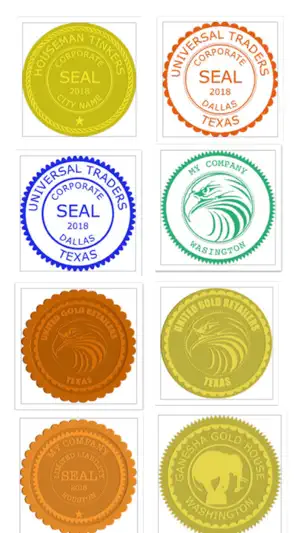

About SealSignDate
This app creates Signature seals, digital Company Seals and Date seals. The user can stamp the Company seal, the Signature seal and the Date seal on pdf and save it. The user can lock the pdf document with password. The user can unlock pdf document, sign/seal/date the document and save it as new copy and lock the new document if required. The user can lock the pdf document with empty password(Encrypt only). Original pdf documents are not changed. But,Seal impressions are permanent on saved Pdf Documents.Seal impressions are not pdf annotations. Create A New Signature:- Hit + button Select Pen thickness. Select Pen colour. Sign in the white box(iPhone - bottom to top) Save the seal.The user can create as many signs as he requires. The sign can be exported(shared) if required. Signature size in inches can be changed(1 5/8 inches to 2 1/2 inches). Other signature images can be imported to this app. Date seal settings:- Date seal size in inches can be changed(1 5/8 inches to 2 1/2 inches). Font size and font name can be changed. Seal colour can be changed. Default date gives the device default date format. The user can customise date format. Date format with / or - separator can be used. Date format with leading zeros(eg. 02/02/2020)can be selected or unselected. Month in letters can be selected(eg. June, 11 2020). Four digit or two digit year can be selected. Create A New Seal:- Hit + Button and 1)Select a seal Template, 2)Edit Text, 3)Leave blank for no text, 4)Select icon image if required by the template, 5)Select Other Properties of the seal 6)Preview and 7)Save the seal. Note:- Company Icon Images needs to be 1024 pt x 1024 pt image with/without transparent background.Lower resolution icons may give poor quality seal images. Eight seal templates are provided. The following can be chosen by the user:- 1)Seal colour 2)Seal Type 3)Border Type 4)Inner Border Type 5)Font Size 6)Font Name 7)Icon type(Round or Square) 8)Icon colour (seal colour mask or original). 9)Rotation 0-30 deg left/right 10)Yin or Yang Seal. Yang seal - Transparent background with Letters in Seal colour. Yin Seal - Background in seal colour and Letters are transparent. Select an Available Seal for stamping:- 1)Select a seal 2)Hit Pick seal Export an Available Seal:- 1)Select a seal 2)Hit Export Seal 3)Save the seal image to your location Company Seal size in inches can be changed(1 5/8 inches to 2 1/2 inches). Other seal images can be imported to this app. You need to import a 1024 pt x 1024 pt png/tiff image.The seal image background needs to be transparent. Note:- Avoid very Dark Colours for Emboss or Wax Seal types. Delete an Available Seal:- 1)Select a seal 2)Hit Delete Seal Stamping On Pdf:- Hit Import Pdf & Choose a Pdf Document. Hit Switch. Select seal:- 1)Company seal 2)Signature seal 3)Date seal Go to the page where you want to stamp. Move to the required location on the page. Tap to stamp. Reset Selected page:- 1)Select the page 2) Hit Clear www.appskou.com for support
What’s new
Version 2.5 · Updated November 11, 2024
Updated for iOS 16.6 and above.
App privacy
The developer, Kandasamy Kaleeswaran, reported these privacy practices to Apple.
Data Not Collected
The developer does not collect any data from this app.
Alternatives to SealSignDate
Looking for apps like SealSignDate? Here are 6 similar apps on the App Store.
-
 Warranty Tracker: Scanner
-
 DestructNote: Secure Notes Pro
-
 ClevverCompliance
-
 ALCS Driver
-
 ClevverToDo
-
 ALCS Manager
| App | Rating | Price | Last updated | Compare |
|---|---|---|---|---|
| SealSignDate | 3.0 / 5 (1 rating) | 29.99 USD | November 11, 2024 | |
| Warranty Tracker: Scanner | – | Free | Aug 21, 2026 | Compare |
| DestructNote: Secure Notes Pro | – | Free | Mar 19, 2026 | Compare |
| ClevverCompliance | – | Free | Mar 3, 2025 | Compare |
| ALCS Driver | – | Free | Aug 26, 2026 | Compare |
| ClevverToDo | – | Free | Mar 11, 2026 | Compare |
| ALCS Manager | – | Free | Sep 30, 2026 | Compare |
Compare SealSignDate with the top alternatives: ratings, updates, ASO score and keyword gaps →