

Overview: Live World Webcams
Wandity LTD Travel iPhoneiPadiPod touch
Overview: Live World Webcams is a free Travel app for iPhone and iPad by Wandity LTD. Rated 4.0/5 from 28 ratings. Requires iOS 16.4.
- Rating
- 4.0
- 28 ratings
- Price
- Free
- on the App Store
- Size
- 48 MB
- Age 4+
- Updated
- Oct 7
- 2026 · v3.2.0
Screenshots



About Overview: Live World Webcams
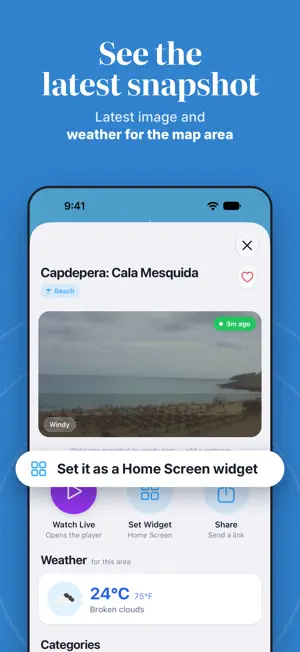
Explore the world through live webcams and camera snapshots. Browse the map, discover a view, and save the places you want to see again. FIND A VIEW ON THE MAP Move and zoom the world map, then search the area on screen for webcams. Tap a camera marker to open its details. Switch to satellite view or center the map on your location with location permission. WATCH LIVE OR VIEW A SNAPSHOT Cameras with a play icon offer live video. Other cameras provide still photos. Open a live camera's player for a larger view, or explore the photo and location details of a snapshot camera. EXPLORE PLACES AND CONDITIONS Look for beach, ski, city, mountain, harbor, and traffic views where cameras are available. Preview a destination before a trip or enjoy a change of scenery from home. Camera images can help you see what a place looks like; their age and quality depend on the provider. KEEP YOUR FAVORITES CLOSE Save cameras to your favorites. Rename and reorder your saved views so you can find them again. Share a camera's title and preview link, or open its coordinates in Maps. A VIEW ON YOUR HOME SCREEN Choose a webcam for the iOS Home Screen widget and see its available snapshot at a glance. WEATHER WHEN AVAILABLE Camera details can show temperature and weather conditions for the map area when weather data is available. Live video, snapshots, and camera availability depend on the provider and your internet connection. Some cameras may be unavailable or show older images. The Home Screen widget displays snapshots, not live video.
Ratings & reviews
4.0
28 ratings
What’s new
Version 3.2.0 · Updated October 7, 2026
Version 3.2.0 - Redesigned camera details, favorites, map help, and video player with native iOS controls. - Reorder your favorites with Move Up and Move Down. - Full-screen ads removed. - Bug fixes and stability improvements.
App privacy
The developer, Wandity LTD, reported these privacy practices to Apple.
Data Used to Track You
The following data may be used to track you across apps and websites owned by other companies:
- Identifiers: Device ID
- Usage Data: Advertising Data
Data Linked to You
The following data, which may be collected and linked to your identity, may be used for the following purposes:
- Location: Coarse Location
- Identifiers: Device ID
- Usage Data: Product Interaction, Advertising Data
Used for: Third-Party Advertising, Developer’s Advertising or Marketing, Analytics, App Functionality
Data Not Linked to You
The following data, which may be collected but is not linked to your identity, may be used for the following purposes:
- Diagnostics: Performance Data, Other Diagnostic Data, Crash Data
Used for: Third-Party Advertising, Developer’s Advertising or Marketing, Analytics
Alternatives to Overview: Live World Webcams
Looking for apps like Overview: Live World Webcams? Here are 6 similar apps on the App Store. The highest rated is Webcams (5.0/5), and all 6 are free to download.
-
 Live Webcam
4.4
-
 Webcams
5.0
-
 Live Webcam HD
3.4
-
 Webcam World Viewer
-
 Abbey Road Studios Cam
4.5
-
 Traffic Cam+
2.8
| App | Rating | Price | Last updated | Compare |
|---|---|---|---|---|
| Overview: Live World Webcams | 4.0 / 5 (28 ratings) | Free | October 7, 2026 | |
| Live Webcam | 4.4 / 5 (14) | Free | Oct 7, 2026 | Compare |
| Webcams | 5.0 / 5 (1) | Free | Apr 10, 2024 | Compare |
| Live Webcam HD | 3.4 / 5 (10) | Free | Dec 14, 2023 | Compare |
| Webcam World Viewer | – | Free | Mar 16, 2025 | Compare |
| Abbey Road Studios Cam | 4.5 / 5 (86) | Free | Sep 25, 2025 | Compare |
| Traffic Cam+ | 2.8 / 5 (55) | Free | Oct 6, 2026 | Compare |