

A592DSP
杏生 卢 Utilities iPhoneiPadiPod touch
A592DSP is a free Utilities app for iPhone and iPad by 杏生 卢. Requires iOS 15.6. Updated May 8, 2026.
- Price
- Free
- on the App Store
- Size
- 21 MB
- Age 4+
- Updated
- May 8
- 2026 · v1.1.1
Screenshots



About A592DSP
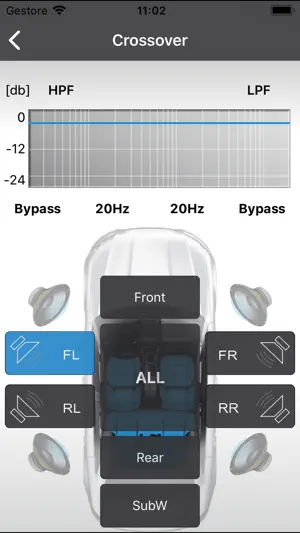
After connecting App to Car Amplifier with Integrated DSP, EQ, BASS, TIME ALIGNMENT, PHASE, MUTE, FILTER , SAVE SOUND SETTING TO PHONE, SAVE SOUND SETTING TO AMPLIFIER, LOAD SOUND SETTING FROM PHONE, RCA OUTPUT etc could be controlled through this App. How to use: 1.Install App and turn on power of car 2. Turn on Bluetooth on your iPhone 3,Open App and wait for around 5 seconds, then click “Connect” icon in left corner of bottom. Amplifier will be connected to App automatically. 4.DIY you preferred sound and then click “Save to AMP” icon to save. Or click “ Save to Phone” to save. Note: 1.Do not exit app during saving and do not turn off power supply, program may be shut down caused by this.
What’s new
Version 1.1.1 · Updated May 8, 2026
- Fixed some bugs.
App privacy
The developer, 杏生 卢, reported these privacy practices to Apple.
Data Not Collected
The developer does not collect any data from this app.
Alternatives to A592DSP
Looking for apps like A592DSP? Here are 6 similar apps on the App Store.


| App | Rating | Price | Last updated | Compare |
|---|---|---|---|---|
| A592DSP | – | Free | May 8, 2026 | |
| DSP-610 | – | Free | Dec 16, 2024 | Compare |
| EL-PA200 NEO | – | Free | Dec 20, 2023 | Compare |
| Hifonics HSP-4.8DSP | – | Free | Mar 10, 2026 | Compare |
| EL-AP300D NEO | – | Free | Dec 20, 2023 | Compare |
| GM-4858DSP | – | Free | Feb 26, 2025 | Compare |
| Gubbl | – | Free | Apr 13, 2026 | Compare |
Compare A592DSP with the top alternatives: ratings, updates, ASO score and keyword gaps →