

Remuxer
Thomas Bilich Photo & Video iPhoneiPadiPod touch
Remuxer is a free Photo & Video app for iPhone and iPad by Thomas Bilich. Rated 3.7/5 from 9 ratings. Requires iOS 17.0. Updated October 11, 2026.
- Rating
- 3.7
- 9 ratings
- Price
- Free
- on the App Store
- Size
- 21 MB
- Age 4+
- Updated
- Oct 11
- 2026 · v1.8
Screenshots

About Remuxer
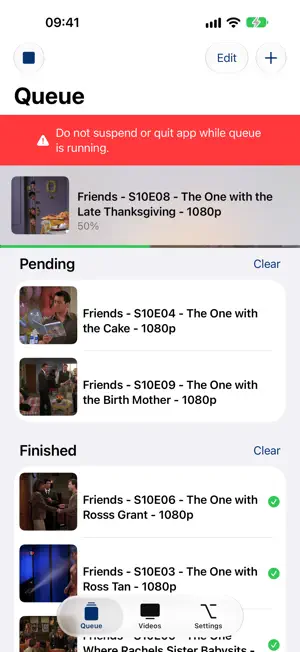
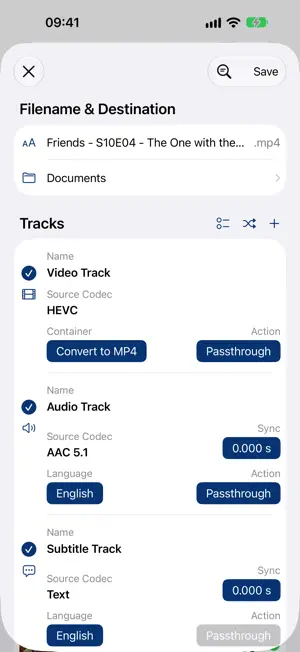
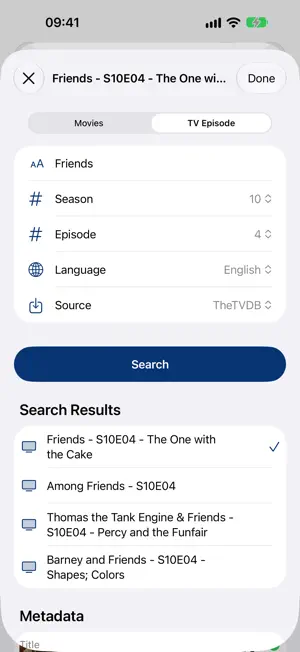
Most of the time your videos are already encoded correctly and just the video container is wrong, so they won't play directly on your device. Remuxer muxes your videos losslessly into an MP4 or MKV container, so you can play them directly on your device, and converts them with your device's hardware encoder when they need it. - Fast muxing of H.264, HEVC and AV1 videos to MP4 or MKV, without re-encoding - Convert videos to H.264 or HEVC with the hardware encoder, at the quality you choose - Exclude unneeded tracks to reduce file size, and reorder the ones you keep - Add audio and subtitle tracks from other files (SRT, ASS, VTT, PGS, AAC, AC3, DTS, FLAC and more) - Fix out-of-sync audio and subtitles with a sync correction for each track - Export audio or subtitle tracks on their own (M4A, AC3, SRT, SUP and more) - Downmix audio to AAC or AC3 with 2.0 or 5.1 channels - Import metadata and artwork online from TheTVDB, TheMovieDB and the iTunes Store
Ratings & reviews
3.7
9 ratings
What’s new
Version 1.8 · Updated October 11, 2026
New: - Video conversion works again: Remuxer now converts to H.264 or HEVC with your device's hardware encoder, in three quality levels (Small File, Balanced, High Quality) - AV1 videos are supported: keep them as they are in MP4 or MKV, or convert them to H.264 or HEVC - Sync correction: delay or advance any audio or subtitle track to the millisecond - Export audio or subtitles on their own: leave out the video and get an M4A, AC3, SRT, SUP or other file in the track's own format - Include or exclude all tracks with one tap; included tracks now show a checkmark - Search metadata online straight from the editor's toolbar Changes: - Movie metadata now comes from TheMovieDB, as the iTunes Store no longer returns movies; iTunes is still available for TV shows - Videos that MP4 can't play in Apple's apps are converted to H.264 by default; MKV keeps every video as it is - Updated to FFmpeg 9 Fixes: - Videos set to convert no longer fail as soon as the queue starts - The iPad editor no longer gets stuck while its window is resized
App privacy
The developer, Thomas Bilich, reported these privacy practices to Apple.
Data Linked to You
The following data, which may be collected and linked to your identity, may be used for the following purposes:
- Purchases: Purchase History
Used for: Analytics, App Functionality
Data Not Linked to You
The following data, which may be collected but is not linked to your identity, may be used for the following purposes:
- Usage Data: Product Interaction
- Diagnostics: Crash Data
Used for: Analytics, App Functionality
Alternatives to Remuxer
Looking for apps like Remuxer? Here are 6 similar apps on the App Store. The highest rated is Focus Video - Video Compressor (4.7/5), and all 6 are free to download.
-
 MP4 Video Converter: MOV & MKV
4.2
-
 Focus Video - Video Compressor
4.7
-
 Video Compressor - Kompresso
4.6
-
 Video Player - PIP and more
4.5
-
 Video Converter and Compressor
4.7
-
 Video Upscaler AI Enhancer 16K
4.1
| App | Rating | Price | Last updated | Compare |
|---|---|---|---|---|
| Remuxer | 3.7 / 5 (9 ratings) | Free | October 11, 2026 | |
| MP4 Video Converter: MOV & MKV | 4.2 / 5 (5) | Free | Sep 22, 2026 | Compare |
| Focus Video - Video Compressor | 4.7 / 5 (68) | Free | Apr 15, 2026 | Compare |
| Video Compressor - Kompresso | 4.6 / 5 (114) | Free | Oct 15, 2026 | Compare |
| Video Player - PIP and more | 4.5 / 5 (97) | Free | Jul 28, 2026 | Compare |
| Video Converter and Compressor | 4.7 / 5 (2,309) | Free | Sep 28, 2026 | Compare |
| Video Upscaler AI Enhancer 16K | 4.1 / 5 (131) | Free | Oct 14, 2026 | Compare |
Compare Remuxer with the top alternatives: ratings, updates, ASO score and keyword gaps →