

PPI Guru
基伟 徐 Utilities iPhoneiPadiPod touchMac
PPI Guru is a free Utilities app for iPhone and iPad by 基伟 徐. Rated 3.6/5 from 8 ratings. Requires iOS 15.0. Updated November 13, 2026.
- Rating
- 3.6
- 8 ratings
- Price
- Free
- on the App Store
- Size
- 2 MB
- Age 4+
- Updated
- Nov 13
- 2026 · v2.0.0
Screenshots


About PPI Guru
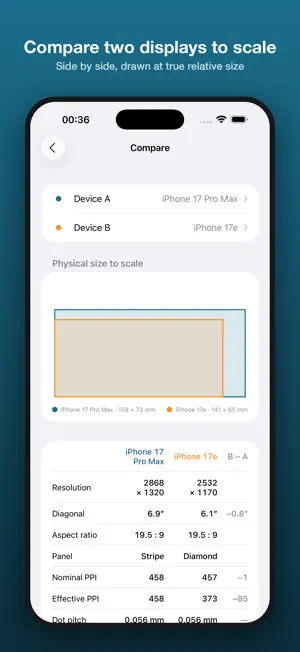
PPI Guru is a utility to calculate a display's PPI (Pixels Per Inch) for phones, tablets, laptops, monitors and TVs. To calculate the PPI of a display, just enter the screen width and height in pixels and the diagonal size in inches. The PPI is calculated automatically, and PPI Guru indicates whether the display is a Retina Display (size 10″ or larger with PPI of 200 or more, or size under 10″ with PPI of 300 or more). Key Features: • Calculating PPI automatically, with Retina Display indicator • Starts with your own device's screen already filled in • Aspect ratio, dot pitch, physical size and total pixels • Retina distance and pixels per degree at your viewing distance • Subpixel layouts: RGB stripe, Diamond Pentile, RG-BG Pentile, Delta and RGBW, illustrated, with effective PPI • Reverse calculation: enter a PPI to get the diagonal size • Compare two displays side by side, drawn to scale • Built-in offline library of about 250 devices: every iPhone, iPad and Mac, Apple displays, plus Samsung, Google, OnePlus, Xiaomi, monitors, TVs and handhelds • Search device information from the internet • Save device information for later reference • English, Simplified Chinese, Traditional Chinese and Japanese For devices on sale, you can just enter the device name and tap Search: PPI Guru looks it up in the built-in library first, then on the web, and fills in the display's information. PS. Online search may not return accurate information, and it depends on network access to the search engine. Effective PPI figures for OLED layouts are approximations. Device information is saved locally for further reference.
Ratings & reviews
3.6
8 ratings
What’s new
Version 2.0.0 · Updated November 13, 2026
PPI Guru 2.0 is a new, native app for iPhone, iPad, Mac and Apple TV. • Your own device is recognised and filled in at launch • Aspect ratio, dot pitch, physical size, total pixels and Retina distance • Five subpixel layouts with illustrations and effective PPI • Reverse calculation from PPI to diagonal size • Compare two displays to scale • Built-in offline library of about 250 devices • iPad split view and iPhone Duo support • Simplified Chinese, Traditional Chinese and Japanese
App privacy
The developer, 基伟 徐, reported these privacy practices to Apple.
Data Not Collected
The developer does not collect any data from this app.
Alternatives to PPI Guru
Looking for apps like PPI Guru? Here are 6 similar apps on the App Store. The highest rated is Sensi Master (4.5/5), and all 6 are free to download.
-
 Sensi Master
4.5
-
 Goxit FF - Sensi Pro
4.1
-
 Game Aim Converter: Sensi DPI
4.1
-
 Sensi Elite
3.8
-
 SenXit External FF Panel
2.3
-
 Mouse Easy
2.7
| App | Rating | Price | Last updated | Compare |
|---|---|---|---|---|
| PPI Guru | 3.6 / 5 (8 ratings) | Free | November 13, 2026 | |
| Sensi Master | 4.5 / 5 (507) | Free | Oct 22, 2026 | Compare |
| Goxit FF - Sensi Pro | 4.1 / 5 (56) | Free | Aug 21, 2026 | Compare |
| Game Aim Converter: Sensi DPI | 4.1 / 5 (130) | Free | Nov 15, 2026 | Compare |
| Sensi Elite | 3.8 / 5 (6) | Free | Aug 11, 2025 | Compare |
| SenXit External FF Panel | 2.3 / 5 (6) | Free | Aug 22, 2026 | Compare |
| Mouse Easy | 2.7 / 5 (6) | Free | Jul 2, 2025 | Compare |
Compare PPI Guru with the top alternatives: ratings, updates, ASO score and keyword gaps →