

Everyone's Vertical Calendar
Funeasy Soft, Inc. Productivity iPhoneiPadiPod touch
Everyone's Vertical Calendar is a free Productivity app for iPhone and iPad by Funeasy Soft, Inc. Rated 4.6/5 from 9 ratings. Requires iOS 15.0.
- Rating
- 4.6
- 9 ratings
- Price
- Free
- on the App Store
- Size
- 143 MB
- Age 4+
- Updated
- Oct 12
- 2026 · v7.9.0
Screenshots



About Everyone's Vertical Calendar
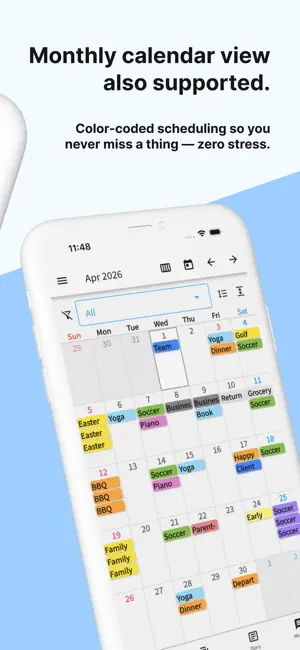
A shareable, easy-to-read vertical calendar! Share with family, friends, and groups! Easily share calendars with others. Push notifications and edit history mean you'll never miss a change. Previously entered schedules can be quickly re-entered from history! How to Use From the top-left menu, select "Edit Items" to register the people or items you want to manage. Long-press items to reorder them. When done, tap the Save button in the top right. On the vertical calendar screen, tap the intersection of an item and date to add a schedule. Previously added schedules can be quickly re-entered from history. Once saved, changes appear on the calendar. Use the arrow buttons (top right) to change months, or tap the calendar icon to jump to today. Added, edited, or deleted schedules can be reviewed in "Edit History" from the top-left menu. Long-press a schedule to quickly edit, move, copy, or delete it. To share your calendar, go to "Share this calendar with others" in the top-left menu, copy the share code, and send it to others. Recipients should download the app and enter the share code where indicated. Existing users can tap "Enter Share Code" from the menu. Each user can access up to 5 calendars. Switch, add, or remove calendars from the top-left menu. When schedules are added, edited, or deleted, all shared users receive push notifications. Disable notifications in iPhone Settings if needed. Per-calendar notification settings are available via the gear icon in the top-left menu. Messages Send messages to shared users. Type a message and tap Send to notify all users. Customize colors and senders. Long-press to copy or delete messages. Memories Tap the Memories tab and press Add to save memories with photos and text. Photos Up to 10 photos per month. Premium subscribers can save up to 50. Backup Your data is backed up on our servers. Save your account code to restore data when switching devices. Photos may be deleted if the calendar is inactive for over a year.
Ratings & reviews
4.6
9 ratings
What’s new
Version 7.9.0 · Updated October 12, 2026
For those who don't use Serial Entry, Diary or Message, you can now show only the calendar. Change it from the gear icon in the top-left menu. This affects everyone you share the calendar with, so please set it with care.
App privacy
The developer, Funeasy Soft, Inc., reported these privacy practices to Apple.
Data Used to Track You
The following data may be used to track you across apps and websites owned by other companies:
- Usage Data: Advertising Data
Data Linked to You
The following data, which may be collected and linked to your identity, may be used for the following purposes:
- Usage Data: Advertising Data
Used for: Third-Party Advertising, Analytics
Data Not Linked to You
The following data, which may be collected but is not linked to your identity, may be used for the following purposes:
- Usage Data: Product Interaction
Used for: Analytics
Alternatives to Everyone's Vertical Calendar
Looking for apps like Everyone's Vertical Calendar? Here are 6 similar apps on the App Store. The highest rated is Vertical Calendar - Planner (5.0/5), and all 6 are free to download.
-
 人気スケジュール帳 仕事や大学で共有、簡単にスケジュール管理
4.8
人気スケジュール帳 仕事や大学で共有、簡単にスケジュール管理
4.8
-
 Vertical Calendar - Planner
5.0
Vertical Calendar - Planner
5.0
-
 もくもくちゃんカレンダー
4.7
もくもくちゃんカレンダー
4.7
-
 Caly - Calendar & Widgets
4.6
Caly - Calendar & Widgets
4.6
-
 Jorte Calendar
4.0
Jorte Calendar
4.0
-
 N Calendar - Planner & Agenda
4.7
N Calendar - Planner & Agenda
4.7
| App | Rating | Price | Last updated | Compare |
|---|---|---|---|---|
| Everyone's Vertical Calendar | 4.6 / 5 (9 ratings) | Free | October 12, 2026 | |
| 人気スケジュール帳 仕事や大学で共有、簡単にスケジュール管理 | 4.8 / 5 (167) | Free | Oct 7, 2026 | Compare |
| Vertical Calendar - Planner | 5.0 / 5 (3) | Free | Oct 15, 2026 | Compare |
| もくもくちゃんカレンダー | 4.7 / 5 (84) | Free | Sep 20, 2024 | Compare |
| Caly - Calendar & Widgets | 4.6 / 5 (83) | Free | Oct 6, 2026 | Compare |
| Jorte Calendar | 4.0 / 5 (267) | Free | Oct 14, 2026 | Compare |
| N Calendar - Planner & Agenda | 4.7 / 5 (105) | Free | Mar 13, 2026 | Compare |