

Typefinity Keyboard & Numbers
AI Tools Apps SRL Productivity iPhoneiPadiPod touch
Typefinity Keyboard & Numbers is a free Productivity app for iPhone and iPad by AI Tools Apps SRL. Rated 3.7/5 from 156 ratings. Requires iOS 15.1.
- Rating
- 3.7
- 156 ratings
- Price
- Free
- on the App Store
- Size
- 96 MB
- Age 4+
- Updated
- Jul 14
- 2026 · v2.4
Screenshots

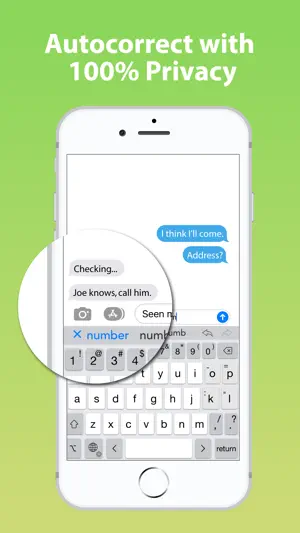


About Typefinity Keyboard & Numbers
Typing without limits on iPad and iPhone. When it comes to on-screen keyboards, bigger IS different, and Typefinity is built to take advantage of the larger screen size on tablets and modern phones. Stay in the flow when it's time to type a number or symbol or you need to move around, because the needed keys are right there in the main layout. And we use the full width, not just the middle, to display word suggestions. Ergonomics aren't sacrificed either. The main keys are big enough to type fast, and autocorrect is fine-tuned for catching common finger misses. You'll find using Typefinity is almost like having a full bluetooth keyboard, without the weight and bulk! How it works: - Step 1: Install Typefinity and open the app. - Step 2: In Settings, open General, Keyboard, Keyboards and add Typefinity. - Step 3: Tap the globe key in any app to switch to Typefinity. - Step 4: Type fast with big keys, and numbers, punctuation and symbols always in view. - Step 5: Swipe to trace words, and use the cursor keys to move by letter or word. What you get: - Numbers and punctuation in one layout, where your fingers remember. - Cursor keys for easy, precise movement by letter or word. - Dedicated keys for accented characters in your language. - Option switch for typing other symbols and accented characters. - Full autocorrect in all supported languages, showing more than three words. - "Short" layout option for more screen visibility in landscape orientation. - Swipe input (trace words with your finger), and flick up on number and punctuation keys for shifted versions. - Numeric and calculator modes. - Multilanguage support: English, Czech, Danish, Dutch, Finnish, French, German, Italian, Norwegian, Polish, Portuguese, Romanian, Spanish and Swedish. Get full access to Typefinity: - Enjoy many themes, dark mode & transparency options. - Use premium custom key sounds & feedback. - Get fine-tuning for autocorrect & punctuation. Subscribe to access premium app features; subscription details: - Payment will be charged to your Apple Account at confirmation of purchase. - Subscription automatically renews unless auto-renew is turned off at least 24 hours before the end of the current period. - The account will be charged for renewal within 24 hours prior to the end of the current period. - Subscriptions may be managed by the user, and auto-renewal turned off, in Account Settings after purchase. - Available plans: weekly or yearly. Terms & Conditions: https://magic-cake-e95.notion.site/iOS-Typefinity-Terms-Conditions-38ecf6557a0880958cf9e0fb058d8b34?source=copy_link Privacy Policy: https://magic-cake-e95.notion.site/iOS-Typefinity-Privacy-Policy-38ecf6557a08808bbba2c4f7128f1a22?source=copy_link If you have any questions, please contact us at [email protected]
Ratings & reviews
3.7
156 ratings
What’s new
Version 2.4 · Updated July 14, 2026
Bug fixing and improvements
App privacy
The developer, AI Tools Apps SRL, reported these privacy practices to Apple.
Data Used to Track You
The following data may be used to track you across apps and websites owned by other companies:
- Identifiers: Device ID
- Usage Data: Advertising Data
Data Not Linked to You
The following data, which may be collected but is not linked to your identity, may be used for the following purposes:
- Usage Data: Advertising Data
- Identifiers: Device ID
Used for: Third-Party Advertising, Analytics
Alternatives to Typefinity Keyboard & Numbers
Looking for apps like Typefinity Keyboard & Numbers? Here are 6 similar apps on the App Store. The highest rated is Clip Keyboard: Paste Snippets (4.8/5), and 5 of the 6 are free to download.
-
 Diary Lock: My Journal
3.8
Diary Lock: My Journal
3.8
-
 CreatorBook: Creator Analytics
-
 PromptDock AI
4.0
PromptDock AI
4.0
-
 WikiTree Sourcer
4.3
WikiTree Sourcer
4.3
-
 TenantDesk: Rental Inspection
-
 Clip Keyboard: Paste Snippets
4.8
Clip Keyboard: Paste Snippets
4.8
| App | Rating | Price | Last updated | Compare |
|---|---|---|---|---|
| Typefinity Keyboard & Numbers | 3.7 / 5 (156 ratings) | Free | July 14, 2026 | |
| Diary Lock: My Journal | 3.8 / 5 (5) | Free | Jul 24, 2026 | Compare |
| CreatorBook: Creator Analytics | – | Free | Aug 19, 2026 | Compare |
| PromptDock AI | 4.0 / 5 (2) | 0.89 USD | Nov 1, 2026 | Compare |
| WikiTree Sourcer | 4.3 / 5 (3) | Free | Oct 6, 2026 | Compare |
| TenantDesk: Rental Inspection | – | Free | Sep 3, 2026 | Compare |
| Clip Keyboard: Paste Snippets | 4.8 / 5 (11) | Free | Oct 29, 2026 | Compare |