

WWA: Where We At
Yaroslav Dukal Navigation iPhoneiPadiPod touch
WWA: Where We At is a free Navigation app for iPhone and iPad by Yaroslav Dukal. Rated 5.0/5 from 7 ratings. Requires iOS 16.0. Updated October 1, 2026.
- Rating
- 5.0
- 7 ratings
- Price
- Free
- on the App Store
- Size
- 26 MB
- Age 4+
- Updated
- Oct 1
- 2026 · v1.2.1
Screenshots
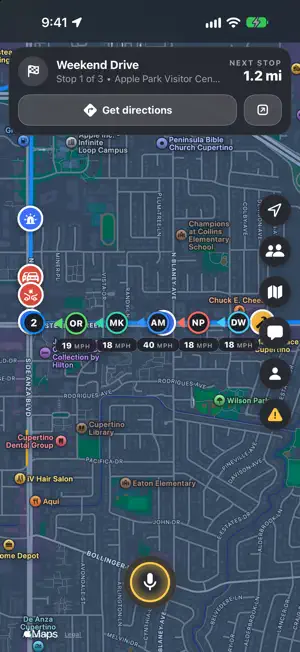
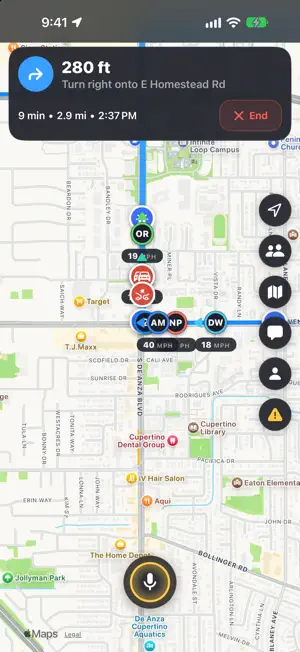

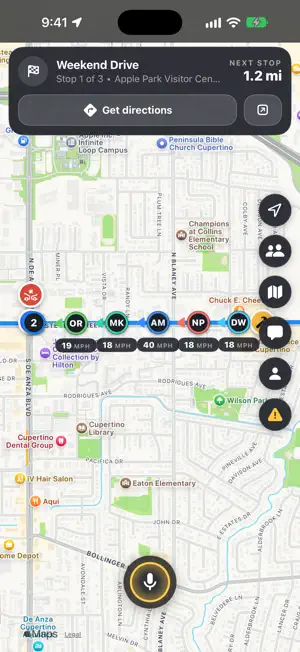
About WWA: Where We At
WWA (Where We At) shows where your friends and family are, in real time, on one map. Create a private group, share the invite code or QR, and everyone who joins appears on the map. Road trips, convoys, hikes, festivals, family outings: you always know where everyone is, and where to meet. LIVE MAP • See every group member on the map, updated in real time • Direction arrows show which way each person is heading • Tap a member to see their speed and distance from you • Day, night or auto map, plus satellite, hybrid and traffic • Share your location only when you want to, and stop at any time SHARED ROUTE • The host plans a route with stops: add, drag, delete or clear them • Everyone sees the same route and the next stop • Turn-by-turn directions inside the app, with distance, arrival time and automatic rerouting • Or open the stop in Apple Maps or Google Maps ROAD REPORTS • Report a crash, police, a slowdown, construction, a closed lane, an object on the road, a flooded road or a stopped vehicle in a couple of taps • The report lands ahead of you, along your route, and shows on the map for everyone in the group • Reports disappear by themselves after one hour GROUP CHAT • Message your group right in the app • Tag friends with @handle, with suggestions as you type • Reply to a specific message with a swipe • Short updates in the chat when someone joins, leaves or reports something • Unread indicator on the chat button PUSH-TO-TALK • Hold the mic button and talk to the whole group, like a walkie-talkie • A live ring on the button shows when you talk and when someone else does • Works with your car's Bluetooth audio, and your music is lowered while someone speaks PRIVATE AND SIMPLE • No account, email, or phone number required. Pick a name and a handle • Only people with your group's code can join • The host can remove or block people, clear the chat, reset locations, or delete the group Location sharing in the background requires the "Always" location permission, so your group can still see you when the app is closed. You can change it any time in Settings. Questions or feedback? Contact us at [email protected]
Ratings & reviews
5.0
7 ratings
What’s new
Version 1.2.1 · Updated October 1, 2026
• Road reports: mark a crash, police, a slowdown and more. Everyone in the group sees it on the map for one hour. • Turn-by-turn directions to the next stop inside the app, with automatic rerouting. • Shared route editing for the host: drag stops, delete one or the whole route. • Tag friends in chat with @handle, with suggestions as you type. Every account now has a handle. • Short chat updates when someone joins, leaves or reports something, plus message delivery status. • Day, night or auto map, and a redesigned map style sheet. • A new push-to-talk button with a live ring while you talk or someone else does. • Members sheet in the chat: remove or block people, clear the chat, reset locations. • Redesigned settings, People and notification cards
App privacy
The developer, Yaroslav Dukal, reported these privacy practices to Apple.
Data Not Collected
The developer does not collect any data from this app.
Alternatives to WWA: Where We At
Looking for apps like WWA: Where We At? Here are 6 similar apps on the App Store. The highest rated is FlyFriends: Airline Crew (5.0/5), and 5 of the 6 are free to download.
-
 Shake Locate
4.5
Shake Locate
4.5
-
 FlyFriends: Airline Crew
5.0
FlyFriends: Airline Crew
5.0
-
 BMPD - Flight Delay Prediction
4.2
BMPD - Flight Delay Prediction
4.2
-
 360 Central Park AR NYC Map
-
 Find Where I Was
3.0
Find Where I Was
3.0
-
 Prosto Travel
| App | Rating | Price | Last updated | Compare |
|---|---|---|---|---|
| WWA: Where We At | 5.0 / 5 (7 ratings) | Free | October 1, 2026 | |
| Shake Locate | 4.5 / 5 (4) | Free | Oct 2, 2026 | Compare |
| FlyFriends: Airline Crew | 5.0 / 5 (1) | Free | Sep 23, 2026 | Compare |
| BMPD - Flight Delay Prediction | 4.2 / 5 (5) | Free | Sep 9, 2026 | Compare |
| 360 Central Park AR NYC Map | – | 0.99 USD | Nov 15, 2023 | Compare |
| Find Where I Was | 3.0 / 5 (1) | Free | Jul 9, 2025 | Compare |
| Prosto Travel | – | Free | May 12, 2025 | Compare |
Compare WWA: Where We At with the top alternatives: ratings, updates, ASO score and keyword gaps →