

iGoKardz
Igor Tupitsyn Games iPhoneiPadiPod touch
iGoKardz is a free Games app for iPhone and iPad by Igor Tupitsyn. Requires iOS 12.4. Updated August 7, 2024.
- Price
- Free
- on the App Store
- Size
- 57 MB
- Age 4+
- Updated
- Aug 7
- 2024 · v1.5
Screenshots



About iGoKardz
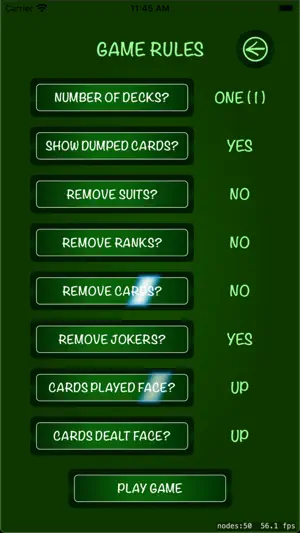
Select a card game of your choice and play with your family and friends while observing social distancing. Up to six players can play together in Extended Version of the game (two in Default Version). Players can play via WiFi or, if WiFi is not available (e.g. on airplanes), via Bluetooth. One player starts a new game by tapping on the New Game button, and then selecting game rules on the next panel. Choose how many decks you want to play, which cards should be removed from the deck, whether cards should be dealt and played with face up or down. Once the game has been initiated, other people may join it. Tap on the Find Players button and then select anyone who is already in a game. Swipe the table down to show the Game Menu with additional options: - Deal cards to other players. Select how many cards each player should get. - Shuffle the deck. - See how many cards are left in the deck (Extended Version only). - See all dumped cards. - Show your cards to other players (Extended Version only). You select who should see your cards. If you are shown another player's cards, you may expand the view by tapping on the player's hand and holding it for a few seconds. A view with all of his/her cards will be displayed. - Show or hide notifications of all the game moves. - Send a text message to other players (Extended Version only). You select who should receive your message. To discard a received message swipe the message to the right. Swipe the table up to hide the Game Menu. Once you are playing, move cards on the table, to your hand or to the deck by holding you finger on a card and moving it. Note that you cannot move a card to other players' hands. Double tap on a card to flip it; the card will also be flipped for other players. Dump a card(s) by swiping the table to the right. Swipe the table to the left to return the dumped cards to the table (up to 5 times). If you want to keep a card on the table while dumping the others, tap on the card and hold it for a few seconds until the card is selected. Now, this card will stay on the table when you swipe to the right. Do the same to unselect the card. If you have too may cards in your hand and you can barely see their ranks or select any of them, tap on your hand and hold it for a few seconds. Now you can scroll through your cards. You may move the deck around the table. Tap on the deck and hold it for a few seconds until the deck is selected. Move the deck with your finger. Do the same to unselect the deck. If you have to switch to another application (e.g., to take a call), you will be disconnected from the game. Other players will see that your hand has turned red, meaning that you are temporarily away. To return back to the game, tap on the Find Players button and select any player. Your hand will be the same as when you left it. To permanently exit the game (which is recommended), open the Game Menu (swipe the table down) and select Exit Game. Choose what you want to do with your cards: you may dump them, leave them on the table or put them back to the deck. Try the tutorial or watch a video available on the Application panel. Enjoy the game!
What’s new
Version 1.5 · Updated August 7, 2024
- Fixed a bug which prevented exchange of data between peers in some cases. - Replaced deprecated methods.
Play today's Inkspill puzzle
Spread your ink until the whole board is one color, within the move limit. A free daily puzzle from Fiplay, same board for everyone. It plays right here, no download.
App privacy
The developer, Igor Tupitsyn, reported these privacy practices to Apple.
Data Not Collected
The developer does not collect any data from this app.
Alternatives to iGoKardz
Looking for apps like iGoKardz? Here are 6 similar apps on the App Store. The highest rated is Card Game Table (5.0/5), and all 6 are free to download.
-
 Card Game Table
5.0
-
 29 Card Multiplayer
-
 Cards with Phones
3.7
-
 Hearts Multiplayer Card Game
4.3
-
 Pidro: Classic Card Game
4.1
-
 Palace Card Game
3.4
| App | Rating | Price | Last updated | Compare |
|---|---|---|---|---|
| iGoKardz | – | Free | August 7, 2024 | |
| Card Game Table | 5.0 / 5 (1) | Free | Dec 17, 2025 | Compare |
| 29 Card Multiplayer | – | Free | Jan 12, 2024 | Compare |
| Cards with Phones | 3.7 / 5 (15) | Free | Jul 17, 2026 | Compare |
| Hearts Multiplayer Card Game | 4.3 / 5 (73) | Free | May 2, 2024 | Compare |
| Pidro: Classic Card Game | 4.1 / 5 (1,152) | Free | Oct 9, 2026 | Compare |
| Palace Card Game | 3.4 / 5 (176) | Free | Aug 13, 2026 | Compare |
Compare iGoKardz with the top alternatives: ratings, updates, ASO score and keyword gaps →