

HelloPDF-PDF Converter&Scanner
Shanghai Dazhuo Information Technology Co., Ltd. Business iPhoneiPadiPod touch
HelloPDF-PDF Converter&Scanner is a free Business app for iPhone and iPad by Shanghai Dazhuo Information Technology Co., Ltd. Rated 4.8/5 from 18 ratings.
- Rating
- 4.8
- 18 ratings
- Price
- Free
- on the App Store
- Size
- 16 MB
- Age 4+
- Updated
- Sep 28
- 2026 · v1.4
Screenshots
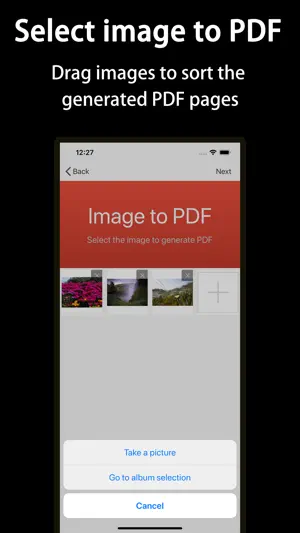
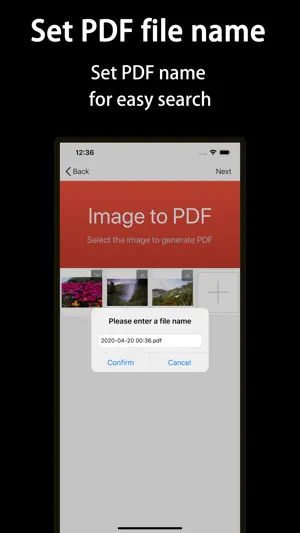

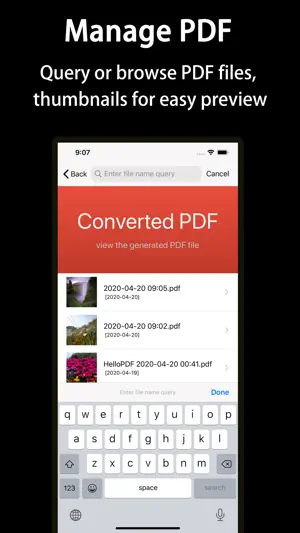
About HelloPDF-PDF Converter&Scanner
HelloPDF converts images and PDFs both ways: scan documents, merge photos into a PDF, turn PDF pages back into images, clear grey backgrounds and lay out pages on A4 — all on your iPhone. Contracts, invoices, ID documents, class notes — just take a photo and get a clean, tidy PDF. — Features — · Image to PDF Pick several photos at once, long-press and drag to reorder, then generate one PDF. · Document Scan Point at the page: edges are detected automatically and skewed pages are straightened. · Image Cleanup Remove grey backgrounds in one tap and turn photos into print-ready black & white — darker text, whiter paper. · A4 Layout Fit 1, 2, 3 or 4 images on a page, side by side or stacked. Ready to print. · PDF to Image Export every PDF page as an image — easy to share or reuse. · Custom Page Size Standard A4 (595 × 842) by default, or set width and height yourself. · File Management All your PDFs in one place: search by name, preview, share, print or delete. — Use cases — · Contracts, invoices, ID documents: snap a photo and archive it, no more lost paperwork · Notes and course material: merge photos into one PDF and print it on A4 · Old files and photocopies: clear the grey background and make blurry pages readable again — About subscriptions — A subscription unlocks all features. Payment is charged to your iTunes account once you confirm the purchase. Subscriptions renew automatically within 24 hours before the current period ends; to stop renewal, turn off auto-renew in your account settings at least 24 hours before it ends. Privacy Policy: http://www.dazhuogroup.com/img2pdf/privacy_statement_en.php Terms of Use: http://www.dazhuogroup.com/img2pdf/terms_of_use_en.php
Ratings & reviews
4.8
18 ratings
What’s new
Version 1.4 · Updated September 28, 2026
What's New: · Supports iOS 27 · Image to PDF: new A4 Layout, 1–4 images per page · New: PDF to Image · Image Scan: perspective correction, skewed pages straightened automatically
App privacy
The developer, Shanghai Dazhuo Information Technology Co., Ltd., reported these privacy practices to Apple.
Data Not Collected
The developer does not collect any data from this app.
Alternatives to HelloPDF-PDF Converter&Scanner
Looking for apps like HelloPDF-PDF Converter&Scanner? Here are 6 similar apps on the App Store. The highest rated is PDF Converter - (4.7/5), and all 6 are free to download.
-
 PDFEsign.com PDF E-Sign
4.3
-
 PDF Hero - PDF Editor & Reader
4.6
-
 PDF Converter -
4.7
-
 Image to PDF - Convert to PDF
4.7
-
 Convert Image To PDF tools
4.5
-
 PDF Converter ©
4.5
| App | Rating | Price | Last updated | Compare |
|---|---|---|---|---|
| HelloPDF-PDF Converter&Scanner | 4.8 / 5 (18 ratings) | Free | September 28, 2026 | |
| PDFEsign.com PDF E-Sign | 4.3 / 5 (12) | Free | Aug 11, 2026 | Compare |
| PDF Hero - PDF Editor & Reader | 4.6 / 5 (10,317) | Free | Sep 17, 2025 | Compare |
| PDF Converter - | 4.7 / 5 (556) | Free | Aug 21, 2026 | Compare |
| Image to PDF - Convert to PDF | 4.7 / 5 (292) | Free | Oct 1, 2026 | Compare |
| Convert Image To PDF tools | 4.5 / 5 (2,595) | Free | Apr 25, 2024 | Compare |
| PDF Converter © | 4.5 / 5 (101) | Free | Sep 13, 2026 | Compare |