

Soulver 4
Zac Cohan Productivity iPhoneiPadiPod touchMac
Soulver 4 is a free Productivity app for iPhone and iPad by Zac Cohan. Rated 4.9/5 from 436 ratings. Requires iOS 17.6. Updated October 30, 2026.
- Rating
- 4.9
- 436 ratings
- Price
- Free
- on the App Store
- Size
- 40 MB
- Age 4+
- Updated
- Oct 30
- 2026 · v4.0.5
Screenshots



About Soulver 4
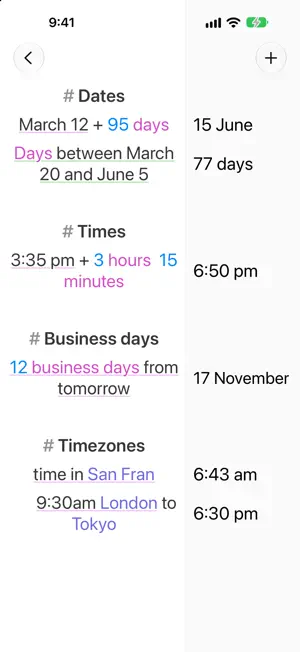
Ever reach for a calculator and the back of an envelope to work something out? That's what Soulver is for. It's a natural-language notepad calculator: think through a problem line-by-line, using plain words and numbers. The answers appear alongside each line as you type. Soulver isn't just a calculator app — it's the paper you'd scribble on to figure something out. Except this paper does the numbers for you, so you stay thinking at the level of your problem. 20% of $1,480 | $296 $100 in EUR | €86 240 km in miles | 149 mi $1,200 + 15% tax | $1,380 3 weeks from today | June 21 Because Soulver uses sheets (like Notes), you can explore different ideas: weigh options, change variables and watch everything update. WHAT CAN SOULVER CALCULATE? – Live currency conversions — 190 currencies, including crypto – Percentages in plain language — "20% off $50", "$50 is what % of $200" – Unit conversions — hundreds of units across length, weight, volume, data and more – Dates & time — "days until Christmas", time intervals, clock and video-timecode math – Time-zone conversions — "3pm New York to London" – Sums & averages – Financial functions — compound interest, mortgage repayments, hourly rates It's the closest thing to an on-device universal calculator ever created. DESIGNED FOR IPHONE – A meticulously designed numeric keyboard that makes calculating fast – Six specialised accessory keyboards — for currencies, percentages, dates & times, and variables – Build your own custom keyboard with the buttons you reach for most BEST-IN-CLASS ON IPAD – Multiple windows, Slide Over & Split View — float Soulver alongside Notes or Safari – Full Magic Keyboard support with dozens of keyboard shortcuts – Scribble & Apple Pencil – Find & replace, a line-styling palette and a powerful text editor – Automation with URL schemes & Siri Shortcuts POWER USER FEATURES – Multi-word variables — "total cost = $750" – Inline tokenized references to previous answers – Subtotals, tags & trip planning – Wolfram|Alpha integration – Headings, comments, labels & dividers to structure long sheets – Custom units and global variables in the definition sheet SHARING & SYNC – Sync your sheets with Soulver 4 for Mac via iCloud – Export to PDF & plain text, or send beautiful HTML emails – Share a calculation as an image — just take a screenshot ONE TIME PURCHASE Soulver is a one-time (non-subscription) purchase. We've been refining and improving Soulver since 2005, and major paid updates average once every 7 years. Try it free for 60 days, no commitment, no automatic charge. —————————————————————————————— Terms of Use (EULA): https://www.apple.com/legal/internet-services/itunes/dev/stdeula/
Ratings & reviews
4.9
436 ratings
What’s new
Version 4.0.5 · Updated October 30, 2026
GENERAL IPHONE DUO – Soulver is made for iPhone Duo – Designed a special number keyboard for Duo in the unfolded pose, with additional accessory keys on the left side and the number pad on the right side – The keyboard automatically splits when in the partially open pose – The answer column automatically aligns along the crease in the partially open pose EXPORT & SHARING – Print, PDF and Email always go through the styling options first, including ⌘P from a keyboard – Improved the layout of the styling options preview EXTERNAL DOCUMENTS (.SLVR FILES) – The title menu now lets you import the file to the open sheetbook, copy the text with answers, and customise PDF, print & email export BUG FIXES – Fixed an issue where the close button was hidden when editing external documents on iOS 26 (thanks David on Mastodon) – Fixed an issue where pushing changes to iCloud could be delayed after making an edit and immediately going to the Home Screen, until reopening the app. The sync now happens in the background even when Soulver is dismissed (thanks Michael) – Fixed an issue where line numbers could be misaligned when using quite large accessibility text sizes CALCULATOR GROWTH & CHANGE – Added a phrase to calculate the time required to reach a multiple or double/triple: time to 2x at 7% → 10.24 years, time to double at 12% → 6.12 years – Support for a growth over a period phrase: years from $100 to $200 at 7% growth every year → 10.24 years DATES & TIMES – Durations in the form “xh:xm” are now supported: 1h:17m → 1 hour 17 min, 1h:17:30 → 1 hour 17 min 30 s, 1:17s → 1 min 17 s – Support for “my time” and “local time” meaning your current device time zone: 4pm EST in local time UNITS – Added the long tons unit: 3 long tons in kg → 3,048.14 kg (thanks Sergiy)
App privacy
The developer, Zac Cohan, reported these privacy practices to Apple.
Data Not Linked to You
The following data, which may be collected but is not linked to your identity, may be used for the following purposes:
- Diagnostics: Crash Data
Used for: App Functionality
Alternatives to Soulver 4
Looking for apps like Soulver 4? Here are 6 similar apps on the App Store. The highest rated is Remind Me Faster (4.8/5), and all 6 are free to download.
-
 Prizmo › Document Scanner, OCR
4.4
Prizmo › Document Scanner, OCR
4.4
-
 Remind Me Faster
4.8
Remind Me Faster
4.8
-
 Unforgetful: Never Lose a Task
4.7
Unforgetful: Never Lose a Task
4.7
-
 Anybox - Bookmark & Read Later
4.7
Anybox - Bookmark & Read Later
4.7
-
 Rocket Typist
4.1
Rocket Typist
4.1
-
 Quick Notes - Capture
4.8
Quick Notes - Capture
4.8
| App | Rating | Price | Last updated | Compare |
|---|---|---|---|---|
| Soulver 4 | 4.9 / 5 (436 ratings) | Free | October 30, 2026 | |
| Prizmo › Document Scanner, OCR | 4.4 / 5 (156) | Free | Oct 19, 2026 | Compare |
| Remind Me Faster | 4.8 / 5 (458) | Free | Oct 27, 2026 | Compare |
| Unforgetful: Never Lose a Task | 4.7 / 5 (239) | Free | Oct 31, 2026 | Compare |
| Anybox - Bookmark & Read Later | 4.7 / 5 (525) | Free | Oct 27, 2026 | Compare |
| Rocket Typist | 4.1 / 5 (24) | Free | Feb 23, 2026 | Compare |
| Quick Notes - Capture | 4.8 / 5 (315) | Free | Oct 27, 2026 | Compare |
Compare Soulver 4 with the top alternatives: ratings, updates, ASO score and keyword gaps →