

FlipKit - Flipbook Maker
Ines Buchetics Graphics & Design iPhoneiPadiPod touch
FlipKit - Flipbook Maker is a free Graphics & Design app for iPhone and iPad by Ines Buchetics. Rated 4.5/5 from 1,495 ratings. Requires iOS 17.6.
- Rating
- 4.5
- 1.4K ratings
- Price
- Free
- on the App Store
- Size
- 20 MB
- Age 4+
- Updated
- Oct 23
- 2026 · v3.6.1
Screenshots

About FlipKit - Flipbook Maker
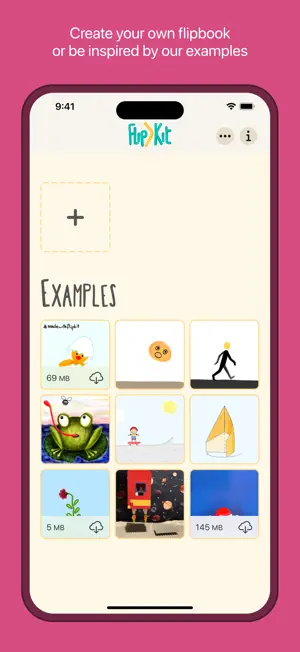
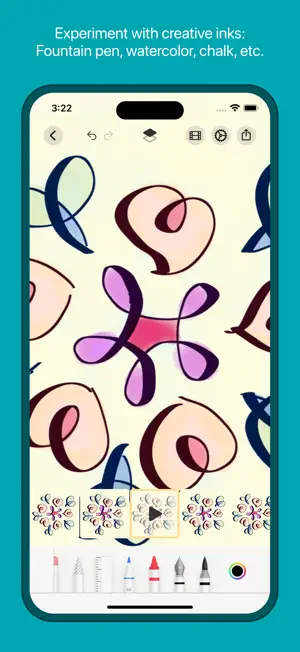
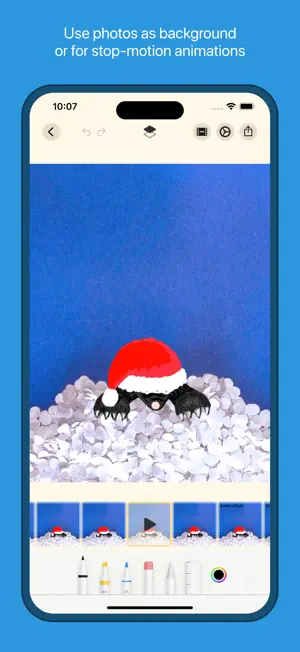
Create your own frame-by-frame animations — just like a real flipbook! FlipKit gives you everything you need to bring your drawings to life. Whether you're a beginner, a pro, or a kid just getting started — FlipKit's intuitive interface makes animating easy and fun. Draw with Apple Pencil or your finger, add shapes and stickers, and watch your creation come to life. Need inspiration? Dive into ready-made examples and templates to get started right away. Import photos from your library or use the camera for the perfect background. Combine photos with your drawings to create stop-motion animations. Advanced artists will love separate foreground and background layers, onion skinning, and fine-tuned animation controls. Flip through your animation like a real physical flipbook or preview it on the canvas. When you're done, export as video, animated GIF, or PNG sequence and share your creation with the world. No account required. No data collected. Just create. DRAWING TOOLS * Draw with pencils, brushes, pens, erasers, and more * Insert shapes, text, emojis, and custom stickers * Fill enclosed areas with color * Copy and move parts of your drawings with the lasso tool * Full support for Apple Pencil * Zoom, rotate, and pan your canvas ANIMATION * Create animations frame by frame with onion skinning * Swipe the filmstrip to flip through your animation * Separate foreground and background layers * Control frames per second, background color, and playback mode (loop, ping-pong, once) * Import photos for backgrounds or stop-motion animations * Various examples and templates for an easy start EXPORT & SHARE * Export as video (MP4), animated GIF, or PNG sequence * Export single frames or transparent image sequences * Share your creations on social media or with friends DESIGNED FOR YOU * Place the filmstrip on the left or right (for right- or left-handed use) * iCloud Drive keeps your animations in sync across all your devices * Automatic backups keep your animations safe * Dark Mode support * No account setup — FlipKit respects your privacy and does not collect any data linked to you CONTACT Questions or wishes? Write us: [email protected] Music obtained from zapsplat.com
Ratings & reviews
4.5
1.4K ratings
What’s new
Version 3.6.1 · Updated October 23, 2026
- Fixed an issue that could replace a frame’s drawing when switching frames or returning to the app. - Improved saving after drawing, adding shapes, copying and pasting, and editing duplicated frames.
App privacy
The developer, Ines Buchetics, reported these privacy practices to Apple.
Data Not Linked to You
The following data, which may be collected but is not linked to your identity, may be used for the following purposes:
- Identifiers: Device ID
- Usage Data: Product Interaction
Used for: Analytics
Alternatives to FlipKit - Flipbook Maker
Looking for apps like FlipKit - Flipbook Maker? Here are 6 similar apps on the App Store. The highest rated is Flikbook: Scan Flipbooks (4.7/5), and all 6 are free to download.
-
 MotionBook - Draw & Animate
4.5
MotionBook - Draw & Animate
4.5
-
 Animation Studio – FlipBook
3.7
Animation Studio – FlipBook
3.7
-
 Pencil 2d - Draw & Animations
4.5
Pencil 2d - Draw & Animations
4.5
-
 AniToon: Draw Art & Animate
4.3
AniToon: Draw Art & Animate
4.3
-
 Flikbook: Scan Flipbooks
4.7
Flikbook: Scan Flipbooks
4.7
-
 Cascadeur: 3D animation
4.3
Cascadeur: 3D animation
4.3
| App | Rating | Price | Last updated | Compare |
|---|---|---|---|---|
| FlipKit - Flipbook Maker | 4.5 / 5 (1,495 ratings) | Free | October 23, 2026 | |
| MotionBook - Draw & Animate | 4.5 / 5 (3,595) | Free | Sep 30, 2026 | Compare |
| Animation Studio – FlipBook | 3.7 / 5 (9) | Free | Oct 10, 2026 | Compare |
| Pencil 2d - Draw & Animations | 4.5 / 5 (321) | Free | Sep 26, 2026 | Compare |
| AniToon: Draw Art & Animate | 4.3 / 5 (267) | Free | Jan 31, 2025 | Compare |
| Flikbook: Scan Flipbooks | 4.7 / 5 (42) | Free | Mar 10, 2024 | Compare |
| Cascadeur: 3D animation | 4.3 / 5 (315) | Free | Oct 9, 2026 | Compare |