

Spiral Photo Editor Neon
Mithilesh Kumar Photo & Video iPhoneiPadiPod touch
Spiral Photo Editor Neon is a free Photo & Video app for iPhone and iPad by Mithilesh Kumar. Rated 3.5/5 from 13 ratings. Requires iOS 14.0.
- Rating
- 3.5
- 13 ratings
- Price
- Free
- on the App Store
- Size
- 29 MB
- Age 4+
- Updated
- Jul 1
- 2025 · v2.0
Screenshots


About Spiral Photo Editor Neon
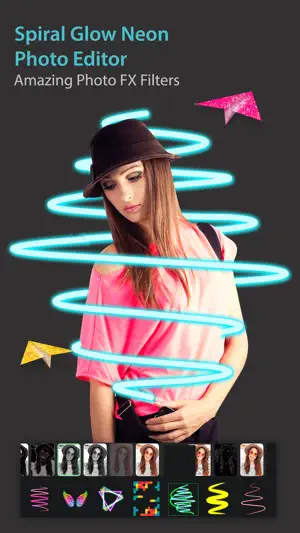
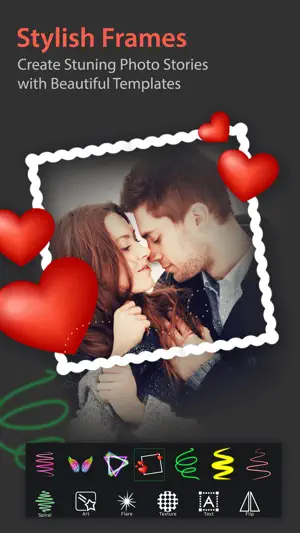
Spiral Photo Editor Neon is an amazing picture editing application with beautiful glowing spirals. Use our different screen modes, wrap your image with our fabulous spirals, unique effects and adjust accordingly to give a new look to your image. Personalize your picture with text and other text editing options. Decorate image with our selective sticker range. Convert your image to sketch with changeable colors and lines. All these features are available for FREE! Features of Image editing in Spiral Photo Editor Neon, Mirror Effects:- 1. Wrap your image with our amazing spirals. 2. Must try our new feature of sketch image, with pre-defined sketch types and editing options . 3. Mirror Photo Editor: - Edit photos with dozens of mirror effects like Up-Down Reflection & Right-Left Reflection and many many more.. - Dozens of frames, layouts and grids. Share your artwork with your friends and family and please share your value-able feedback with us, to make this application much more better. SUBSCRIPTION: You can subscribe to premium features, choosing from the following plans: – 1 Month – 12 months – Lifetime (One Time Purchase) The subscription automatically renews unless auto-renewal is turned off at least 24 hours before the end of the current period. Payment will be charged to your iTunes account at confirmation of purchase. Account will be charged for renewal within 24 hours of the end of the current period, and the cost of the renewal will be provided. Subscriptions may be managed by the user. Auto-renewal may be turned off by going to the user’s Account Settings after purchase. No cancellation of the current subscription is allowed during active subscription period. Any unused portion of a free trial period, if offered, will be forfeited when the user purchases a subscription to that publication. Terms of Use: https://iosapps.home.blog/2019/12/20/terms-of-use/ Privacy Policy: https://iosapps.home.blog/2019/03/18/privacy-policy/
Ratings & reviews
3.5
13 ratings
What’s new
Version 2.0 · Updated July 1, 2025
- Enhancement in UI and bug fixes.
App privacy
The developer, Mithilesh Kumar, reported these privacy practices to Apple.
Data Used to Track You
The following data may be used to track you across apps and websites owned by other companies:
- Identifiers: Device ID
- Usage Data: Advertising Data
Data Linked to You
The following data, which may be collected and linked to your identity, may be used for the following purposes:
- Usage Data: Advertising Data
Used for: Third-Party Advertising, Developer’s Advertising or Marketing, Analytics, Product Personalization, App Functionality
Data Not Linked to You
The following data, which may be collected but is not linked to your identity, may be used for the following purposes:
- Identifiers: Device ID
Used for: Third-Party Advertising, Developer’s Advertising or Marketing, Analytics, Product Personalization
Alternatives to Spiral Photo Editor Neon
Looking for apps like Spiral Photo Editor Neon? Here are 6 similar apps on the App Store. The highest rated is Neon Photo Editor Spiral Photo (5.0/5), and all 6 are free to download.
-
 3D Neon Spiral Photo Editor Fx
2.2
-
 Drip Art & Neon Photo Editor
4.0
-
 NeonArt Spiral Photo Editor
2.0
-
 Neon Photo Editor Spiral Photo
5.0
-
 Neon Photo Editor & Effects
4.3
-
 NeoArt - Neon Spiral Effect
4.3
| App | Rating | Price | Last updated | Compare |
|---|---|---|---|---|
| Spiral Photo Editor Neon | 3.5 / 5 (13 ratings) | Free | July 1, 2025 | |
| 3D Neon Spiral Photo Editor Fx | 2.3 / 5 (4) | Free | Jun 10, 2025 | Compare |
| Drip Art & Neon Photo Editor | 4.0 / 5 (14) | Free | Jul 10, 2025 | Compare |
| NeonArt Spiral Photo Editor | 2.0 / 5 (2) | Free | Dec 26, 2023 | Compare |
| Neon Photo Editor Spiral Photo | 5.0 / 5 (1) | Free | Mar 4, 2025 | Compare |
| Neon Photo Editor & Effects | 4.3 / 5 (3) | Free | Feb 1, 2025 | Compare |
| NeoArt - Neon Spiral Effect | 4.3 / 5 (3) | Free | May 30, 2025 | Compare |