

One Walk A Day: Step Counter
Add Jam Health & Fitness iPhoneiPadiPod touch
One Walk A Day: Step Counter is a free Health & Fitness app for iPhone and iPad by Add Jam. Requires iOS 26.0. Updated October 18, 2026.
- Price
- Free
- on the App Store
- Size
- 87 MB
- Age 4+
- Updated
- Oct 18
- 2026 · v3.0.0
Screenshots
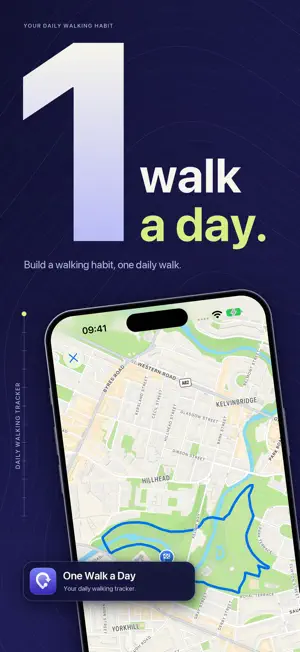

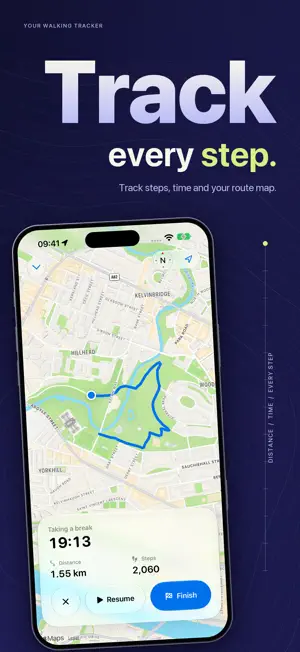

About One Walk A Day: Step Counter
One Walk a Day helps you build a daily walking habit. Record a walk with a live GPS route map, keep your streak going and watch your week add up, one walk at a time. RECORD EVERY WALK Tap Start and your route draws itself on the map while you walk. See time, distance and steps as you go, then pause, resume or finish whenever you like. Steps taken while a walk is paused are not counted, and a walk you forget to finish pauses itself. KEEP YOUR STREAK GOING Your streak counts the days you actually walk. Every seven walking days earns a grace day, and you choose when to use one if life gets in the way. Set a weekly target of walking days and see your progress on Today and in your widgets. A DAILY CHALLENGE THAT FITS YOU Each day brings a challenge based on your recent walks, so it stays achievable and still nudges you a little further. SHARE YOUR WALKS Turn any saved walk into a share card made from your real route. Choose a layout, colors, background and size, and decide exactly what to show, including whether the map appears. SEE YOUR PROGRESS Look back through your walk history with route maps, pace, elevation and splits. Stats shows streaks, weekly progress and your journey through every kilometer or mile you have walked. With Premium, explore week, month and year trends, personal bests and achievements. WALKS WITH NAMES Walks are named after the park or city where they happened, such as a lunchtime walk in the park. On supported devices, a short title and description are written on your device. WEEKLY, MONTHLY AND YEARLY RECAPS Look back at completed weeks and months, and at your whole year, then share the recap you are proudest of. WORKS ACROSS YOUR IPHONE AND IPAD - Today and Daily Walks widgets for the Home Screen and Lock Screen - A Live Activity on the Lock Screen and in the Dynamic Island, with Pause and Resume - Walk and Pause Walk controls for Control Center, the Lock Screen and the Action button - Siri and Shortcuts to start a walk or ask how your week is going - Spotlight search for your saved walks - Import walks from Apple Health PRIVATE BY DESIGN Your walks are stored on your device. Walk names and descriptions are created on your device, and share cards only include what you choose. Some features, including full history, trends, personal bests and achievements, need One Walk a Day Premium. Premium is offered as an in-app purchase. Payment is charged to your Apple Account, and any subscription renews automatically unless cancelled at least 24 hours before the end of the current period. You can manage or cancel it in your Apple Account settings. Privacy policy: https://addjam.com/privacy Terms of use: https://www.apple.com/legal/internet-services/itunes/dev/stdeula/
What’s new
Version 3.0.0 · Updated October 18, 2026
One Walk a Day 3.0 is a complete rebuild, with sharing, smarter streaks and new ways to start a walk. NEW - Share cards: turn any walk into an image made from your real route, with your choice of layout, colors and details. - Grace days: every seven walking days earns one, and you choose when to use it. - Weekly targets: pick how many days a week you want to walk and track your progress. - Walk and Pause Walk controls for Control Center, the Lock Screen and the Action button. - Pause and Resume straight from the Live Activity. - Siri and Shortcuts: start a walk or ask how your week is going. - A new Today widget with your challenge, streak and today's walking. - Walks named after the park or city where they happened. - Weekly, monthly and yearly recaps, plus trends, personal bests and achievements in Stats. - Find your saved walks in Spotlight. IMPROVED - A summary of every walk as soon as you finish. - More accurate steps and time: paused steps and idle minutes are left out. - Walks keep the day and time where they started, even after traveling. - Daily challenges are based on your recent walks. - Today, Stats and walk details use two columns on larger screens and in landscape. Your existing walks, streaks and settings come with you.
App privacy
The developer, Add Jam, reported these privacy practices to Apple.
Data Not Linked to You
The following data, which may be collected but is not linked to your identity, may be used for the following purposes:
- Usage Data: Product Interaction, Other Usage Data
- Diagnostics: Crash Data, Performance Data
- Identifiers: Device ID
Used for: Analytics, App Functionality
Alternatives to One Walk A Day: Step Counter
Looking for apps like One Walk A Day: Step Counter? Here are 6 similar apps on the App Store. The highest rated is 365 Mile Challenge (5.0/5), and all 6 are free to download.
-
 365 Mile Challenge
5.0
365 Mile Challenge
5.0
-
 Steps: Step Counter, Pedometer
4.6
Steps: Step Counter, Pedometer
4.6
-
 Weight Loss Walking Step Count
4.6
Weight Loss Walking Step Count
4.6
-
 Walking for Weight Loss
4.9
Walking for Weight Loss
4.9
-
 Walking Distance Tracker
4.5
Walking Distance Tracker
4.5
-
 Centr: Strength & Fitness App
4.8
Centr: Strength & Fitness App
4.8
| App | Rating | Price | Last updated | Compare |
|---|---|---|---|---|
| One Walk A Day: Step Counter | – | Free | October 18, 2026 | |
| 365 Mile Challenge | 5.0 / 5 (2) | Free | Oct 17, 2026 | Compare |
| Steps: Step Counter, Pedometer | 4.6 / 5 (19,435) | Free | Jul 25, 2026 | Compare |
| Weight Loss Walking Step Count | 4.6 / 5 (12,194) | Free | Jan 19, 2026 | Compare |
| Walking for Weight Loss | 4.9 / 5 (5,586) | Free | Apr 5, 2026 | Compare |
| Walking Distance Tracker | 4.5 / 5 (3,105) | Free | Oct 14, 2026 | Compare |
| Centr: Strength & Fitness App | 4.8 / 5 (21,370) | Free | Sep 23, 2026 | Compare |