

Ruler∘
Andrei Shpileuski Lifestyle iPhoneiPadiPod touch
Ruler∘ is a free Lifestyle app for iPhone and iPad by Andrei Shpileuski. Rated 4.4/5 from 44 ratings. Requires iOS 17.0. Updated September 20, 2026.
- Rating
- 4.4
- 44 ratings
- Price
- Free
- on the App Store
- Size
- 8 MB
- Age 4+
- Updated
- Sep 20
- 2026 · v1.5
Screenshots

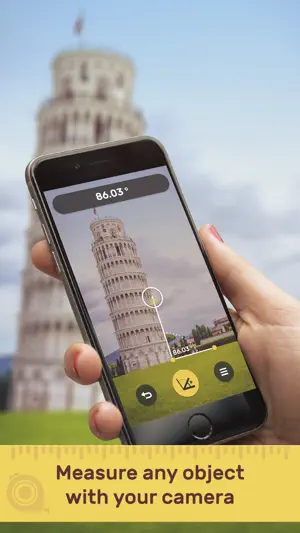

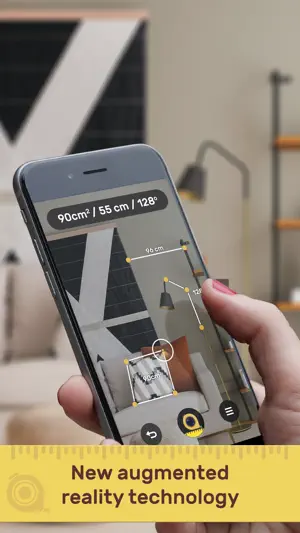
About Ruler∘
Measure height, length, square, angle and more with your iPhone camera! Download now! Ruler AR uses Apple ARKit and augmented reality technology to bring you the full experience of a real tape measure right out of the box. Get the right measurement everytime by choosing the right tool for the job. • Point and shoot Aim the camera toward an object to measure • Air Mode Move phone from A to B like a tape measure • Surface Locked Restrict to surfaces like a floor or wall Features: - Light and easy to design - Measure distance, length, height, area, angles and more - Use plane detection or feature point focus - Measure in inches, meters, and centimeters - Sliders to measure small objects accurately - Save measures to Camera Roll SUBSCRIPTION PRICING AND TERMS Subscription Options: Premium Membership Monthly offers a $1.99/monthly, $0.99/weekly subscription for premium functionally and removing ads. * The price is for US customers. Pricing in other countries may vary and actual charges may be converted to your local currency depending on the country of residence. * Free trial automatically converts to a paid subscription unless canceled at least 24-hours before the end of the trial period. * Your subscription will automatically renew at the end of each term and your credit card will be charged through your iTunes account at confirmation of purchase. * Account will be charged for renewal within 24-hours prior to the end of the current period, and identify the cost of the renewal. * You can turn off auto-renew at any time from your iTunes account settings but refunds will not be provided for any unused portion of the term. The cancellation will take effect the day after the last day of the current subscription period, and you will be downgraded to the free service. Privacy Policy - https://sites.google.com/view/rulerar/privacy-policy Terms of Use - https://sites.google.com/view/rulerar/terms-of-use
Ratings & reviews
4.4
44 ratings
What’s new
Version 1.5 · Updated September 20, 2026
What’s New in Ruler 1.5 • Improved the accuracy and stability of AR measurements, especially on difficult and low-texture surfaces. • Completely reworked room scanning with cleaner geometry, better detection of walls, recesses and projections, and lower device load. • Improved the room 3D model with better contrast, readability and detail visibility. • Optimized 3D object scanning and result processing. • Refined the measurement and scanning interface with fewer distractions and clearer guidance. • Improved saving of projects, rooms, measurements and 3D models. • Saved items can now be deleted faster without an additional confirmation step. • Improved LiDAR performance and handling in challenging lighting conditions. • Reviewed and improved the interface and localization across all supported languages. • Fixed bugs and improved overall performance and stability.
App privacy
The developer, Andrei Shpileuski, reported these privacy practices to Apple.
Data Not Collected
The developer does not collect any data from this app.
Alternatives to Ruler∘
Looking for apps like Ruler∘? Here are 6 similar apps on the App Store. The highest rated is Magnifying Glass & Mirror (4.8/5), and all 6 are free to download.
-
 58同城-求职招聘找工作租房二手车
4.3
-
 Blood Pressure Log, Heart Rate
4.3
-
 Watch Faces Gallery for iWatch
4.6
-
 Live Wallpapers 4K ChargeWall
4.7
-
 Magnifying Glass & Mirror
4.8
-
 4Plan: Home & Interior Planner
4.6
| App | Rating | Price | Last updated | Compare |
|---|---|---|---|---|
| Ruler∘ | 4.4 / 5 (44 ratings) | Free | September 20, 2026 | |
| 58同城-求职招聘找工作租房二手车 | 4.3 / 5 (1,457) | Free | Oct 27, 2026 | Compare |
| Blood Pressure Log, Heart Rate | 4.3 / 5 (33,294) | Free | Nov 4, 2026 | Compare |
| Watch Faces Gallery for iWatch | 4.6 / 5 (12,453) | Free | Nov 3, 2026 | Compare |
| Live Wallpapers 4K ChargeWall | 4.7 / 5 (2,920) | Free | Oct 26, 2026 | Compare |
| Magnifying Glass & Mirror | 4.8 / 5 (9,631) | Free | Sep 6, 2025 | Compare |
| 4Plan: Home & Interior Planner | 4.6 / 5 (3,071) | Free | Oct 6, 2026 | Compare |
Compare Ruler∘ with the top alternatives: ratings, updates, ASO score and keyword gaps →