

Audio Transcribe
Emanuele Floris Productivity iPhoneiPadiPod touch
Audio Transcribe is a free Productivity app for iPhone and iPad by Emanuele Floris. Rated 2.8/5 from 11 ratings. Requires iOS 18.0. Updated August 20, 2026.
- Rating
- 2.8
- 11 ratings
- Price
- Free
- on the App Store
- Size
- 175 MB
- Age 4+
- Updated
- Aug 20
- 2026 · v5.0
Screenshots



About Audio Transcribe
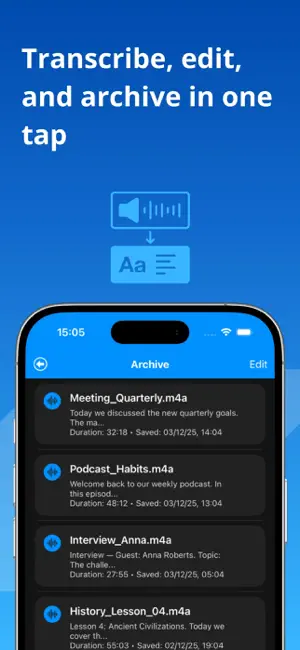
Tired of spending hours transcribing interviews, lectures, or video meetings? This app transforms your iPhone or iPad into a powerful, private AI transcription studio. Whether it’s an audio recording or a video file, forget hitting 'pause' and 'play' hundreds of times—the app does all the hard work for you. Our advanced artificial intelligence analyzes your media and converts it into highly accurate, editable, and shareable text in minutes. It's the ultimate tool for students, journalists, content creators, and researchers who need to effortlessly turn speech into text. PRO: Maximum Privacy. Zero Cloud. Unlike web services, our high-precision AI models run entirely on your device (optimized for Apple Silicon). • Secure: Your sensitive audio and video data never leave your device. • Fast: Optimized for on-device performance. • Offline: Transcribe anywhere, even without an internet connection. Now Supporting Video Files! You can now import video clips directly from your gallery or Files. The app automatically extracts the audio and provides a full transcript of the dialogue. Perfect for transcribing: • Video interviews and webinars. • Social media clips and vlogs. • Recorded university lessons and presentations. How It Works: 3 Simple Steps 1. Select Media: Easily choose any audio (MP3, M4A, WAV, FLAC) or video file (MP4, MOV, etc.) from your iCloud, local storage, or Photo Library. 2. Transcribe On-Device: Our AI engine instantly analyzes the file, recognizes speech even with background noise, and generates accurate text. 3. Edit & Export: Review and refine the transcription in our integrated editor. Save it to your personal archive or share it instantly with your team. Subscription and Purchase Information: You may purchase an auto-renewing subscription or a one-time purchase through an In-App Purchase. Auto-renewable subscription: • Monthly with 3-Days Free Trial, Annual with 3-Days Free Trial • Your subscription will be charged to your iTunes account at confirmation of purchase and will automatically renew (at the duration selected) unless auto-renew is turned off at least 24 hours before the end of the current period. • The account will be charged for renewal within 24 hours prior to the end of the current period. • Subscriptions may be managed by the user and auto-renewal may be turned off by going to the user's Account Settings after purchase. One-time Purchase: • A non-consumable purchase is available for lifetime access to Pro features. Privacy Policy: https://sites.google.com/site/privacycoldat/ Terms of use: https://www.apple.com/legal/internet-services/itunes/dev/stdeula/
Ratings & reviews
2.8
11 ratings
What’s new
Version 5.0 · Updated August 20, 2026
New: Improve with AI — free for everyone! Transform any transcription with one tap, with the new button: - Fix & Clean Up — perfect punctuation, no filler words or repetitions - Bullet Points — the key points of your recording in seconds - Meeting Minutes — topics, decisions and action items, already organized - Smarter, more natural summaries
App privacy
The developer, Emanuele Floris, reported these privacy practices to Apple.
Data Used to Track You
The following data may be used to track you across apps and websites owned by other companies:
- Location: Coarse Location
- Identifiers: Device ID
- Usage Data: Product Interaction, Advertising Data
- Diagnostics: Crash Data, Performance Data
Data Linked to You
The following data, which may be collected and linked to your identity, may be used for the following purposes:
- Location: Coarse Location
- Identifiers: Device ID
- Usage Data: Product Interaction, Advertising Data
- Diagnostics: Crash Data, Performance Data
Used for: Third-Party Advertising
Alternatives to Audio Transcribe
Looking for apps like Audio Transcribe? Here are 6 similar apps on the App Store. The highest rated is Transkriptor - Speech to Text (4.7/5), and all 6 are free to download.
-
 AI Transcribe Audio to Text !
4.5
-
 Transcriby - Dictation to text
4.2
-
 Voice to Text AI Transcriber
4.3
-
 Transkriptor - Speech to Text
4.7
-
 Transcriber
3.0
-
 SoundType AI - Voice To Text
4.7
| App | Rating | Price | Last updated | Compare |
|---|---|---|---|---|
| Audio Transcribe | 2.8 / 5 (11 ratings) | Free | August 20, 2026 | |
| AI Transcribe Audio to Text ! | 4.5 / 5 (13) | Free | Oct 28, 2026 | Compare |
| Transcriby - Dictation to text | 4.2 / 5 (24) | Free | Aug 21, 2024 | Compare |
| Voice to Text AI Transcriber | 4.3 / 5 (259) | Free | Oct 1, 2026 | Compare |
| Transkriptor - Speech to Text | 4.7 / 5 (1,101) | Free | Oct 16, 2026 | Compare |
| Transcriber | 3.0 / 5 (6) | Free | May 23, 2026 | Compare |
| SoundType AI - Voice To Text | 4.7 / 5 (322) | Free | Apr 20, 2026 | Compare |
Compare Audio Transcribe with the top alternatives: ratings, updates, ASO score and keyword gaps →