

Let's Unmix -AI Stem Splitter
Hikaru Tsuyumine Music iPhoneiPadiPod touch
Let's Unmix -AI Stem Splitter is a free Music app for iPhone and iPad by Hikaru Tsuyumine. Rated 4.4/5 from 69 ratings. Requires iOS 16.0.
- Rating
- 4.4
- 69 ratings
- Price
- Free
- on the App Store
- Size
- 486 MB
- Age 4+
- Updated
- Oct 8
- 2026 · v7.2
Screenshots

About Let's Unmix -AI Stem Splitter
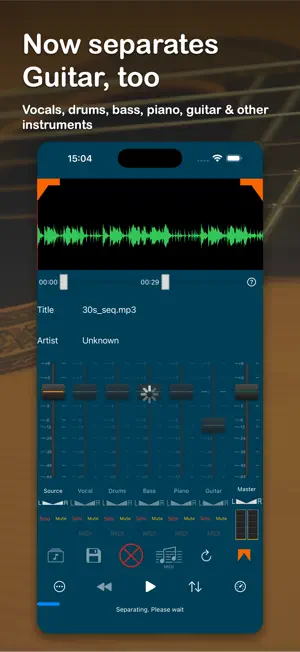
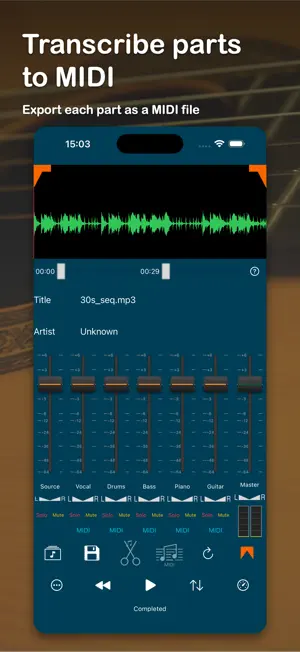
Effortlessly isolate and control your music—now with guitar separation! Separate any song into up to 6 individual tracks—vocals, drums, bass, piano, guitar, and other instruments—right on your device. No uploads, works fully offline. Turn any part into MIDI. Convert vocals, bass, piano, and now guitar to MIDI, then export it to your DAW or other music apps. Once separated, you can save and export these tracks to other apps, including your favorite DAWs (Digital Audio Workstations). Customize your playback by adjusting the volume and panning for each track independently, or even change the playback speed to suit your needs. With the waveform editor, it's easy to select specific regions for playback or export, giving you full control over your audio. Import your music directly from the Media Library, other apps, or cloud services like iCloud, Dropbox, Google Drive, and more. We support a wide range of audio formats, including mp3, m4a, ALAC, AIFF, FLAC, and WAV. Export your edited tracks in m4a, ALAC, AIFF, MIDI, or WAV formats. For the best experience, we recommend using music files with a 44.1kHz sample rate (CD quality). All exports are set to 44.1kHz to ensure consistent, high-quality audio output. One purchase unlocks all features forever. No subscriptions.
Ratings & reviews
4.4
69 ratings
What’s new
Version 7.2 · Updated October 8, 2026
The new features of this version (7.2) - Added per-stem level meters. Each stem now shows its own L/R audio levels, so you can see exactly which parts are playing and balance your mix more easily. The new features of this version (7.1.1) - bug fix The new features of this version (7.1) - bug fix The new features of this version (7.0) - Guitar can now be separated as its own stem (powered by a high-quality model) - Convert guitar to MIDI, with instrument (sound) selection - Bug fixes and stability improvements The new features of this version (6.1.1) - bug fix The new features of this version (6.1) - On iPhone, the faders for each part are now shown in a horizontally scrolling rack, making them easy to view and control even with many parts. (On iPad, the larger screen shows all parts at once, with no scrolling needed.) - Added a master fader to adjust the overall volume and left/right pan in one place. - Added stereo L/R level meters to monitor the output while playing. - Improved stability and fixed several issues. The new features of this version (6.0) - New high-performance separation model for cleaner results across vocals, drums, bass, piano, and other. - Choose your separation model — high-performance or standard — in Settings, with smarter defaults based on your device. - Performance improvements, bug fixes, and stability enhancements. The new features of this version (5.0) - UI improvements - bug fix The new features of this version (4.2) - bug fix The new features of this version (4.1) - bug fix The new features of this version (4.0) - playback transcribed MIDI files - bug fix The new features of this version (3.3) - bug fix The new features of this version (3.2) - Keyboard Shortcut Feature Added - SPACE: Start/Stop - Left Arrow Key: Rewind 10 seconds - Right Arrow Key: Fast-forward 10 seconds - "R" or "r": Restart The new features of this version (3.1) - Enhanced MIDI Export - Now you can save and export piano, drums, and accompaniment tracks in addition to bass and vocals. - Set Program Change for each track to customize the instrument during playback. - Set Tempo functionality for more precise control. - bug fix The new features of this version (3.0) - Piano sound separation in addition to Vocals, Drums, Bass and Other Instruments - AIFF,ALAC Support - New UI layout for better usability - easier file operations such as Load,Save,Export - Bug Fix The new features of this version (2.6) - Transcribes vocal and base tracks and export as MIDI format * MIDI playback is not supported on 2.6 - Supports FLAC format for input file - bug fix The new features of this version (2.5) - Unload feature which enables to unload separated tracks from players, remove those files and reset UI to the initial position - Support longer than 20min source songs. Max length is still limited by the available memory and storage size on the device - bug fix The new features of this version (2.4) - smooth volume faders - change the default behavior of the source track to turn down source volume to zero when separation has completed ( can be configured) - bug fix The new features of this version (2.3) - mute source track automatically after separation as a default for better usability - bug fix The new features of this version (2.2) - saves and exports Native Instruments Stem File format so that you can export all stems directly into DJ apps that support Stem format. * - On app restart, restores and reloads tracks separated just before restart. * * Monaural sound source is not supported - reduces power consumption in the background - bug fix The new features of this version (2.0) - improve usability of Mute/Solo buttons - stepper for playback speed control for finer change - bug fix The new features of this version (1.9) - bug fix
App privacy
The developer, Hikaru Tsuyumine, reported these privacy practices to Apple.
Data Used to Track You
The following data may be used to track you across apps and websites owned by other companies:
- Location: Coarse Location
- Identifiers: Device ID
- Usage Data: Product Interaction, Advertising Data, Other Usage Data
- Diagnostics: Crash Data, Performance Data, Other Diagnostic Data
Data Linked to You
The following data, which may be collected and linked to your identity, may be used for the following purposes:
- Location: Coarse Location
- Identifiers: Device ID
- Usage Data: Product Interaction, Advertising Data, Other Usage Data
- Diagnostics: Performance Data, Other Diagnostic Data
Used for: Third-Party Advertising
Data Not Linked to You
The following data, which may be collected but is not linked to your identity, may be used for the following purposes:
- Diagnostics: Crash Data
Used for: Third-Party Advertising
Alternatives to Let's Unmix -AI Stem Splitter
Looking for apps like Let's Unmix -AI Stem Splitter? Here are 6 similar apps on the App Store. The highest rated is AI Vocal Remover - unMix (4.6/5), and all 6 are free to download.
-
 MuziUnmix - AI Music Splitter
3.9
MuziUnmix - AI Music Splitter
3.9
-
 ExtVocal Pro - Spatial Audio
4.3
ExtVocal Pro - Spatial Audio
4.3
-
 Ruffio: Backing track creator
4.5
Ruffio: Backing track creator
4.5
-
 AI Vocal Remover - unMix
4.6
AI Vocal Remover - unMix
4.6
-
 SoundHi +EQ30 HD Amp & Player
3.9
SoundHi +EQ30 HD Amp & Player
3.9
-
 Vocal Remover, Audio Extractor
4.0
Vocal Remover, Audio Extractor
4.0
| App | Rating | Price | Last updated | Compare |
|---|---|---|---|---|
| Let's Unmix -AI Stem Splitter | 4.4 / 5 (69 ratings) | Free | October 8, 2026 | |
| MuziUnmix - AI Music Splitter | 3.9 / 5 (74) | Free | Jan 6, 2025 | Compare |
| ExtVocal Pro - Spatial Audio | 4.3 / 5 (10) | Free | Dec 13, 2025 | Compare |
| Ruffio: Backing track creator | 4.5 / 5 (442) | Free | Nov 17, 2025 | Compare |
| AI Vocal Remover - unMix | 4.6 / 5 (627) | Free | Oct 18, 2026 | Compare |
| SoundHi +EQ30 HD Amp & Player | 3.9 / 5 (32) | Free | Oct 21, 2026 | Compare |
| Vocal Remover, Audio Extractor | 4.0 / 5 (9) | Free | Jun 24, 2026 | Compare |