

Typing Value Money US
Blooming Kids Software LLC Education iPad
Typing Value Money US is a free Education app for iPad by Blooming Kids Software LLC. Requires iOS 12.0. Updated December 16, 2025.
- Price
- Free
- on the App Store
- Size
- 48 MB
- Age 4+
- Updated
- Dec 16
- 2025 · v1.2
Screenshots



About Typing Value Money US
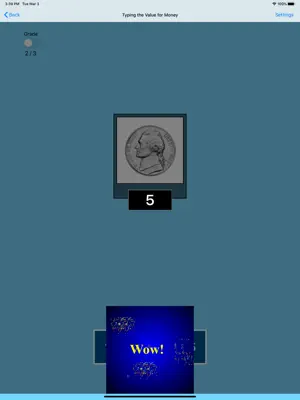
Here, the student has to click the value (from the box in the bottom of the screen) of the coin or bill shown in the picture at the top of the screen. The value will then appear under the picture of the coin or bill. Settings Mode Training When this is selected, the program can be used to train the student. Test Select this option to measure the student's progress. The "Report" button under "Test" mode is enabled. Report This displays results of the "Test". The report Holds Only 20 Records. Grade On/Off: If it is on, app will monitor correct and wrong responses by the student Correct Answer: When a student response to a question with correct answer Wrong Answer: When a student response to a question with wrong answer Number of Total Attempt: Number of times a student tried to answer questions in the app. Bar Chart: Represents the student's performance graphically. View Records: Test results including the grade. Object identified distracter and time taken to finish the test. Print: This will print the grade or data on the screen. Clear Data: This button erase all the data that was stored and free up the memory that data was occupying. Prompt (Blink) This is checked by default. If the student fails to type or click the correct value within ten seconds, the program guides him/her to the correct value by making the coin or bill blink. This is available for "Training" mode but disabled for "Test" mode. Uncheck this box if the prompt is not needed in "Training" mode. Congratulatory Animation This box is checked by default. This is available only for the ìTraining" mode. When this is checked, clicking or typing the correct value invites a congratulatory animation. This animation runs for ten seconds. Click anywhere on the screen or press space bar to stop the congratulatory animation. Uncheck the box if the student doesn't need congratulatory animation. Selection Click on the check box to select or deselect the coins or bills. Select All Check this box to select all coins and bills. Uncheck to deselect. OK Click this button to open this program after choosing settings. Back Click this button to close the program and return to the main page.
What’s new
Version 1.2 · Updated December 16, 2025
The current app version updated with the new age rating.
App privacy
The developer, Blooming Kids Software LLC, reported these privacy practices to Apple.
Data Not Collected
The developer does not collect any data from this app.
Alternatives to Typing Value Money US
Looking for apps like Typing Value Money US? Here are 6 similar apps on the App Store. The highest rated is SPELLING MAGIC 4 for Schools (4.8/5).
-
 Montessori Division
-
 SPELLING MAGIC 3 for Schools
3.7
-
 SPELLING MAGIC 4 for Schools
4.8
-
 iWordQ Pro US
-
 SPELLING MAGIC 1 for Schools
1.0
-
 iWordQ US
2.8
| App | Rating | Price | Last updated | Compare |
|---|---|---|---|---|
| Typing Value Money US | – | Free | December 16, 2025 | |
| Montessori Division | – | 0.99 USD | Jan 26, 2024 | Compare |
| SPELLING MAGIC 3 for Schools | 3.7 / 5 (3) | 1.99 USD | Sep 25, 2024 | Compare |
| SPELLING MAGIC 4 for Schools | 4.8 / 5 (5) | 1.99 USD | Sep 25, 2024 | Compare |
| iWordQ Pro US | – | 24.99 USD | Sep 18, 2026 | Compare |
| SPELLING MAGIC 1 for Schools | 1.0 / 5 (2) | 1.99 USD | Sep 25, 2024 | Compare |
| iWordQ US | 2.8 / 5 (4) | 20.99 USD | Sep 19, 2026 | Compare |