

Swyx Mobile 2020
Enreach GmbH Business iPhoneiPadiPod touchApple Watch
Swyx Mobile 2020 is a free Business app for iPhone and iPad by Enreach GmbH. Rated 5.0/5 from 1 ratings. Requires iOS 15.0. Updated January 25, 2024.
- Rating
- 5.0
- 1 ratings
- Price
- Free
- on the App Store
- Size
- 74 MB
- Age 4+
- Updated
- Jan 25
- 2024 · v3.2.6
Screenshots


About Swyx Mobile 2020
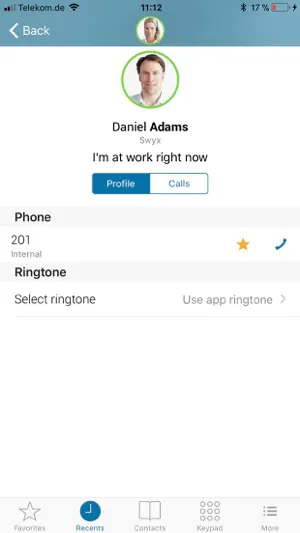
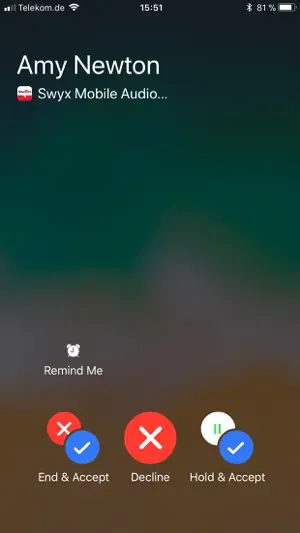
STAY FLEXIBLE – WITH SWYX MOBILE One decisive advantage of Swyx Mobile is being reachable under one single phone number. This means you can be reached at one single business number, no matter whether you are using a smartphone or a fixed phone. When using the Swyx App to make outgoing calls, your office number is displayed to the callee. Moreover, you can flexibly define call forwarding rules in the VoIP software from Swyx, thereby exercising a high level of control over your availability. FEATURES - Voice communication in HD audio quality - Navigating through contacts, favourites, call journal - Send messages to your colleagues - Starting calls via direct input, or by using the phone book, call journal and favourites - Call management (connect, forward, mute, hold and toggle) - Number suppression for calls, name resolution for numbers - Voicemail support with Message Waiting Indicator (MWI) - Contact management and telephone book with search function - Creation of a favourites list for contacts - Call protocols (incoming, outgoing, missed calls) - HD conferences, user-initiated ad-hoc 3-party conferences - Call forwarding for all calls or if the user is not answering, busy or logged out - Presence and profile management (setting manual presence status and status message) - Push Notification Support - Optimized for iPad REQUIREMENTS - iPhone or iPad with iOS 10 (or higher) - SwyxWare 12.10 on server (or higher) with push notification service correctly installed and running - Apple requires the use of TLS 1.2 for apps uploaded to the App Store. TLS 1.2 is enabled by default on Windows Server 2012, only. If your SwyxWare is running on a Windows system prior to Windows Server 2012 (e.g. Windows Server 2008 R2) you need to manually enable the use of TLS 1.2 on your server (https://www.swyx.com/support/ssdb.html?kbid=kb4894) KNOWN RESTRICTIONS - Don't use on SwyxWare lower than 12.10. For these please use the legacy app 'Swyx Mobile 2019' from App Store. - No proper error notification when a new password doesn't meet the complexity requirements defined by the server - Own user state is wrong if "SIP device" is not selected as "Login Device" for the user (needs to be set up by your admin) - This Swyx app cannot be used with a Swyxware Advance / DeutschlandLAN Swyx server - The use of h/w buttons of Jabra Stealth devices is not supported by Jabra, yet - Non-login-relevant user settings are not transferred with easy transit mechanism from the app “Swyx Mobile 2019” (version 2.x) to “Swyx Mobile” (version 3.x)
What’s new
Version 3.2.6 · Updated January 25, 2024
This app has been updated by Apple to prepare for watchOS 27 compatibility. No new features are included. We have only changed the name of the app and updated the app icon.
App privacy
The developer, Enreach GmbH, reported these privacy practices to Apple.
Data Not Collected
The developer does not collect any data from this app.
Alternatives to Swyx Mobile 2020
Looking for apps like Swyx Mobile 2020? Here are 6 similar apps on the App Store. The highest rated is Citrix Secure Web (4.7/5), and all 6 are free to download.


| App | Rating | Price | Last updated | Compare |
|---|---|---|---|---|
| Swyx Mobile 2020 | 5.0 / 5 (1 rating) | Free | January 25, 2024 | |
| Swyx Mobile | 2.3 / 5 (3) | Free | Oct 11, 2026 | Compare |
| Sophos Mobile Control | 2.6 / 5 (28) | Free | May 7, 2025 | Compare |
| Circula | 4.6 / 5 (72) | Free | Aug 27, 2026 | Compare |
| Citrix Secure Web | 4.7 / 5 (1,693) | Free | Sep 13, 2026 | Compare |
| Langdock | – | Free | Oct 27, 2026 | Compare |
| BRAK beA | 1.0 / 5 (1) | Free | Sep 17, 2026 | Compare |
Compare Swyx Mobile 2020 with the top alternatives: ratings, updates, ASO score and keyword gaps →