

Tot Pocket
The Iconfactory Productivity iPhoneiPadiPod touch
Tot Pocket is a free Productivity app for iPhone and iPad by The Iconfactory. Rated 4.4/5 from 237 ratings. Requires iOS 17.0. Updated October 7, 2025.
- Rating
- 4.4
- 237 ratings
- Price
- Free
- on the App Store
- Size
- 43 MB
- Age 4+
- Updated
- Oct 7
- 2025 · v2.1.1
Screenshots

About Tot Pocket
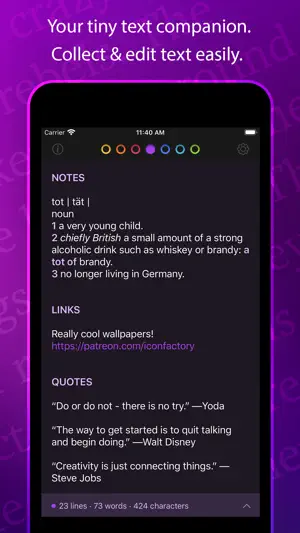
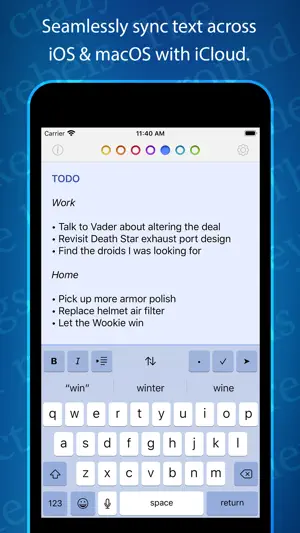
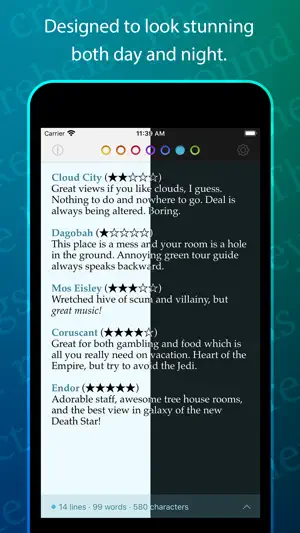
Tot is an elegant, simple way to collect & edit text across your Mac, iPhone, iPad, and Apple Watch. It’s your tiny text companion! ⁕ Less Is More Tot’s single window design and simple formatting controls mean no more hunting for that chunk of text. Seven color-coded dots let you organize your notes while keeping them from getting out of hand. ⁕ Dark / Light Mode Designed to look stunning both day and night, Tot takes full advantage of iOS and macOS themes. ⁕ Small Footprint Stays out of the way on the desktop with minimal chrome and can even be controlled via the Menu bar. On mobile, each dot is just a swipe away. ⁕ iCloud Sync Seamlessly syncs your text across iOS and macOS using iCloud so you can capture thoughts wherever you are. ⁕ Markdown Support Full support for rich or plain text and even automatically translates text to Markdown for handy use on the web. Have an RTF file you need marked up? No problem! ⁕ Killer Keyboard Tot puts common text operations on the keyboard and keeps track of word and character counts as you type. Available for iOS, macOS, and watchOS.
Ratings & reviews
4.4
237 ratings
What’s new
Version 2.1.1 · Updated October 7, 2025
Action to toggle the formatting bar on/off, added a new rich text font choice, fixed What’s New appearing when it shouldn’t plus fixed some Tahoe bugs. All: • Tot’s What’s New view no longer appears when there’s nothing new • Added "System (Monospaced)" as a rich text font choice iOS: • Added a toggle to turn Tot’s formatting bar on/off: - Tap the Actions Menu (⋯) and toggle Format Bar - Increases editing area on smaller devices • Fixed an issue with Compact Dots button not working macOS: • Added “Display as Floating Window” back to menu bar: - Shift-Command-F is default keyboard shortcut - You can override shortcut in System Settings • Added a partial workaround for bug on macOS Tahoe: - Happens when presenting the popover window and the menu bar is hidden - Fixed window that was too small and placed incorrectly - There is still a nub that we can't fix: it's arrows displaying incorrectly
App privacy
The developer, The Iconfactory, reported these privacy practices to Apple.
Data Not Collected
The developer does not collect any data from this app.
Alternatives to Tot Pocket
Looking for apps like Tot Pocket? Here are 6 similar apps on the App Store. The highest rated is Simple Scan • Quick Scanner (4.9/5), and all 6 are free to download.
-
 Simple Scan • Quick Scanner
4.9
Simple Scan • Quick Scanner
4.9
-
 DEVONthink To Go 4
4.7
DEVONthink To Go 4
4.7
-
 OmniOutliner 6
4.7
OmniOutliner 6
4.7
-
 Funnel - Quick Capture
4.6
Funnel - Quick Capture
4.6
-
 Bebop: Quick Notes
4.9
Bebop: Quick Notes
4.9
-
 Remind Me Faster
4.8
Remind Me Faster
4.8
| App | Rating | Price | Last updated | Compare |
|---|---|---|---|---|
| Tot Pocket | 4.4 / 5 (237 ratings) | Free | October 7, 2025 | |
| Simple Scan • Quick Scanner | 4.9 / 5 (665) | Free | Sep 10, 2026 | Compare |
| DEVONthink To Go 4 | 4.7 / 5 (238) | Free | Aug 24, 2026 | Compare |
| OmniOutliner 6 | 4.7 / 5 (15) | Free | Sep 14, 2026 | Compare |
| Funnel - Quick Capture | 4.6 / 5 (47) | Free | Feb 14, 2026 | Compare |
| Bebop: Quick Notes | 4.9 / 5 (46) | Free | Jun 7, 2026 | Compare |
| Remind Me Faster | 4.8 / 5 (456) | Free | Sep 23, 2026 | Compare |
Compare Tot Pocket with the top alternatives: ratings, updates, ASO score and keyword gaps →