

TracingMat
Yoko Nishimura Utilities iPhoneiPadiPod touch
TracingMat is a free Utilities app for iPhone and iPad by Yoko Nishimura. Rated 3.7/5 from 26 ratings. Requires iOS 12.4. Updated August 9, 2026.
- Rating
- 3.7
- 26 ratings
- Price
- Free
- on the App Store
- Size
- 5 MB
- Age 4+
- Updated
- Aug 9
- 2026 · v1.17
Screenshots


About TracingMat
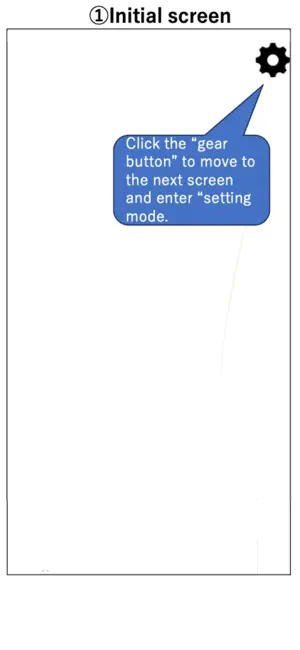
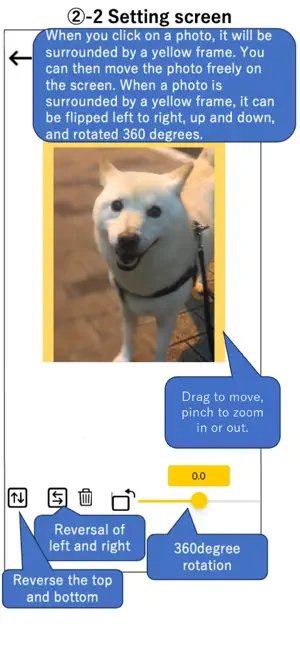
"Tracing Mat" is an app for using your iPad or iPhone as a light table. After displaying the image you want to copy on the app, place the copy destination paper on it and trace the image that can be seen through under the paper. It is also possible to prepare the manuscript on paper, stack the copy destination paper on it, place it on the screen, and illuminate it from below with this application. [How to use] Tap the “gear” button on the upper right to enter the setting mode. In the setting mode, add the image to be displayed with the “+” button or "Camera" button at the bottom left. You can also add text using the "T" button. Tapping a displayed image or text highlights it with a yellow frame; in this state, you can move it by dragging, or zoom in and out using a pinch gesture. Images and text can also be flipped or rotated, while text can be edited or have its styling modified. You can save the current image and text layout with the “Save” button, and restore the saved layout later with the “Load” button, even after restarting the app. The screen brightness can be adjusted with the slider bar at the bottom right. When you tap the “left arrow” button on the upper left to exit the setting mode, the displayed image and text will be fixed, so place a piece of paper on the screen and trace it. [Caution] - I think it is easier to see the image under the paper if the room is darkened a little. - Attach a protective film, etc., to prevent the display from being scratched during copying. - Please use this application at your own risk. We do not take any responsibility for the disadvantage caused by using this application.
Ratings & reviews
3.7
26 ratings
What’s new
Version 1.17 · Updated August 9, 2026
- Added Save and Load buttons. You can now save the current image and text layout and restore it later, even after restarting the app. - Improved the button layout in setting mode.
App privacy
The developer, Yoko Nishimura, reported these privacy practices to Apple.
Data Used to Track You
The following data may be used to track you across apps and websites owned by other companies:
- Location: Coarse Location
- Identifiers: Device ID
- Usage Data: Product Interaction, Advertising Data
- Diagnostics: Crash Data, Performance Data
Data Linked to You
The following data, which may be collected and linked to your identity, may be used for the following purposes:
- Location: Coarse Location
- Identifiers: Device ID
- Usage Data: Product Interaction, Advertising Data
- Diagnostics: Performance Data
Used for: Third-Party Advertising
Data Not Linked to You
The following data, which may be collected but is not linked to your identity, may be used for the following purposes:
- Diagnostics: Crash Data
Used for: Third-Party Advertising
Alternatives to TracingMat
Looking for apps like TracingMat? Here are 6 similar apps on the App Store. The highest rated is AR Tracing: Anime Drawing (4.6/5), and all 6 are free to download.
-
 AR Tracing: Anime Drawing
4.6
AR Tracing: Anime Drawing
4.6
-
 Easy Pose -Best Posing App
4.0
Easy Pose -Best Posing App
4.0
-
 Draw Easy AI: AR Trace Sketch
3.0
Draw Easy AI: AR Trace Sketch
3.0
-
 Adoptme Values Calculator
4.3
Adoptme Values Calculator
4.3
-
 AR Drawing: Trace to Sketch '
4.5
AR Drawing: Trace to Sketch '
4.5
-
 AI Skins for Minecraft
4.6
AI Skins for Minecraft
4.6
| App | Rating | Price | Last updated | Compare |
|---|---|---|---|---|
| TracingMat | 3.7 / 5 (26 ratings) | Free | August 9, 2026 | |
| AR Tracing: Anime Drawing | 4.6 / 5 (1,148) | Free | Sep 21, 2026 | Compare |
| Easy Pose -Best Posing App | 4.0 / 5 (1,117) | Free | Jun 3, 2026 | Compare |
| Draw Easy AI: AR Trace Sketch | 3.0 / 5 (97) | Free | Sep 8, 2026 | Compare |
| Adoptme Values Calculator | 4.3 / 5 (1,119) | Free | Oct 19, 2026 | Compare |
| AR Drawing: Trace to Sketch ' | 4.5 / 5 (967) | Free | Mar 14, 2024 | Compare |
| AI Skins for Minecraft | 4.6 / 5 (6,775) | Free | May 13, 2026 | Compare |
Compare TracingMat with the top alternatives: ratings, updates, ASO score and keyword gaps →