

MsyMetronom
Bernhard Feiten Music iPhoneiPadiPod touch
MsyMetronom is a paid Music app for iPhone and iPad by Bernhard Feiten. Requires iOS 17.6. Updated October 7, 2026.
- Price
- 0.99 USD
- on the App Store
- Size
- 6 MB
- Age 4+
- Updated
- Oct 7
- 2026 · v1.2.0
Screenshots
About MsyMetronom
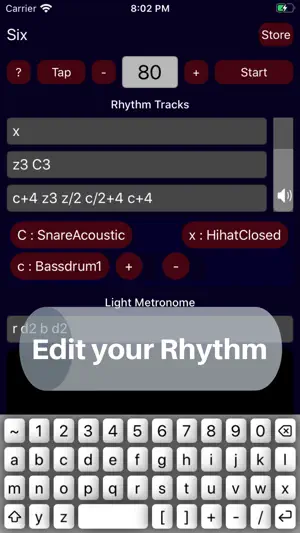
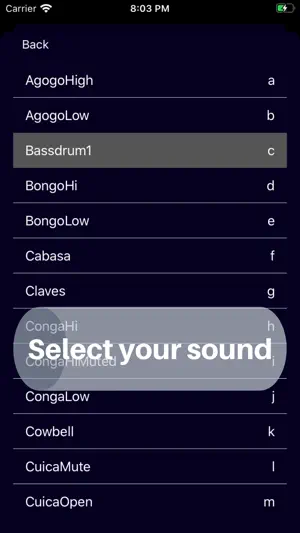
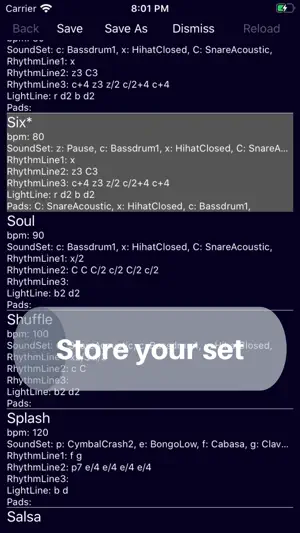
To set a rhythm, a textual programming interface is provided. The sounds are denoted by single characters. For example the character 'g' represents a Claves sound. The length of the sound is given as fraction of the beat. Examples: 1. "g" means, sound g is repeatedly played with the tempo given by the beats per minute setting. g1 is identical to g. The one can be omitted. 2. "a b b b" ... is a rhythm of 4 notes with two sounds 'a' for AgogoHigh and 'b' for AgogoLow. The sounds are running in a loop. 3. "a b z" ... rhythm of 3 notes. 'z' denotes a pause, 4. "d/2 d/2 c3/2 d/2" ... pattern with fractions of beats; first two notes have a half beat duration; then a note with one and a half beat duration follows; then a note with a half beat duration again. 5. "h/3" in the first line and "j/4" in the second line results in high and low bongo notes playing four against three. In similar manner complex polyrhythms can be set. The lines are looping even if they have different durations. An extra keyboard allows efficient editing of rhythms. The drum sound inventory of 43 sounds can be inspected from the keyboard by typing the '~'. In addition to the three drum sound tracks, a light metronome can be programmed in similar manner. The lights are set with the letters w, r, g, b, y, m, c and d, meaning the colors white, red, green, blue, yellow, magenta, cyan and dark (black). Example: b2 d2 ... two beats blue, two beats black. Further a surface with configurable drum pads supports drumming interaction and memorizing the drum sound letters. The pads can be added from the drum sound inventory by pressing '+', reordered by long pressing the pad and dragging and dropping, and removed with '-' if needed. Beside a slider for adjusting the overall loudness, the individual drum sound loudness can be set by adding a plus or minus sign followed by a number in the range from -9 to 9. For example 'd/2-4' would reduce the sound level for 4 dB. The Store allows to select a rhythm from the repository. Around 20 preset rhythms are provided. Self created rhythms can be named, added to the list and saved for later use. Help information is provided at a fingertip.
What’s new
Version 1.2.0 · Updated October 7, 2026
Updated with recent iOS libraries.
App privacy
The developer, Bernhard Feiten, reported these privacy practices to Apple.
Data Not Collected
The developer does not collect any data from this app.
Alternatives to MsyMetronom
Looking for apps like MsyMetronom? Here are 6 similar apps on the App Store. The highest rated is Pruina (5.0/5).
-
 Loopr Live Loop Composer
2.3
Loopr Live Loop Composer
2.3
-
 Minimic
4.0
Minimic
4.0
-
 Pruina
5.0
Pruina
5.0
-
 shapesynth
4.9
shapesynth
4.9
-
 Scales Lexicon •
4.8
Scales Lexicon •
4.8
-
 GSiRotary
3.7
GSiRotary
3.7
| App | Rating | Price | Last updated | Compare |
|---|---|---|---|---|
| MsyMetronom | – | 0.99 USD | October 7, 2026 | |
| Loopr Live Loop Composer | 2.3 / 5 (6) | 0.99 USD | Mar 18, 2024 | Compare |
| Minimic | 4.0 / 5 (3) | 2.99 USD | Jun 19, 2026 | Compare |
| Pruina | 5.0 / 5 (2) | 2.99 USD | Aug 5, 2026 | Compare |
| shapesynth | 4.9 / 5 (24) | 4.99 USD | Jun 26, 2026 | Compare |
| Scales Lexicon • | 4.8 / 5 (6) | 2.99 USD | Aug 29, 2026 | Compare |
| GSiRotary | 3.7 / 5 (3) | 19.99 USD | Aug 7, 2025 | Compare |
Compare MsyMetronom with the top alternatives: ratings, updates, ASO score and keyword gaps →