

MooveTO - Torino e Piemonte
Andrea Bellitto Navigation iPhoneiPadiPod touch
MooveTO - Torino e Piemonte is a free Navigation app for iPhone and iPad by Andrea Bellitto. Requires iOS 16.4. Updated October 11, 2026.
- Price
- Free
- on the App Store
- Size
- 56 MB
- Age 4+
- Updated
- Oct 11
- 2026 · v2.18.00
Screenshots


About MooveTO - Torino e Piemonte
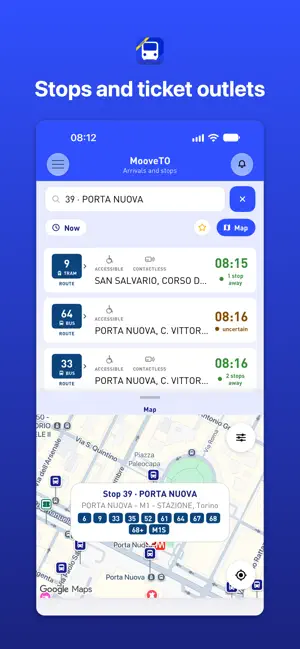
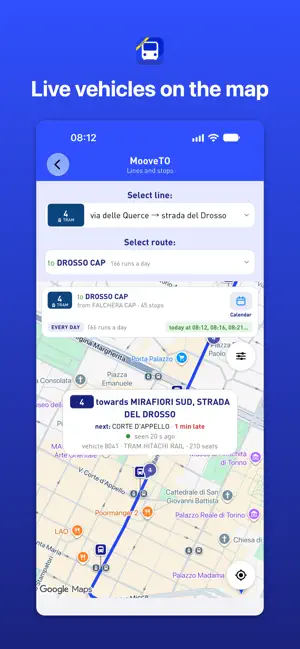
Get around Turin and Piedmont by public transport: with MooveTO you plan journeys, check times and arrivals for buses, trams, metro and trains, explore lines and stops, and read compatible BIP tickets and cards. Find nearby stops, see the next departures and follow vehicles on the map, live where the service provides them. Free, no account needed. With MooveTO you can: • Plan a journey from one place to another: see when to leave, where to get on and off, and how far you walk. • See times and arrivals at every stop or station, live where the service provides them, and how many stops away your bus is. • Read compatible BIP tickets and cards: tickets, passes, rides left and expiry. • Find the stops near you and your favourites on one screen, already showing their next departures. • Watch vehicles move on the map, with their line number and direction. • Keep up with service alerts and diversions. • Browse every line with its timetable and full route, street by street. • Search the map for stops, addresses and places, and ticket outlets with their opening hours. • Save favourite stops and get a reminder before your bus arrives. • Choose the screen the app opens on, and use light or dark mode. Reading BIP tickets and cards Open the side menu, choose "Electronic ticket reader" and hold the ticket or card near the top of the back of your iPhone: in a moment you'll see its tickets, passes and their validity. Requires an iPhone, as iPads have no NFC. MooveTO is an independent app and not the official app of the transport service: line, timetable and alert information comes from data published by GTT S.p.A. — Gruppo Torinese Trasporti (https://www.gtt.to.it).
What’s new
Version 2.18.00 · Updated October 11, 2026
• «Arrivals and stops», one screen: search for a stop, a street or a place, and find the stops near you and your favourites already with their next departures, with the map at hand. If you prefer, Settings brings back the two screens of before. • Where your vehicle is: in the live arrivals you see how many stops away it is, and in the details it is highlighted on the line's route. • Runs the live data cannot see are marked «uncertain»: they may not come, or come without showing up. • Contactless payment on board, shown in the row and in the run's details. • Live arrivals refresh more often. • Route planner renewed: after a search you compare the routes on the map and pick yours; for each one you see when to leave, how far you walk and the next departures. The details give step-by-step directions and the vehicles on their way, with the stops still to go. • Driving and parking: the route starts by car to a park-and-ride near public transport. • On iPad, your favourite stops on a board with the next departures. • Live vehicles on the lines map and on the route that opens from a departure's number, each with its line number and direction. • Dark theme: the app follows the phone, or choose light or dark in Settings. • Text follows the size chosen in the iPhone's settings. • More reliable reminders: they come at the right time, allow for delays and stay active after the phone restarts. • Ticket resellers updated, with opening hours. • More precise alerts: a diversion in one direction no longer flags the stops of the other, and timetable changes have a sign of their own. • Choose the screen the app opens on. • Line routes follow the streets instead of a straight line between stops. • On the map you can also search for addresses and places, not just stops. • A short introduction on first launch. • More precise card reading: the rides and minutes of the ticket you are using, its last validation, and a notice when something can't be read. Older cards are read too. • Favourites, history and dialogs redesigned, and many small fixes.
App privacy
The developer, Andrea Bellitto, reported these privacy practices to Apple.
Data Used to Track You
The following data may be used to track you across apps and websites owned by other companies:
- Usage Data: Product Interaction, Advertising Data
- Diagnostics: Crash Data
Data Not Linked to You
The following data, which may be collected but is not linked to your identity, may be used for the following purposes:
- Usage Data: Product Interaction, Advertising Data, Other Usage Data
- Diagnostics: Crash Data
Used for: Third-Party Advertising, Analytics, Product Personalization, App Functionality
Alternatives to MooveTO - Torino e Piemonte
Looking for apps like MooveTO - Torino e Piemonte? Here are 6 similar apps on the App Store. The highest rated is Turin Travel Guide . (4.8/5), and all 6 are free to download.


| App | Rating | Price | Last updated | Compare |
|---|---|---|---|---|
| MooveTO - Torino e Piemonte | – | Free | October 11, 2026 | |
| Bus Torino | 4.0 / 5 (35) | Free | Aug 5, 2026 | Compare |
| TO Move | 1.3 / 5 (38) | Free | Mar 10, 2026 | Compare |
| MATO Live Bus | 4.0 / 5 (3) | Free | May 6, 2026 | Compare |
| Bip Piemonte | – | Free | May 22, 2026 | Compare |
| Moeves Bus | – | Free | Sep 22, 2026 | Compare |
| Turin Travel Guide . | 4.8 / 5 (12) | Free | Jan 9, 2026 | Compare |